Type text, add images, blackout confidential details, add comments, highlights and more.
02. Sign it in a few clicks
Draw your signature, type it, upload its image, or use your mobile device as a signature pad.
03. Share your form with others
Send it via email, link, or fax. You can also download it, export it or print it out.
How to use or fill out RESIDENTIAL CONTRACT (Revised 03/15/18) with DocHub
Ease of Setup
DocHub User Ratings on G2
Ease of Use
DocHub User Ratings on G2
Click ‘Get Form’ to open the RESIDENTIAL CONTRACT in our editor.
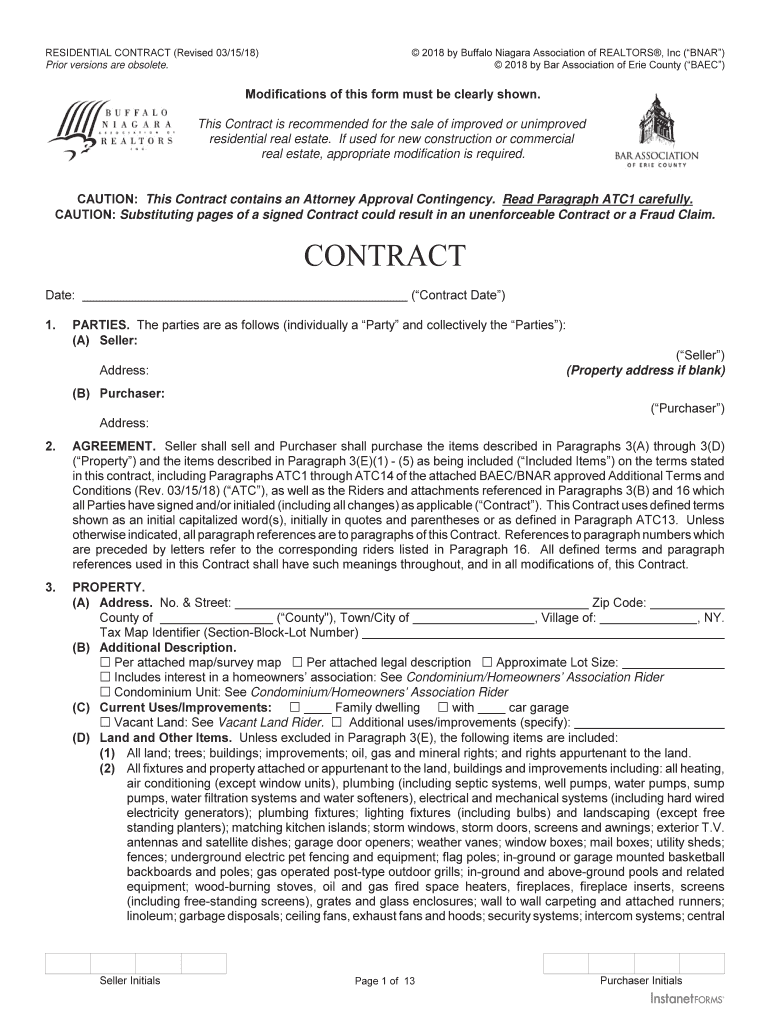
Begin by entering the Contract Date at the top of the form. This is essential for establishing the timeline of your agreement.
Fill in the Parties section with the Seller's and Purchaser's names and addresses. Ensure accuracy as this identifies who is involved in the transaction.
In the PROPERTY section, provide detailed information about the property address, including zip code and county. If applicable, include any additional descriptions or features.
Specify the PURCHASE PRICE and any Seller’s Concession. Make sure to double-check these figures for correctness.
Complete sections regarding CONDITION OF PROPERTY and INCLUDED ITEMS, ensuring you note any specific conditions or items included in the sale.
Review all disclosures carefully, particularly those related to inspections and financing options. This ensures compliance with legal requirements.
Finally, sign and date where indicated. You can easily add signatures using our platform’s signing feature for a seamless process.
Start filling out your RESIDENTIAL CONTRACT today for free on our platform!
Fill out RESIDENTIAL CONTRACT (Revised 03/15/18) online It's free
Can a seller back out of a real estate purchase agreement?
Legally, a sellers best bet for successfully backing out of a sale is if a contingency written into the contract has not been met. Home sellers can give themselves an out by adding contingencies to the contract that make the sale contingent upon certain conditions.
Can a seller back out after signing a purchase agreement?
Most real estate contracts include contingencies conditions that must be met for the agreement to move forward. If the seller included their own contingencies, such as a clause stating the sale is contingent upon their ability to find a new home, they can back out if those conditions are not met.
Can a seller change mind after signing a contract?
After accepting a written offer, the seller is bound by the contract. In most cases, the seller cannot unilaterally back out of the contract -- they need an ``out provided in the agreement, such as a bdocHub by the buyer.
Can a seller cancel a sale after accepting an offer?
Homeowners may want to back out of a deal to sell their home for a number of reasons, including receiving a higher offer, an inability to buy a new home, or they just plain changed their minds. The buyer can sue a seller who cancels a home sale in a way not allowed by the purchase and sale contract.
Related Searches
Residential contract revised 03 15 18 templateResidential contract revised 03 15 18 pdfBnar residential contract revised 03 15 18TREC One to Four Family Residential ContractOne to FOUR Family Residential Contract pdfOne to four family residential contract explainedTREC contract PDFNew TREC 1 4 Family contract
Security and compliance
At DocHub, your data security is our priority. We follow HIPAA, SOC2, GDPR, and other standards, so you can work on your documents with confidence.
S:\Real Estate, BAEC Forms\Contract 2016\2018 Final
May 11, 2018 RESIDENTIAL CONTRACT (Revised 03/15/18). 2018 by Buffalo Niagara Association of REALTORS, Inc (BNAR). Prior versions are obsolete. 2018Read more
Cookie consent notice
This site uses cookies to enhance site navigation and personalize your experience.
By using this site you agree to our use of cookies as described in our Privacy Notice.
You can modify your selections by visiting our Cookie and Advertising Notice.