




Here's how it works

01. Edit your dochub com fillable form online
Type text, add images, blackout confidential details, add comments, highlights and more.

02. Sign it in a few clicks
Draw your signature, type it, upload its image, or use your mobile device as a signature pad.

03. Share your form with others
Send fs form 1048 via email, link, or fax. You can also download it, export it or print it out.
How to use or fill out fs form 1048 with our platform

- Click ‘Get Form’ to open it in the editor.
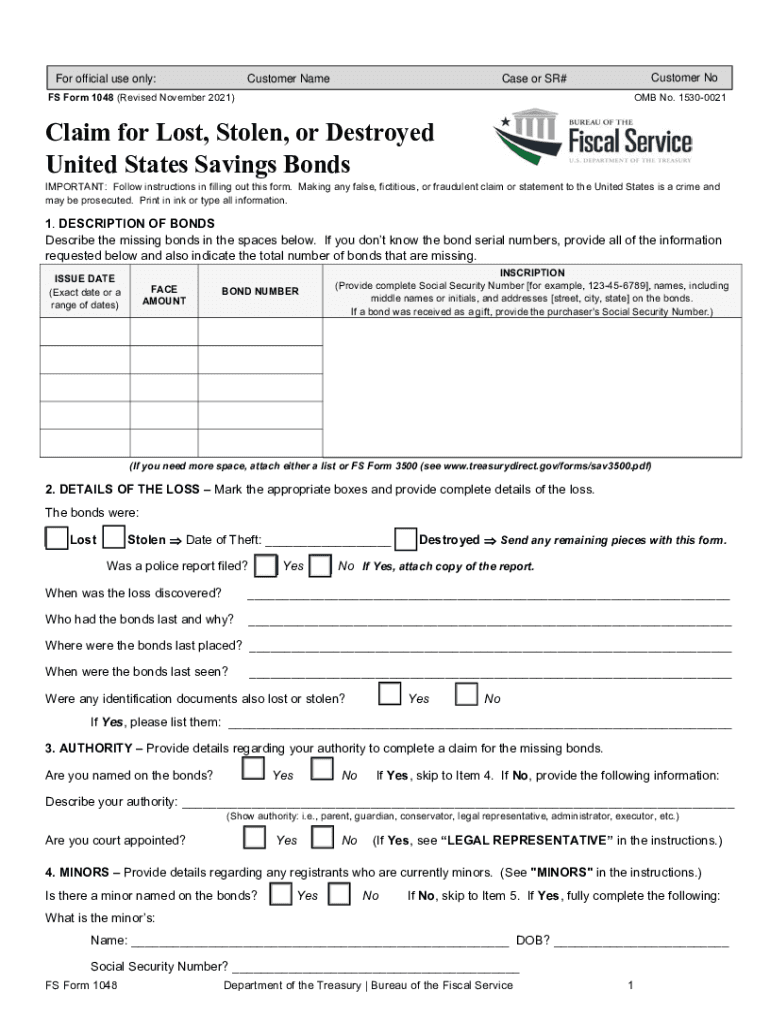
- Begin by filling out Section 1, 'DESCRIPTION OF BONDS'. Provide details such as the bond's inscription, issue date, face amount, and bond number. If you lack serial numbers, include all other requested information and indicate the total number of missing bonds.
- In Section 2, 'DETAILS OF THE LOSS', mark the appropriate box for how the bonds were lost (stolen, lost, or destroyed) and provide additional details like the date of theft or when the loss was discovered.
- Proceed to Section 3 to clarify your authority to claim for the missing bonds. Indicate if you are named on the bonds and provide necessary details if not.
- If applicable, complete Section 4 regarding any minors named on the bonds. Provide their name, date of birth, and your relationship to them.
- In Section 5, specify whether you want substitute bonds or payment. Follow instructions based on the series of bonds you possess.
- Finally, sign in Section 7 after reviewing all information for accuracy. Ensure signatures are done in front of a notary or certifying officer.
Start using our platform today for free to streamline your fs form 1048 completion!
Fill out fs form 1048 online
It's free
It's free
See more fs form 1048 versions
We've got more versions of the fs form 1048 form. Select the right fs form 1048 version from the list and start editing it straight away!
| Versions | Form popularity | Fillable & printable |
|---|---|---|
| 2025 | 4.9 Satisfied (37 Votes) | |
| 2021 | 4.8 Satisfied (196 Votes) | |
| 2020 | 4.4 Satisfied (108 Votes) | |
| 2019 | 4.3 Satisfied (162 Votes) | |
| 2018 | 4.3 Satisfied (174 Votes) | |
| 2016 | 4.4 Satisfied (136 Votes) | |
| 2016 | 4 Satisfied (29 Votes) | |
| 2014 | 4.4 Satisfied (510 Votes) | |
| 2011 | 4.2 Satisfied (69 Votes) | |
| 2008 | 4 Satisfied (46 Votes) |
Security and compliance
At DocHub, your data security is our priority. We follow HIPAA, SOC2, GDPR, and other standards, so you can work on your documents with confidence.
Learn more


Related forms

The Seed Lab: Testing for Seed
The Alabama Farmers and Consumers Bulletin for March 2016 highlights various agricultural topics, including the importan ...

Indiana notice appear form
The document is a legal notice from the State of Indiana regarding a petition for an Order for Protection. It informs th ...

In release judgment
The document is a 'Release of Judgment' form used by a court to officially release a judgment lien against a defendant. ...
Indiana extension modification
The document is a legal notice from the Division of State Court Administration in Indiana, indicating that an existing c ...

Page 1 Indiana Judicial Nominating Commission Indiana

Co jdf418 order seal records make
The document is an official court order from the District Court in Colorado, directing the sealing of arrest and crimina ...

If you choose to represent yourself, you are bound by the same rules
The document provides detailed instructions for filing a Replevin action in Colorado, which allows a plaintiff to recove ...
CIV-680 Master's Report Cover Sheet - Condemnation (11 95) PDF
The document is a master's report related to a legal case in the Superior Court for the State of Alaska. It includes dir ...