Type text, add images, blackout confidential details, add comments, highlights and more.
02. Sign it in a few clicks
Draw your signature, type it, upload its image, or use your mobile device as a signature pad.
03. Share your form with others
Send it via email, link, or fax. You can also download it, export it or print it out.
How to use or fill out the Michigan Claim Form with DocHub
Ease of Setup
DocHub User Ratings on G2
Ease of Use
DocHub User Ratings on G2
Click ‘Get Form’ to open the Michigan Claim Form in our editor.
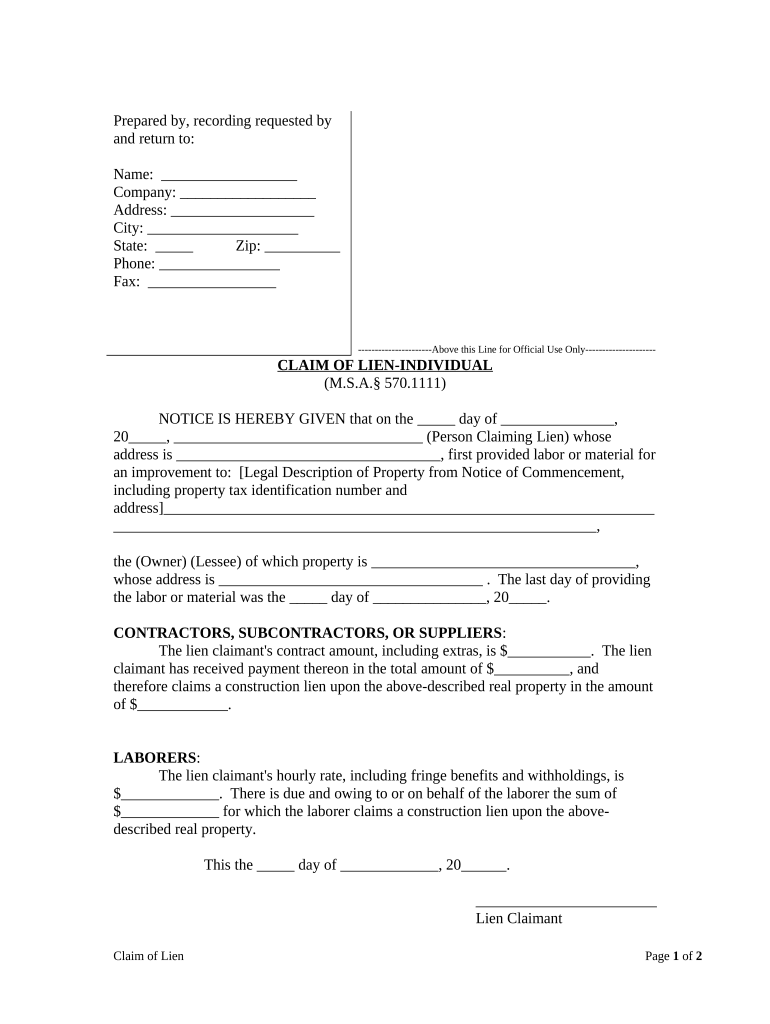
Begin by filling in your name, company, address, city, state, zip code, phone number, and fax number at the top of the form. Ensure all information is accurate for proper processing.
In the 'Claim of Lien' section, enter the date you first provided labor or materials. Specify the person claiming the lien and their address.
Provide a legal description of the property where work was performed, including tax identification numbers. This is crucial for identifying the property involved.
Indicate whether you are a contractor, subcontractor, or supplier and fill in your contract amount and any payments received. Calculate and enter the total amount you claim as a lien.
For laborers, specify your hourly rate and any amounts due. Complete this section accurately to support your claim.
Sign and date the form at the bottom. If applicable, have it notarized to validate your claim.
Start using our platform today to fill out your Michigan Claim Form online for free!
Changing Account Information: If you have discontinued or ceased business activity, discontinued employment, sold or transferred ownership of all or part of your business, formed a new partnership or corporation, merged, or changed your status as a sole proprietorship or corporation, you must file Form UIA 1772, Notice
Do I need proof of insurance to transfer a title in Michigan?
What is a Property Transfer Affidavit? A Property Transfer Affidavit (PTA) must be filed whenever real estate or some types of personal property are transferred (even if you are not recording a deed or the transfer occurs via a land contract).
What is a TR 34 form in Michigan?
Link to form: TR-34 - Michigan Department of State Certification. This is used when multiple heirs are involved and agree that one person will take. ownership.
How long do you have to file a claim in Michigan?
Time limits for car accident injury claims in Michigan Filing for No-Fault benefits must be within 1 year of your crash. Filing for pain and suffering compensation, excess medical benefits and other economics damages must be filed within 3 years of the collision.
What is a TR number in Michigan?
The account number on the sales tax license is your business Federal Employer Identification Number (FEIN). If you do not have an FEIN, Treasury has assigned you a 9-character account number beginning with TR.
Related Searches
Michigan claim form pdfMichigan claim form onlineSmall claims affidavit and claim form MichiganFile Small Claims court Michigan onlinemichigan workers' compensation formsMichigan Small Claims court FormsAffidavit and Claim form DC84Michigan small claims court Rules
Security and compliance
At DocHub, your data security is our priority. We follow HIPAA, SOC2, GDPR, and other standards, so you can work on your documents with confidence.
discontinuing a business on behalf of a deceased taxpayer, a copy of the death certificate is required with this form. Close Entire Business With the exception of IFTA, Motor Fuel, and Tobacco Tax, checking this box registers a discontinuance of all Michigan taxes related to this business.
Related links
Claims
Claims Submission Guidelines. Filing Limit. Claims should be sent to Molina Healthcare within 365 days from the date of service.
Cookie consent notice
This site uses cookies to enhance site navigation and personalize your experience.
By using this site you agree to our use of cookies as described in our Privacy Notice.
You can modify your selections by visiting our Cookie and Advertising Notice.