




Here's how it works

01. Edit your form online
Type text, add images, blackout confidential details, add comments, highlights and more.

02. Sign it in a few clicks
Draw your signature, type it, upload its image, or use your mobile device as a signature pad.

03. Share your form with others
Send it via email, link, or fax. You can also download it, export it or print it out.
How to use or fill out ma letter tenant with our platform

- Click ‘Get Form’ to open the ma letter tenant in the editor.
- Begin by entering the date at the top of the document. This sets the context for your notice.
- Fill in your landlord’s name and address in the designated fields to ensure proper identification.
- In the greeting section, address your landlord directly by entering their name.
- Provide your address as a tenant in the specified area to clarify which premises this notice pertains to.
- Indicate the date you received the rent increase notice. This is crucial for establishing timelines.
- Clearly state your intentions regarding rent payment, ensuring you express any objections you may have about insufficient notice.
- Sign and date at the bottom of the letter, confirming your acknowledgment and intent.
- Complete the Proof of Delivery section by selecting how you delivered this notice to your landlord and signing it accordingly.
Start using our platform today for free to streamline your document editing and signing process!
Fill out ma letter tenant online
It's free
It's free
Security and compliance
At DocHub, your data security is our priority. We follow HIPAA, SOC2, GDPR, and other standards, so you can work on your documents with confidence.
Learn more


Related forms
Eligibility for Funding
The document is a form from the Grand River Post Secondary Education Office that outlines the requirements for students ...
Applications & FormsLivonia, MI
The document is a rental license application for the City of Livonia, detailing the requirements and fees associated wit ...
Welcome Packet - Business Information - Wisconsin
The document is an attendance sheet for AA/NA meetings provided by the Wisconsin Department of Safety and Professional S ...

AFFIDAVIT OF TEST OF CASING IN WELL
The document is an affidavit detailing the testing of casing in a well, including information about the operator, well c ...
49515792 2210813708963488 4284096201197879296 n jpg
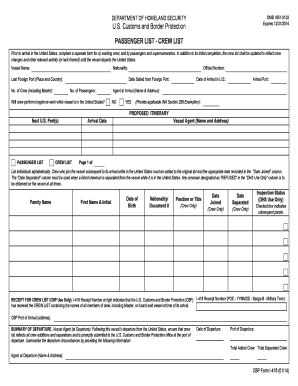
Travel manifest
The document outlines the requirements for U.S. Customs and Border Protection regarding the submission of passenger and ...

05 359
Form 6a see rule 16 4
The document outlines the MVL RULE form 4a, which is an International Driving Permit (IDP) issued in India. It includes ...