Type text, add images, blackout confidential details, add comments, highlights and more.
02. Sign it in a few clicks
Draw your signature, type it, upload its image, or use your mobile device as a signature pad.
03. Share your form with others
Send it via email, link, or fax. You can also download it, export it or print it out.
How to use or fill out complaint contest will with our platform
Ease of Setup
DocHub User Ratings on G2
Ease of Use
DocHub User Ratings on G2
Click ‘Get Form’ to open the complaint contest will in the editor.
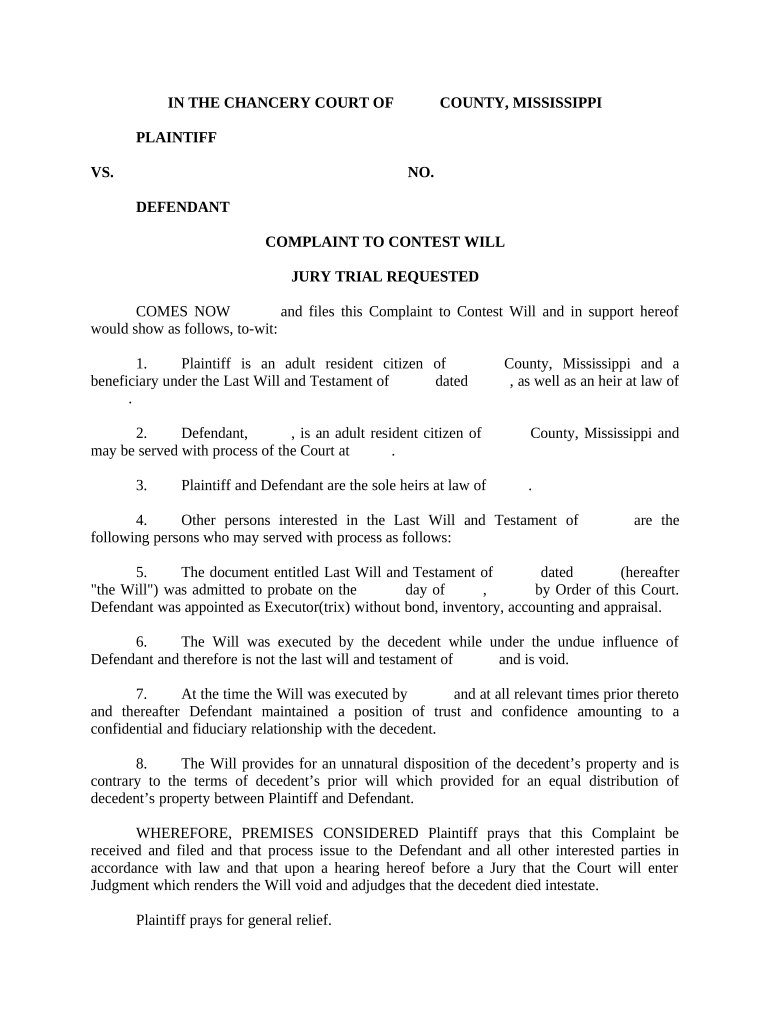
Begin by filling in the plaintiff's name and address in the designated fields. Ensure that you are accurately representing your status as a beneficiary under the Last Will and Testament.
Next, enter the defendant's name and address. This information is crucial for serving process of the Court.
In section three, provide details about both parties' relationship to the decedent, including any relevant counties involved.
Fill out section five with specifics regarding the Last Will and Testament, including its date and any pertinent court orders related to probate.
Address allegations of undue influence in section six by clearly stating your claims against the defendant.
Conclude by summarizing your requests for relief in accordance with section eight, ensuring clarity on what you seek from the court.
Start using our platform today to easily complete your complaint contest will for free!
Success rate of contesting a willComplaint contest will exampleComplaint contest will sampleWho pays legal costs when contesting a willHow to contest a will and winHow much does it cost to contest a willHow to contest a will without a lawyerSuccess rate of contesting a will in ny
Security and compliance
At DocHub, your data security is our priority. We follow HIPAA, SOC2, GDPR, and other standards, so you can work on your documents with confidence.
20305. Complaint to contest the validity of a will.
Any person may file a verified complaint to contest the validity of a will within 6 months following notice by publication of the appointment or reappointmentRead more
Still Laying Claim: An Update to Developments in Will Contest
Aug 10, 2016 The statute allows a contest to be filed in the circuit court of the county in which the will was admitted to or denied probate by the CountyRead more
Cookie consent notice
This site uses cookies to enhance site navigation and personalize your experience.
By using this site you agree to our use of cookies as described in our Privacy Notice.
You can modify your selections by visiting our Cookie and Advertising Notice.