Complaint - Mississippi 2026

Get Form
Complaint - Mississippi Preview on Page 1

Here's how it works

01. Edit your form online
Type text, add images, blackout confidential details, add comments, highlights and more.
02. Sign it in a few clicks
Draw your signature, type it, upload its image, or use your mobile device as a signature pad.
03. Share your form with others
Send it via email, link, or fax. You can also download it, export it or print it out.

How to use or fill out Complaint - Mississippi with our platform

Form edit decoration
9.5
Ease of Setup
DocHub User Ratings on G2
9.0
Ease of Use
DocHub User Ratings on G2
  1. Click ‘Get Form’ to open the Complaint - Mississippi in the editor.
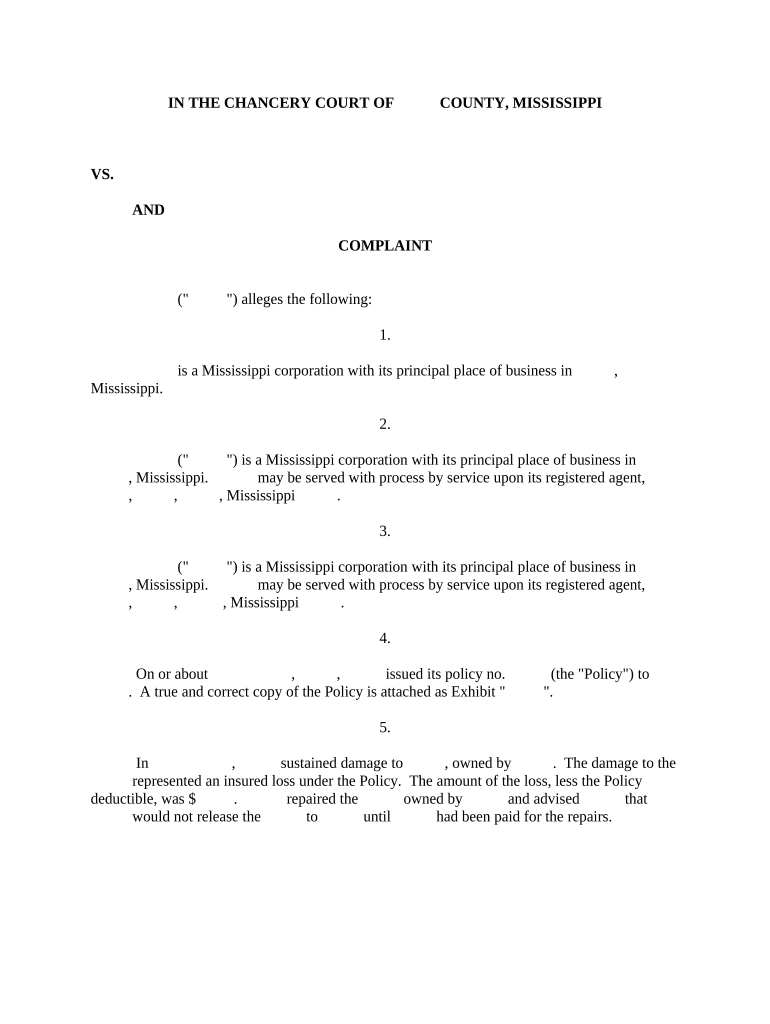
  2. Begin by filling in the names of the parties involved in the case. Ensure you accurately list the plaintiff and defendant corporations, including their principal places of business.
  3. In section 4, provide details about the insurance policy, including the policy number and attach a copy as Exhibit A. This is crucial for establishing your claims.
  4. Detail any damages sustained in section 5, specifying what was damaged and how it relates to your insurance claim. Include the amount of loss after deductibles.
  5. Complete sections regarding checks issued and endorsements in steps 6 and 7. Clearly state any issues with check endorsements and demands for reissuance.
  6. In section 9, indicate the interpleader fund amount deposited with the Clerk of Court. This shows compliance with procedural requirements.
  7. Finally, review all entries for accuracy before signing at the bottom. Ensure that all necessary fields are completed to avoid delays.

Start using our platform today to streamline your document editing and ensure a smooth filing process!

be ready to get more

Complete this form in 5 minutes or less

Get form

Got questions?

We have answers to the most popular questions from our customers. If you can't find an answer to your question, please contact us.
Contact us
How to File a Consumer Complaint Against a Mississippi Business Gather Details About the Issue Before submitting your complaint online, make sure you have key details like: Visit the Attorney Generals Complaint Form. Enter Your Personal Information The first section asks for your name and contact information.
File a complaint with government or consumer programs File a complaint with your local consumer protection office. Notify the Better Business Bureau (BBB) in your area about your problem. Report scams and suspicious communications to the Federal Trade Commission.
Keep your complaint focused and to the point. Avoid adding unnecessary documents. A well-organized, concise complaint is much easier to review. If you have a lot of documents, provide an overview and sort them in chronological order.
Get Outside Help Contact your state attorney general or state consumer protection office. Contact a national consumer organization. Contact your local Better Business Bureau The Better Business Bureau is made up of organizations supported by local businesses. File a report with the FTC.
Contacts: Phone: 601-359-1633. 1-800-256-3494. Fax: 601-576-2546. CustomerService@sos.ms.gov.
be ready to get more

Complete this form in 5 minutes or less

Get form

People also ask

If you think a business has broken the law or acted unfairly, you can report them to Trading Standards. Trading Standards use the information you give them to investigate unfair trading and illegal business activity, like rogue traders and scams.
Three of the most common complaints on nursing homes are: Insufficient staffing. Substandard care and living conditions. Abuse, neglect, or mistreatment.
File a complaint with government or consumer programs File a complaint with your local consumer protection office. Notify the Better Business Bureau (BBB) in your area about your problem. The BBB tries to resolve complaints against companies. Report scams and suspicious communications to the Federal Trade Commission.

Related links