Type text, add images, blackout confidential details, add comments, highlights and more.
02. Sign it in a few clicks
Draw your signature, type it, upload its image, or use your mobile device as a signature pad.
03. Share your form with others
Send it via email, link, or fax. You can also download it, export it or print it out.
How to use or fill out ms deposit with our platform
Ease of Setup
DocHub User Ratings on G2
Ease of Use
DocHub User Ratings on G2
Click ‘Get Form’ to open the ms deposit document in the editor.
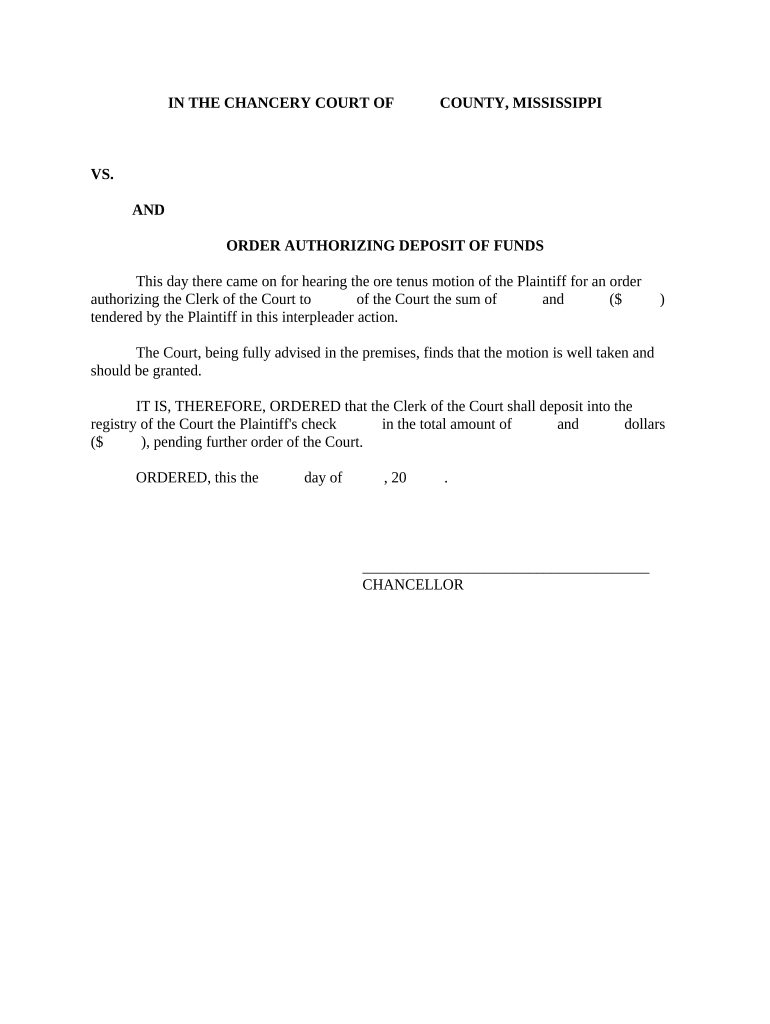
Begin by entering the name of the Plaintiff in the designated field at the top of the form. This identifies who is requesting the deposit.
Next, specify the amount of funds being deposited. Fill in both numerical and written forms of the amount in the appropriate sections to ensure clarity.
Indicate any additional parties involved in this interpleader action, if applicable, by filling out their names in the provided fields.
Finally, review all entered information for accuracy before signing. Use our platform’s signature feature to add your signature where indicated, confirming your request for deposit.
Start using our platform today to fill out your ms deposit form quickly and efficiently!
Aug 25, 2024 The second output of both trade fee txs must lead to the (same) deposit tx. The deposit tx has an OpReturn and the first output is to aRead more
Mississippi State University does not require a deposit to secure admission. The way a student confirms their intent to attend MSU is by registering forRead more
Payroll Deposit Program | State Treasury of Mississippi
We are thrilled youre interested in starting a Payroll Deposit program! Please contact us by email at CollegeSavings@treasury.ms.gov or call (601) 359-5255.Read more
Cookie consent notice
This site uses cookies to enhance site navigation and personalize your experience.
By using this site you agree to our use of cookies as described in our Privacy Notice.
You can modify your selections by visiting our Cookie and Advertising Notice.