Type text, add images, blackout confidential details, add comments, highlights and more.
02. Sign it in a few clicks
Draw your signature, type it, upload its image, or use your mobile device as a signature pad.
03. Share your form with others
Send it via email, link, or fax. You can also download it, export it or print it out.
How to use or fill out Ohio Burial with our platform
Ease of Setup
DocHub User Ratings on G2
Ease of Use
DocHub User Ratings on G2
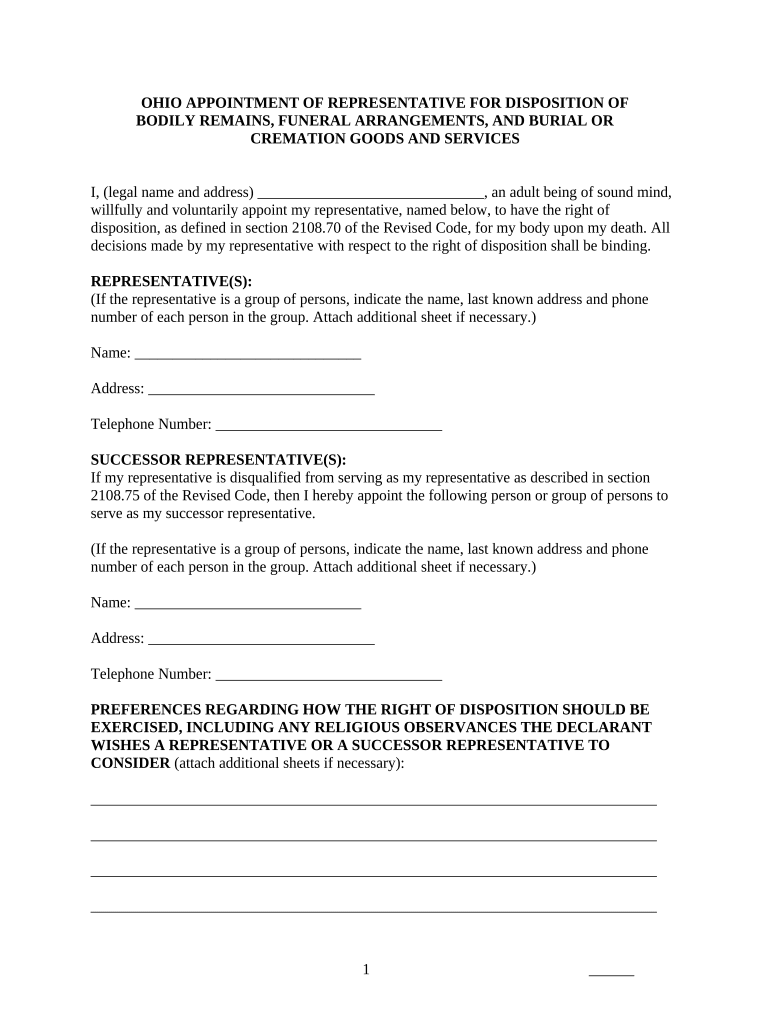
Click ‘Get Form’ to open the Ohio Burial document in the editor.
Begin by entering your legal name and address in the designated fields at the top of the form. This identifies you as the declarant.
In the 'Representative(s)' section, provide the name, address, and phone number of your chosen representative. If there are multiple representatives, list them all and attach an additional sheet if necessary.
Next, fill out the 'Successor Representative(s)' section with similar details for any alternate representatives you wish to appoint.
In the 'Preferences' section, outline any specific wishes regarding religious observances or other preferences for how your right of disposition should be exercised.
Indicate potential sources of funds for covering burial or cremation costs in the relevant section.
Finally, sign and date the document at the bottom. Ensure that two witnesses sign as well, or complete a notary acknowledgment if required.
Start using our platform today to easily complete your Ohio Burial form online for free!
The Kokosing Nature Preserve is a conservation burial ground located in the picturesque countryside of Gambier, Ohio. twenty-three acres of restored prairie
The public can now search across all digital burial records by name, learn about cemetery locations, and explore maps. Hours: Monday - Friday 9 AM to 4:30 PM
The office is open from 8:30 am to. 5:00 pm, Monday through Friday; 8:30 am to 12:30 pm, Saturday; closed Sunday. LAKE VIEW CEMETERY. 12316 EUCLID AVENUE.Read more
Cookie consent notice
This site uses cookies to enhance site navigation and personalize your experience.
By using this site you agree to our use of cookies as described in our Privacy Notice.
You can modify your selections by visiting our Cookie and Advertising Notice.