Notice breach tenant 2026

Get Form
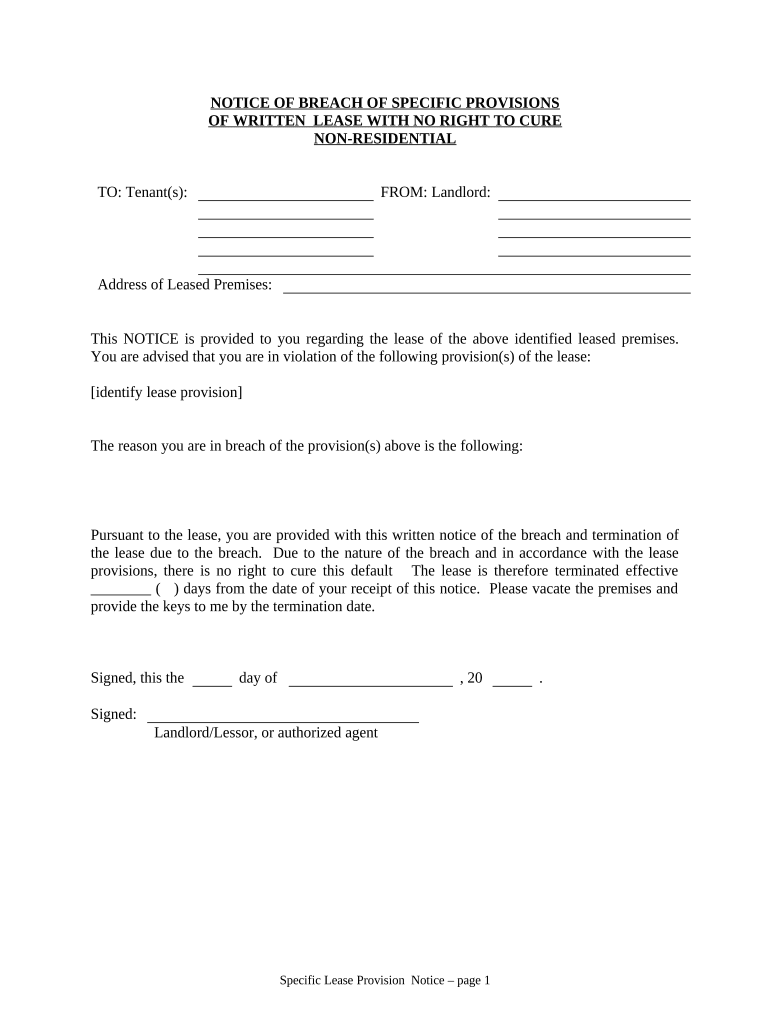
notice breach tenant Preview on Page 1

Here's how it works

01. Edit your form online
Type text, add images, blackout confidential details, add comments, highlights and more.
02. Sign it in a few clicks
Draw your signature, type it, upload its image, or use your mobile device as a signature pad.
03. Share your form with others
Send it via email, link, or fax. You can also download it, export it or print it out.

How to use or fill out notice breach tenant with our platform

Form edit decoration
9.5
Ease of Setup
DocHub User Ratings on G2
9.0
Ease of Use
DocHub User Ratings on G2
  1. Click ‘Get Form’ to open the notice breach tenant document in the editor.
  2. Begin by filling in the 'Tenant(s)' section with the names of the tenants involved. This ensures clarity on who is receiving the notice.
  3. Next, enter your name in the 'From: Landlord' section. This identifies you as the sender of the notice.
  4. In the 'Address of Leased Premises' field, provide the complete address of the property in question to avoid any confusion.
  5. Identify and specify the lease provision(s) that have been violated in the designated area. Be precise to ensure that tenants understand their breach.
  6. Clearly state the reason for the breach in the provided space, which helps tenants comprehend their situation better.
  7. Fill in the termination date by calculating how many days from receipt this notice will take effect, ensuring compliance with lease terms.
  8. Sign and date at the bottom of the form to validate your notice before sending it out.
  9. Finally, choose a delivery method for proof of delivery and fill out that section accordingly.

Start using our platform today to streamline your document editing and signing process for free!

be ready to get more

Complete this form in 5 minutes or less

Get form

Got questions?

We have answers to the most popular questions from our customers. If you can't find an answer to your question, please contact us.
Contact us
If a tenant fails to pay rent, the landlord may give a written notice to the tenant. The notice has to say that the lease will end if the rent is not paid within 3 days. This gives a right to cure or fix the lease violation. If the tenant pays the rent in 3 days, the landlord cannot evict the tenant.
The court can order the landlord to make necessary repairs, pay damages to tenants, or cease harassing behaviors when they violate housing laws.
As soon as you fall into rent arrears, the lessor can issue you with a bdocHub notice. The bdocHub notice can be a letter or a Form 21 - BdocHub Notice for Non-Payment of Rent and must give you 14 days to pay the rent owing. 3. If you pay the rent owing within the 14 days, the lessor cannot take any further action.
Your landlord must then give you a certain amount of time (at least 14 days) to pay the balance owed in rent or to move out (vacate). Generally, landlords in Washington must give you a 14-Day Notice to Pay Rent or Vacate that looks similar to the notice in Washingtons Residential-Landlord Tenant Act at RCW 59.18.
Non-payment of rent is the most common bdocHub and one of the main causes of eviction.

Security and compliance

At DocHub, your data security is our priority. We follow HIPAA, SOC2, GDPR, and other standards, so you can work on your documents with confidence.

Learn more
ccpa2
pci-dss
gdpr-compliance
hipaa
soc-compliance

People also ask

In Western Australia, if your tenant falls behind in rent by more than a day, you can issue a BdocHub Notice (Form 21) for non-payment of rent. This gives them a 14-day window to make up the overdue payments.
A notice to remedy bdocHub is a formal, written document issued by one party (for example, a landlord or a business contracting party) to inform the other party that they have bdocHubed a term of their agreement.

Related links