New hampshire notice 2026

Get Form
new hampshire notice Preview on Page 1

Here's how it works

01. Edit your form online
Type text, add images, blackout confidential details, add comments, highlights and more.
02. Sign it in a few clicks
Draw your signature, type it, upload its image, or use your mobile device as a signature pad.
03. Share your form with others
Send it via email, link, or fax. You can also download it, export it or print it out.

How to use or fill out New Hampshire Notice with our platform

Form edit decoration
9.5
Ease of Setup
DocHub User Ratings on G2
9.0
Ease of Use
DocHub User Ratings on G2
  1. Click ‘Get Form’ to open the New Hampshire Notice in the editor.
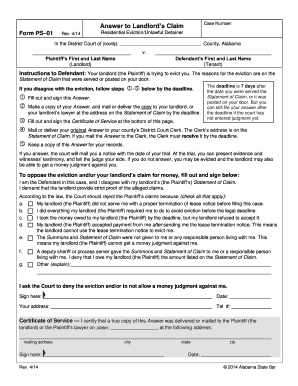
  2. Begin by entering the Tenant(s) name in the designated field. This ensures that the notice is directed appropriately.
  3. Next, fill in your name as the Landlord in the corresponding section. This identifies you as the issuer of the notice.
  4. Provide the address of the leased premises where the tenant resides. Accurate information is crucial for legal purposes.
  5. In the body of the notice, clearly outline any actions or inactions that are not permitted. Be specific to avoid ambiguity.
  6. Sign and date the document at the bottom, ensuring that it reflects when you issued this warning.
  7. Complete the Proof of Delivery section by indicating how you delivered this notice to the tenant, whether by hand, mail, or posting.

Start using our platform today for free to streamline your document editing and signing process!

be ready to get more

Complete this form in 5 minutes or less

Get form

Got questions?

We have answers to the most popular questions from our customers. If you can't find an answer to your question, please contact us.
Contact us

Yes, electronically drawing your signature is appropriate, but only if you utilize a tool that complies with industry laws and regulations. Consider DocHub, which guarantees eSignature validity under ESIGN and UETA requirements. All you need to eSign your new hampshire notice is an account with DocHub and an internet connection. After you open your paperwork in our editor, click Sign and choose the Draw tool.

With a swift editing platform like DocHub, you do not need anything but a browser and connection to the internet to edit your new hampshire notice on the internet swiftly. Add your file or find the relevant form in DocHub’s catalog, open our editor with one click, and finish it digitally. To edit your forms anytime, sign up a free profile with DocHub.

Beginning in 1992, New Hampshire became a swing state in both national and local elections. The state supported Democrats Bill Clinton in 1992 and 1996, John Kerry in 2004, Barack Obama in 2008 and 2012, Hillary Clinton in 2016, Joe Biden in 2020 and Kamala Harris in 2024.
Live Free or Die New Hampshire / Motto
New Hampshire is an at-will employment state. This means that either party may terminate the employment relationship at any time, with or without cause, and with or without notice.

Security and compliance

At DocHub, your data security is our priority. We follow HIPAA, SOC2, GDPR, and other standards, so you can work on your documents with confidence.

Learn more
ccpa2
pci-dss
gdpr-compliance
hipaa
soc-compliance

People also ask

Taking the idea from the English government, a community of towns was erected, and this became a royal province in 1679 with John Cutt as president, with a population intended to be as nearly like England as it could be.
The words Live Free or Die, written by General John Stark, July 31, 1809, shall be the official motto of the state. It was the 1945 Legislature that gave New Hampshire its official motto and emblem, as World War II approached a successful end.

Related links