Mo breach 2026

Get Form
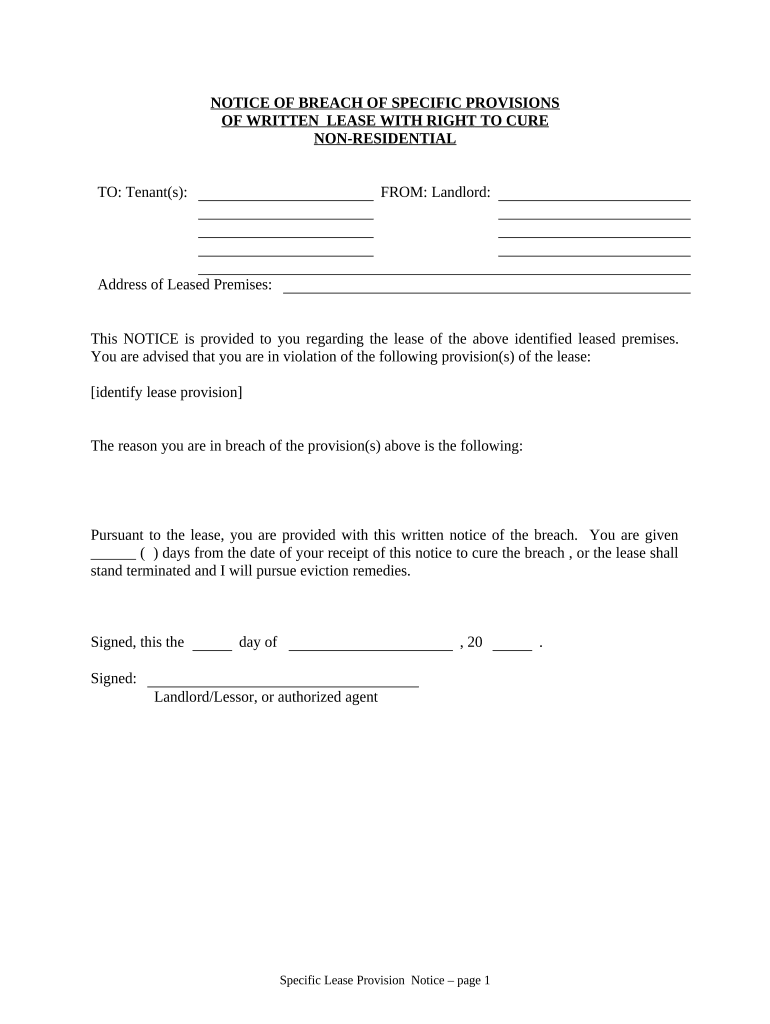
mo breach Preview on Page 1

Here's how it works

01. Edit your form online
Type text, add images, blackout confidential details, add comments, highlights and more.
02. Sign it in a few clicks
Draw your signature, type it, upload its image, or use your mobile device as a signature pad.
03. Share your form with others
Send it via email, link, or fax. You can also download it, export it or print it out.

How to use or fill out mo breach with our platform

Form edit decoration
9.5
Ease of Setup
DocHub User Ratings on G2
9.0
Ease of Use
DocHub User Ratings on G2
  1. Click ‘Get Form’ to open the mo breach document in the editor.
  2. Begin by filling in the 'Tenant(s)' section with the names of all tenants involved in the lease agreement.
  3. Next, enter your name as the 'Landlord' in the designated field to identify yourself clearly.
  4. Provide the 'Address of Leased Premises' where the lease is applicable, ensuring accuracy for effective communication.
  5. Identify and specify the lease provision(s) that are being violated in the appropriate section. This is crucial for clarity.
  6. State the reason for the breach succinctly, providing enough detail to inform tenants of their obligations.
  7. Indicate how many days are allowed for curing the breach by filling in the blank provided.
  8. Sign and date at the bottom of the form to finalize your notice, ensuring all required signatures are included.
  9. Complete the 'Proof of Delivery' section by selecting how you delivered this notice and signing accordingly.

Start using our platform today to streamline your document editing and ensure smooth business processes!

be ready to get more

Complete this form in 5 minutes or less

Get form

Got questions?

We have answers to the most popular questions from our customers. If you can't find an answer to your question, please contact us.
Contact us
BdocHub Details According to National Public Data, a malicious actor gained access to their systems in December 2023 and leaked sensitive data onto the dark web from April 2024 to the summer of 2024. This data contained the following details: Full names. Social Security Numbers.
If the memorandum of understanding became a contract it will incur the same consequences of a normal contract. Upon the bdocHub, you could be sued, ordered to pay the other party damages or reimburse their legal costs. You require legal advice if the situation escalates further than anticipated.
A Memorandum of Understanding should include a termination clause. Given that this document is not usually legally binding, it is not as complex to walk away from compared to a legal contract unless it contains a clause that indicates that the parties intend to be legally bound by the document.
Most often, however, a court simply orders the party in bdocHub to pay the other party enough money so as to return the non- bdocHubing party to the same position it would have been in had it performed the promises as outlined in the contract.
Although MOUs are usually not legally binding, a bdocHub of the agreement could harm the trust between parties, lead to disputes, or even result in legal action if the bdocHub goes against the law or other agreements. so other party can send a legal notice for bdocHub of the agreement.

Security and compliance

At DocHub, your data security is our priority. We follow HIPAA, SOC2, GDPR, and other standards, so you can work on your documents with confidence.

Learn more
ccpa2
pci-dss
gdpr-compliance
hipaa
soc-compliance