Missouri annual 2026

Get Form
missouri annual Preview on Page 1

Here's how it works

01. Edit your form online
Type text, add images, blackout confidential details, add comments, highlights and more.
02. Sign it in a few clicks
Draw your signature, type it, upload its image, or use your mobile device as a signature pad.
03. Share your form with others
Send it via email, link, or fax. You can also download it, export it or print it out.

How to use or fill out Missouri Annual with our platform

Form edit decoration
9.5
Ease of Setup
DocHub User Ratings on G2
9.0
Ease of Use
DocHub User Ratings on G2
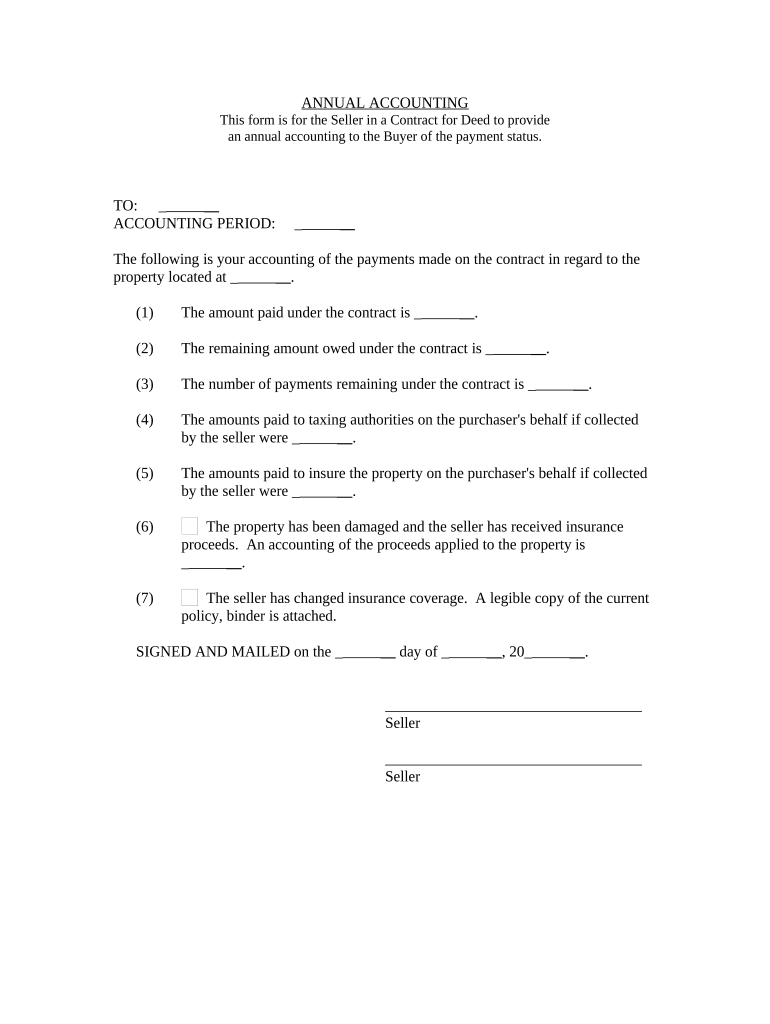
  1. Click ‘Get Form’ to open the Missouri Annual form in the editor.
  2. Begin by entering the recipient's name in the 'TO' field, ensuring accuracy for proper communication.
  3. Specify the accounting period by filling in the relevant dates to clarify the timeframe of your accounting.
  4. In section (1), input the total amount paid under the contract. This provides a clear overview of payments made.
  5. For section (2), indicate the remaining amount owed under the contract, which is crucial for both parties' records.
  6. Fill in section (3) with the number of payments remaining, helping track future obligations.
  7. If applicable, list any amounts paid to taxing authorities on behalf of the purchaser in section (4).
  8. In section (5), document any insurance payments made on behalf of the purchaser for transparency.
  9. If there has been property damage and insurance proceeds were received, provide an accounting in section (6).
  10. Attach a legible copy of any changed insurance coverage as mentioned in section (7) for reference.
  11. Finally, sign and date at the bottom to complete your annual accounting report before sending it off.

Start using our platform today to easily fill out your Missouri Annual form for free!

be ready to get more

Complete this form in 5 minutes or less

Get form

Got questions?

We have answers to the most popular questions from our customers. If you can't find an answer to your question, please contact us.
Contact us
The state of Missouri requires all Missouri corporations and nonprofits to file an annual OR biennial registration report depending on what your business chooses. Either way, youll need to submit your report to the Missouri Secretary of State, Corporations Division each year OR every other year.
Statutory business entities which include business corporations, nonprofit corporations, limited liability companies (LLCs), limited partnerships (LPs), and limited liability partnerships (LLPs) are generally required to file an information report with the business entity filing office of their formation state and
Missouri Annual Report Information. Businesses and nonprofits are required to file annual reports to stay in good standing with the secretary of state. Annual reports are required in most states. Due dates and fees vary by state and type of entity.
Key Things to Know About Annual Reports Almost Every State Requires It: All US states require some form of annual report filing, except Ohio. That means if your business is registered anywhere else, youve got to file a yearly business report to stay in good standing.
Quick Summary. Filing an annual report is mandatory for any business registered in Missouri to remain in good standing with the Missouri Secretary of State. In Missouri, the fee to file an LLCs annual report is \$15 for submissions by mail and \$10 for those filed online.

Security and compliance

At DocHub, your data security is our priority. We follow HIPAA, SOC2, GDPR, and other standards, so you can work on your documents with confidence.

Learn more
ccpa2
pci-dss
gdpr-compliance
hipaa
soc-compliance

People also ask

$53k household income is median for the city, $70k is the median for the Metro Area. Above $100k youll be good anywhere.
Tender annuals need warm soil temperatures and should only be planted after all danger of frost has passed. Summer annuals such as celosia, zinnias and petunias may be safely planted outside after May 10th in Missouri.

Related links