Commercial Lease Assignment from Tenant to New Tenant - Minnesota 2026

Get Form
assignment of lease Preview on Page 1

Here's how it works

01. Edit your assignment of lease online
Type text, add images, blackout confidential details, add comments, highlights and more.
02. Sign it in a few clicks
Draw your signature, type it, upload its image, or use your mobile device as a signature pad.
03. Share your form with others
Send lease assignment agreement word via email, link, or fax. You can also download it, export it or print it out.

How to use or fill out Commercial Lease Assignment from Tenant to New Tenant - Minnesota

Form edit decoration
9.5
Ease of Setup
DocHub User Ratings on G2
9.0
Ease of Use
DocHub User Ratings on G2
  1. Click ‘Get Form’ to open it in the editor.
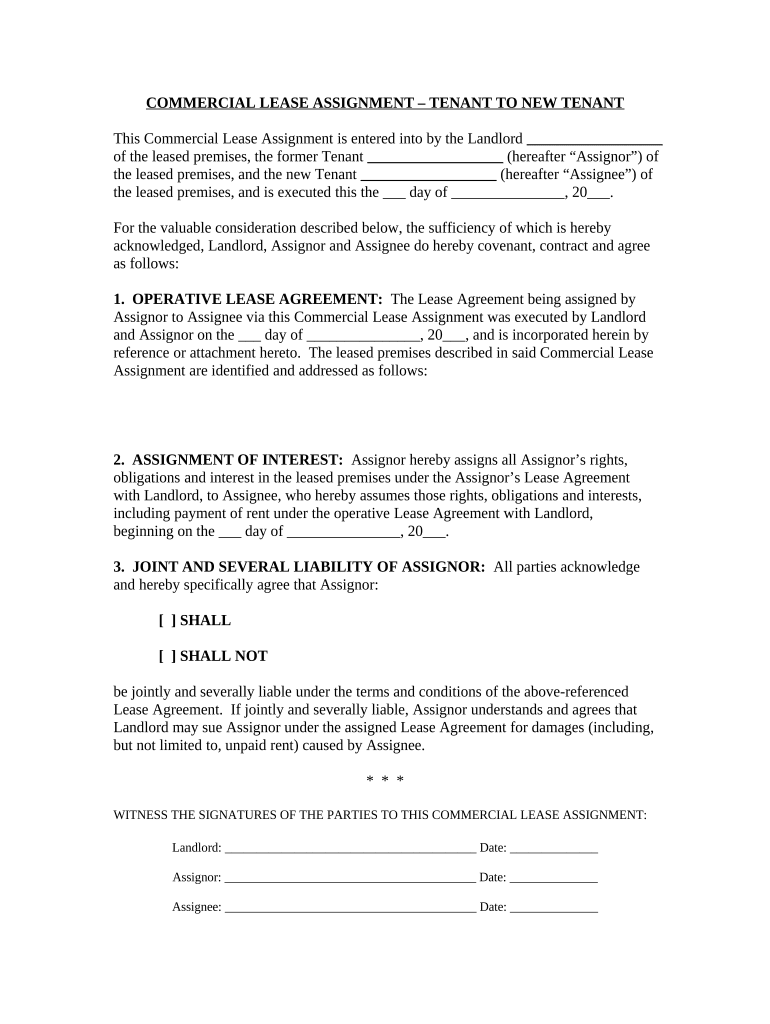
  2. Begin by filling in the names of the Landlord, Assignor (former Tenant), and Assignee (new Tenant) at the top of the form. Ensure accuracy as these parties are crucial for the assignment.
  3. In the section labeled 'Operative Lease Agreement', enter the date when the original Lease Agreement was executed. This establishes a reference point for all parties involved.
  4. Next, specify the address of the leased premises. This is essential for identifying the property being assigned.
  5. For 'Assignment of Interest', indicate the start date when Assignee will assume rights and obligations under the Lease Agreement. This clarifies when responsibilities transfer.
  6. In 'Joint and Several Liability of Assignor', select whether Assignor will be jointly liable or not by checking the appropriate box. This decision impacts legal responsibilities.
  7. Finally, ensure all parties sign and date at the bottom of the form to validate this assignment legally.

Start using our platform today to streamline your document editing and signing process for free!

be ready to get more

Complete this form in 5 minutes or less

Get form

Got questions?

We have answers to the most popular questions from our customers. If you can't find an answer to your question, please contact us.
Contact us
Answer. Under a typical lease assignment, you transfer all of your space to someone else for the entire remaining term of the lease, and the new tenant pays rent directly to the landlord. If the new tenant fails to pay rent or damages the rental, your landlord could look to you for compensation.
Most commercial leases require landlord consent for any assignment. To ask for this, you need to send a Request for Consent letter to the landlord. This letter should include details about the new tenant (assignee), like: The nature of their business.
An assignment is a full transfer of the lease between the tenant and the assignee. Therefore, since the tenant no longer has any ownership interest in the property, there is no longer any relationship between the landlord and the tenant as far as the property ownership is concerned.
The Principle of Assignment in Commercial Leases This process is called an assignment of the lease. Essentially, the tenants obligations and rights under the lease agreement transfer to the new owner, who assumes the position of the previous landlord.
Assignment of a lease If a tenant assigns (transfers) the lease to another person, Stamp Duty must be paid on the assignment. You treat an assignment the same way as a purchase of property. Mary leases the premises in which she conducts her accountancy business from John.

Security and compliance

At DocHub, your data security is our priority. We follow HIPAA, SOC2, GDPR, and other standards, so you can work on your documents with confidence.

Learn more
ccpa2
pci-dss
gdpr-compliance
hipaa
soc-compliance

People also ask

In general, the landlord must agree to the lease transfer, and usually records their consent to it via a document called a license to assign.
We outlined the top steps to adding a new tenant to an existing lease to help guide you along the process. Request a Rental Application. Create a Lease Amendment. Collect Signatures From All Parties. Set Up Rent Collection From the New Tenant.

Related links