Instructions for Cost of Living Adjustment Worksheet - Minnesota 2026

Get Form
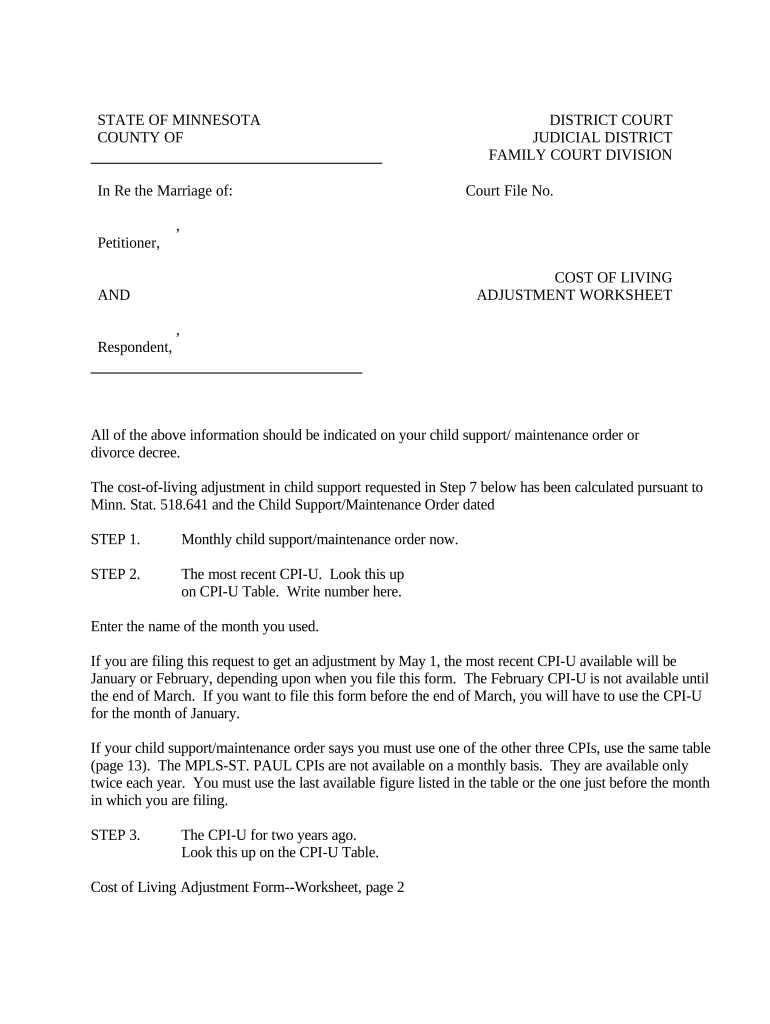
minnesota cost of living Preview on Page 1

Here's how it works

01. Edit your minnesota cost of living online
Type text, add images, blackout confidential details, add comments, highlights and more.
02. Sign it in a few clicks
Draw your signature, type it, upload its image, or use your mobile device as a signature pad.
03. Share your form with others
Send it via email, link, or fax. You can also download it, export it or print it out.

How to use or fill out Instructions for Cost of Living Adjustment Worksheet - Minnesota with our platform

Form edit decoration
9.5
Ease of Setup
DocHub User Ratings on G2
9.0
Ease of Use
DocHub User Ratings on G2
  1. Click 'Get Form' to open the Instructions for Cost of Living Adjustment Worksheet in the editor.
  2. Begin by entering the name of the county and court where your child support order was issued, along with the case number. Ensure this matches your original documents.
  3. In Step 1, input the current monthly child support amount as stated in your order. This is crucial for accurate calculations.
  4. For Step 2, find the most recent Consumer Price Index (CPI-U) from the provided table and enter it along with the corresponding month.
  5. Proceed to Step 3 by locating the CPI-U from two years ago and entering that value.
  6. Follow through Steps 4 to 7 by performing necessary calculations: subtract, divide, multiply, and finally add to determine your new child support amount.
  7. Once completed, ensure you save your document. You can easily make copies directly from our platform for filing and personal records.

Start using our platform today to streamline your form completion process for free!

be ready to get more

Complete this form in 5 minutes or less

Get form

Got questions?

We have answers to the most popular questions from our customers. If you can't find an answer to your question, please contact us.
Contact us

With DocHub, you can rapidly approve your Instructions for Cost of Living Adjustment Worksheet - Minnesota or any other document on iOS, even without setting up extra programs. You can access your DocHub account from any web-connected browser and fill out and sign your form in any way you like with just a few clicks.

You may complete and sign your Instructions for Cost of Living Adjustment Worksheet - Minnesota on the internet, even on a tight deadline. All you need to access high quality editing instruments on any device is a DocHub account, that you can sign up in just a couple of moments. Once you sign up, add your file or find what you are searching for in our catalog, complete it using the editing instruments you need, and place your electronic signature on it at the end.

The formula used to calculate COLA utilizes an average of the CPI-W from the third quarter of the current year (A) and the third quarter of the previous year (B). The formula is (A-B) / B * 100 = I. Usually calculated in December, the adjustment begins in January of the following year.
When the CPI-W increases, the COLA increases too. The formula used to calculate COLA utilizes an average of the CPI-W from the third quarter of the current year (A) and the third quarter of the previous year (B). The formula is (A-B) / B * 100 = I.
Employees with a $100,000 base salary might receive a 6% raise, or $6,000 for their COLA, before any performance-based increases. Likewise, an employee making $20 per hour might receive another $1.20 per hour, raising their pay rate to $21.20.

Security and compliance

At DocHub, your data security is our priority. We follow HIPAA, SOC2, GDPR, and other standards, so you can work on your documents with confidence.

Learn more
ccpa2
pci-dss
gdpr-compliance
hipaa
soc-compliance

People also ask

Most child support orders issued in Minnesota after August 1, 1983, include a requirement that the child support amount be adjusted every 2 years based on changes in the cost of living. Cost of living increases will be implemented by the child support agency when the agency is providing services.
You can calculate this by using the following formula:Current employee salary x cost of living increase = Cost of living raiseFor the abovementioned employee, the calculation would be as follows: 40,000 x 0.02 = 800This means that the employee would receive an $800 raise and would now make $40,800 annually.
Best practices for cost-of-living pay adjustments Keep an employees salary commensurate with their living expenses. Give regular raises. Customize the cost-of-living pay adjustment for each employee given their location. Research market rates. Set boundaries. Offer an increase when earned.

Related links