Michigan anatomical 2026

Get Form
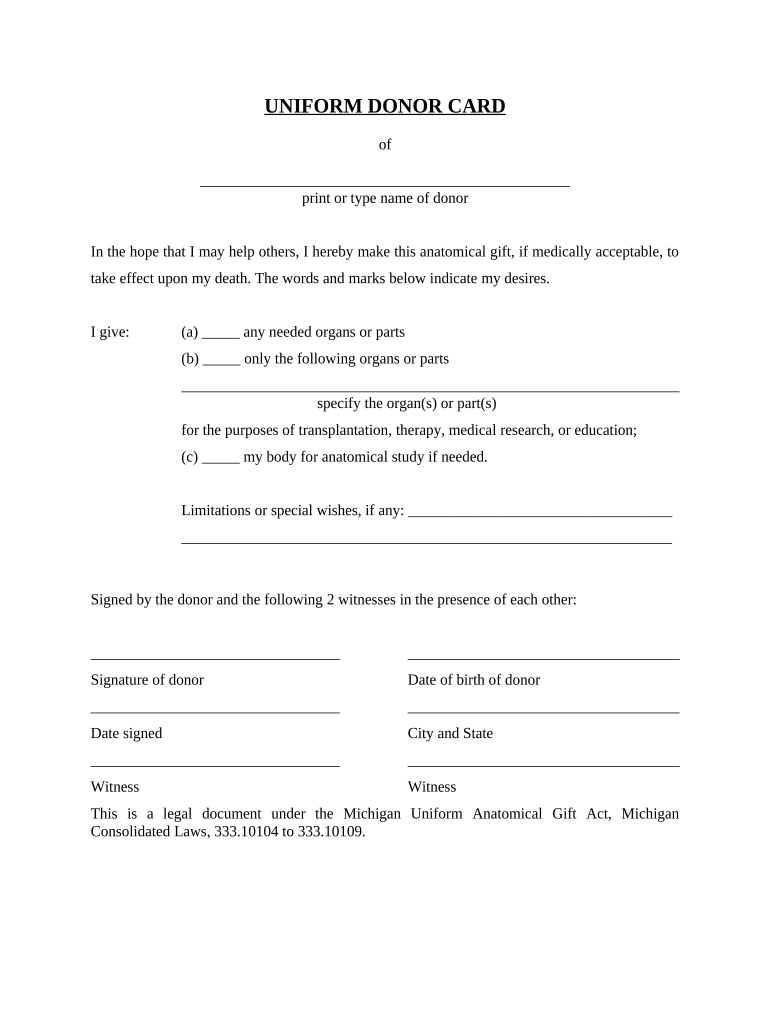
michigan anatomical Preview on Page 1

Here's how it works

01. Edit your form online
Type text, add images, blackout confidential details, add comments, highlights and more.
02. Sign it in a few clicks
Draw your signature, type it, upload its image, or use your mobile device as a signature pad.
03. Share your form with others
Send it via email, link, or fax. You can also download it, export it or print it out.

How to use or fill out michigan anatomical with our platform

Form edit decoration
9.5
Ease of Setup
DocHub User Ratings on G2
9.0
Ease of Use
DocHub User Ratings on G2
  1. Click ‘Get Form’ to open the Michigan Anatomical Gift form in the editor.
  2. Begin by entering the donor's name in the designated field. Ensure that you print or type clearly for accuracy.
  3. In the section indicating your gift, select one of the options: (a) for any needed organs, (b) for specific organs, or (c) if you wish to donate your body for anatomical study. If choosing option (b), specify the organs or parts in the provided space.
  4. If you have any limitations or special wishes regarding your donation, write them in the designated area.
  5. Sign the document where indicated and provide your date of birth. Ensure that two witnesses also sign in each other's presence, along with their respective details.
  6. Finally, review all entries for accuracy before saving or exporting your completed form.

Start using our platform today to complete your Michigan Anatomical Gift form online for free!

be ready to get more

Complete this form in 5 minutes or less

Get form

Got questions?

We have answers to the most popular questions from our customers. If you can't find an answer to your question, please contact us.
Contact us

With DocHub, it’s quite simple. The platform offers users an add-on called DocHub for Gmail, which you can find in the Google Workspace Marketplace without being charged. Install it and give it access to your Google account. Open your email with your michigan anatomical attached and click on the add-on button in the right-side panel. Log in to your DocHub account, and import the file to our editor, where you can complete it and sign.

If you store your papers in Google Drive, there is no need to download your michigan anatomical on your computer and upload it back to our editor. A significantly easier way is to install a browser extension created by DocHub to streamline this flow. The extension allows editing PDFs in your browser. Alternatively, you may integrate your DocHub and Gmail accounts for more efficient modifying.

Tradition of Excellence The U-M Medical School consistently ranks in the top of all medical schools in the country.
Anatomical examination is used to teach students and medical or allied professionals about the structure and function of the body. The centre is located in the School of Biosciences and is used by undergraduate medical, dental and science students. Postgraduate and professional training courses are also held here.
BlueLink is a multimedia based education resource for medical students, developed by Dr. B. Kathleen Alsup and Dr. Glenn M. Fox of the Division of Anatomical Sciences at the University of Michigan Medical School.

Security and compliance

At DocHub, your data security is our priority. We follow HIPAA, SOC2, GDPR, and other standards, so you can work on your documents with confidence.

Learn more
ccpa2
pci-dss
gdpr-compliance
hipaa
soc-compliance
be ready to get more

Complete this form in 5 minutes or less

Get form

People also ask

(1)In this Act anatomical examination means the examination by dissection of a body for purposes of teaching or studying, or researching into, morphology; and where parts of a body are separated in the course of its anatomical examination, such examination includes the examination by dissection of the parts for those
A method for assessing student ability to apply anatomical knowledge within a traditional anatomy laboratory examination.

Related links