



Here's how it works



How to use or fill out nursing worksheets with our platform

- Click ‘Get Form’ to open the nursing worksheet in the editor.
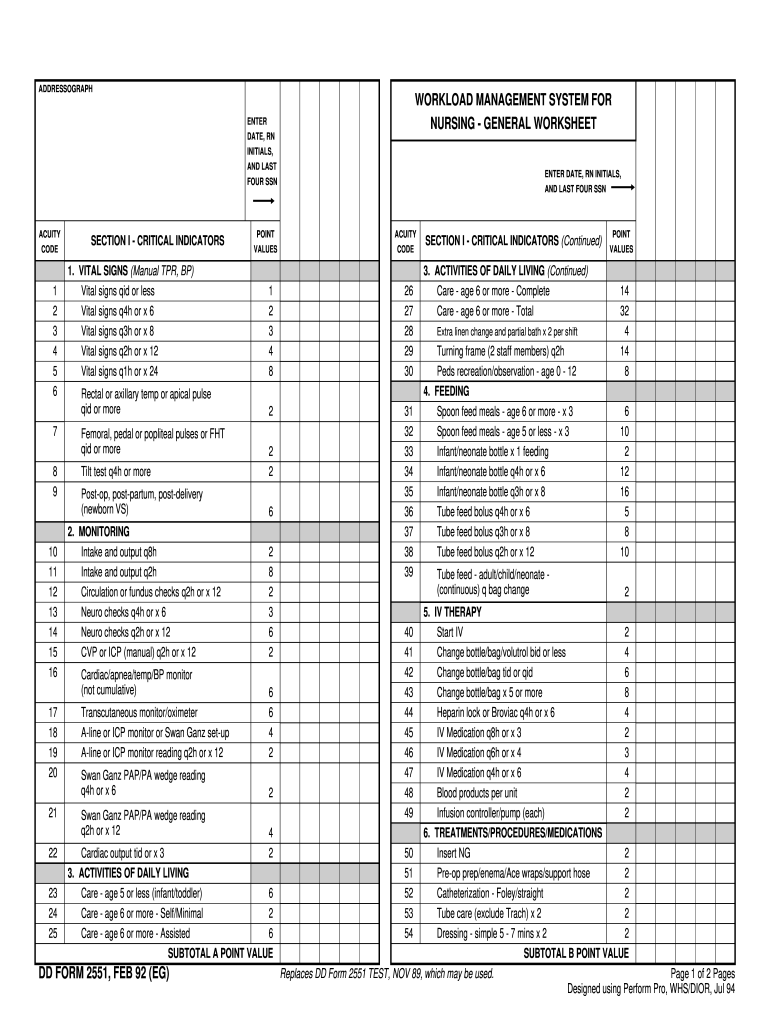
- Begin by entering the date, your RN initials, and the last four digits of your Social Security Number in the designated fields at the top of the form.
- Proceed to Section I - Critical Indicators. Here, you will find various categories such as Vital Signs and Monitoring. Fill in each relevant field based on patient assessments, ensuring to select appropriate acuity codes for accurate documentation.
- Continue through each subsection, including Activities of Daily Living and Feeding. Carefully input data regarding patient care activities, noting point values associated with each task.
- Once all sections are completed, review your entries for accuracy before saving or exporting the document directly from our platform.
Start using our editor today to streamline your nursing documentation process for free!
It's free
See more nursing worksheets versions
| Versions | Form popularity | Fillable & printable |
|---|---|---|
| 1992 | 4.8 Satisfied (140 Votes) |
Got questions?
How do I sign my nursing worksheets free of charge?
Most eSignature services require users to have a paid subscription. With DocHub, there are two ways for you to add an electronic signature to your nursing worksheets free of charge:
- You can do it during a 7-day trial period;
- You can sign up for a free plan.
The second option, though, has restrictions on the number of signatures, sign requests, emails, and documents for adjusting available per month. You can check for full information here.
How do you get nursing worksheets pdf for my state?
If you are looking for a state-specific nursing worksheets pdf sample, you will find it in our DocHub Forms & Templates catalog. Use the search field, enter your form’s name, and search through the results for your state. You may also filter out irrelevant results while browsing our catalog by groups.
How can I memorize my nursing skills?
Is there a lot of memorization in nursing school?
How do I become a better nursing student?
Security and compliance
At DocHub, your data security is our priority. We follow HIPAA, SOC2, GDPR, and other standards, so you can work on your documents with confidence.
Learn more