






Understanding the Appointment of Agent in Michigan
The Appointment of Agent form in Michigan is a vital legal document that enables vehicle, watercraft, or mobile home owners to designate an authorized agent to act on their behalf in transactions involving their property. This form is crucial for ensuring that any legal documentation related to the sale or purchase of such items is handled efficiently and properly. This section will explore its significance, the process for usage, and key features to consider.
What is the Appointment of Agent Form?
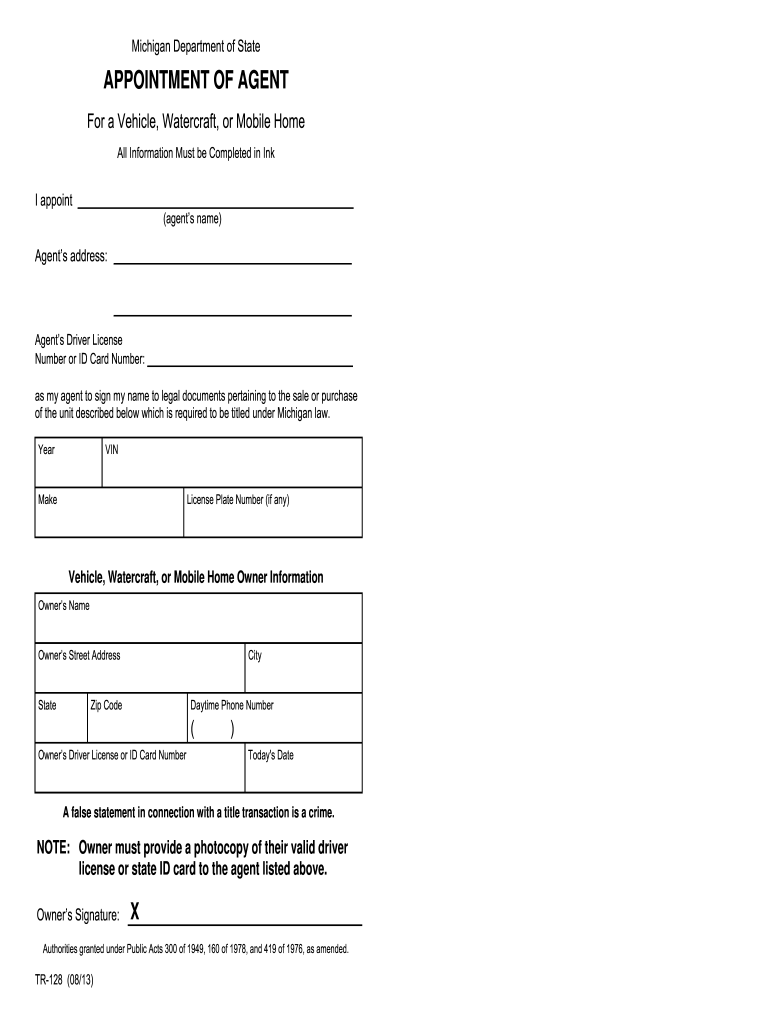
The Appointment of Agent form is issued by the Michigan Department of State and serves as a declaration that allows a designated person to sign documents on behalf of the owner regarding specific vehicles, watercrafts, or mobile homes.
- Authority Granted: The appointed agent can handle various legal documents necessary for the transfer of ownership or other legal matters.
- Importance of Accuracy: Completing the form accurately ensures that the agent has the appropriate authority, which prevents legal disputes and complications in the future.
How to Complete the Appointment of Agent Form
Filling out the Appointment of Agent form requires meticulous attention to detail to ensure that all necessary information is accurately provided. The key steps include:
- Identifying the Owner: Enter the full name and contact information of the individual designating the agent.
- Providing Agent Details: Clearly state the name and address of the appointed agent who is authorized to act.
- Describing the Property: Specify the vehicle, watercraft, or mobile home by providing essential details such as the Vehicle Identification Number (VIN) or Hull Identification Number (HIN).
- These details must match official documentation for validity.
- Signing and Dating: The owner must sign and date the form to validate it. Ensure that the signature is consistent with that on the owner’s official documents.
Legal Considerations of the Form
It's important to understand the legal implications tied to the Appointment of Agent document.
- Legally Binding: Once completed, the form is legally binding. Any contracts or agreements signed by the agent within the scope of this authority are binding on the owner.
- Penalties for Misrepresentation: Providing false information on the form can lead to penalties, including potential criminal charges and civil liability. Therefore, accuracy and honesty in all declarations are crucial.
Common Uses of the Appointment of Agent Form
The Appointment of Agent form is commonly used under several circumstances:
- Transfer of Ownership: Frequently utilized during the sale or transfer of vehicles, ensuring that the appointed agent can execute necessary paperwork.
- Registration and Re-titling: The agent may also assist in re-titling the vehicle or watercraft, ensuring all changes are documented correctly in the state's records.
- Representation in Legal Matters: In situations where the owner cannot be present, the agent may represent them in legal proceedings related to the property.
Key Terms Associated With the Appointment of Agent Form
Familiarity with specific terminology related to the Appointment of Agent form can enhance understanding:
- Principal: The individual who designates the agent.
- Agent: The individual granted authority to act on behalf of the principal.
- Scope of Authority: The extent to which the agent can act, which must be clearly defined within the form.
Important Considerations for Michigan Residents
When using the Appointment of Agent document in Michigan, residents should keep a few considerations in mind:
- State-Specific Requirements: It’s essential to adhere to requirements set forth by the Michigan Department of State to ensure compliance.
- Keeping Records: Maintain copies of the completed form and any documentation related to transactions authorized by the appointed agent for record-keeping and future reference.
Conclusion
Filling out the Appointment of Agent form accurately and understanding its implications are crucial steps for vehicle, watercraft, or mobile home owners in Michigan. Proper utilization of this document ensures that transactions can proceed smoothly while safeguarding the interests of the owner.