Type text, add images, blackout confidential details, add comments, highlights and more.
02. Sign it in a few clicks
Draw your signature, type it, upload its image, or use your mobile device as a signature pad.
03. Share your form with others
Send it via email, link, or fax. You can also download it, export it or print it out.
How to use or fill out oregon motion with our platform
Ease of Setup
DocHub User Ratings on G2
Ease of Use
DocHub User Ratings on G2
Click ‘Get Form’ to open the oregon motion document in the editor.
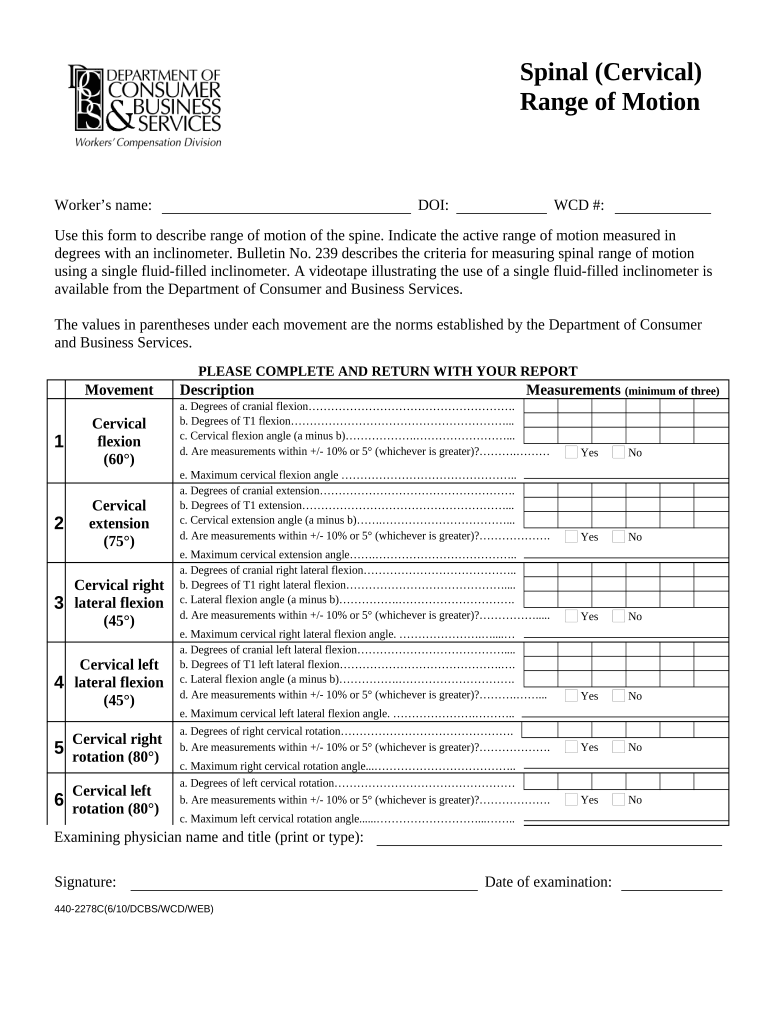
Begin by entering the worker’s name, date of injury (DOI), and WCD number at the top of the form.
For each movement listed (cervical flexion, extension, lateral flexion, and rotation), measure the active range of motion using an inclinometer. Input your measurements in degrees under 'Measurements'.
Ensure you provide a minimum of three measurements for each movement and calculate the cervical angles as instructed. Indicate if they are within the specified range.
Complete the physician's section by printing or typing their name and title, signing, and dating the examination.
Start using our platform today to streamline your form completion process for free!
Oregon motion for extension of timeOregon motion to change venueHow to file a motion with the court without an attorneyMotion to consolidate OregonExamples of court motionsOJD Guide and fileOregon subpoena formOjd Guide and file login
Security and compliance
At DocHub, your data security is our priority. We follow HIPAA, SOC2, GDPR, and other standards, so you can work on your documents with confidence.
Motions are formal actions taken by the Senate to express its collective will on academic matters, make recommendations, or publicly communicate its opinion.Read more
Cookie consent notice
This site uses cookies to enhance site navigation and personalize your experience.
By using this site you agree to our use of cookies as described in our Privacy Notice.
You can modify your selections by visiting our Cookie and Advertising Notice.