Type text, add images, blackout confidential details, add comments, highlights and more.
02. Sign it in a few clicks
Draw your signature, type it, upload its image, or use your mobile device as a signature pad.
03. Share your form with others
Send it via email, link, or fax. You can also download it, export it or print it out.
How to Use or Fill Out Stock Issuance
Ease of Setup
DocHub User Ratings on G2
Ease of Use
DocHub User Ratings on G2
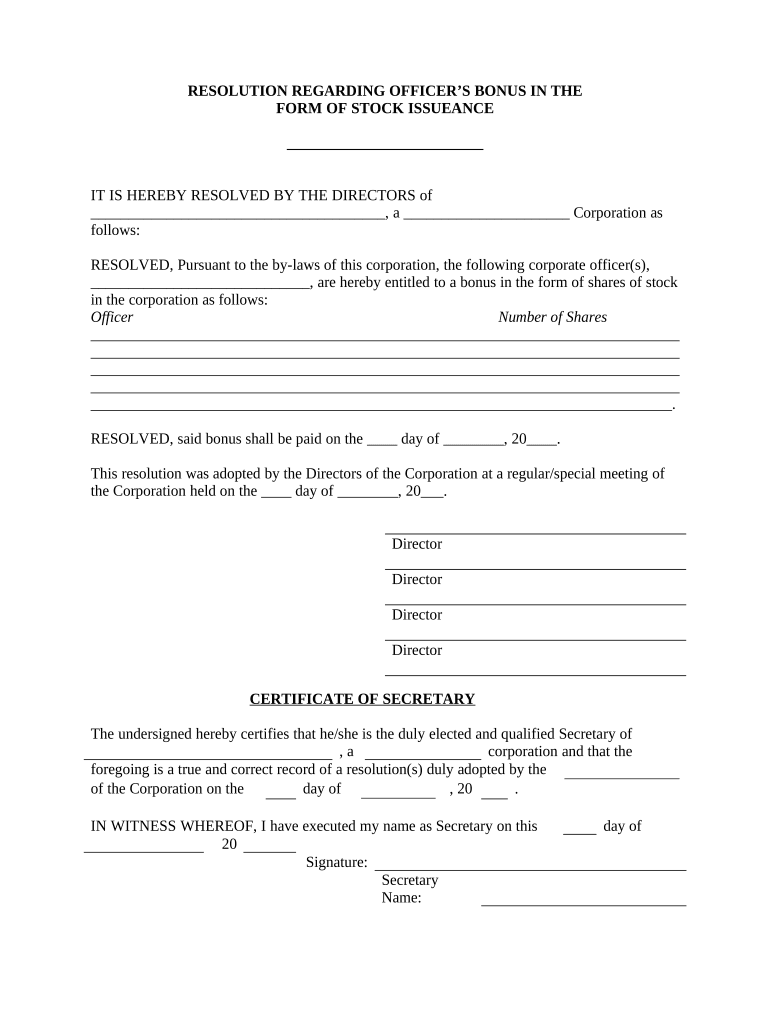
Click ‘Get Form’ to open the stock issuance document in our editor.
Begin by filling in the corporation's name and type at the top of the form. This identifies the entity issuing the stock.
In the section for corporate officers, list the names of those entitled to receive stock bonuses. Ensure accuracy as this reflects official records.
Next, specify the number of shares each officer will receive. Be precise to avoid any discrepancies in stock distribution.
Indicate the payment date for the bonus in the designated fields. This is crucial for record-keeping and compliance.
Finally, have directors sign and date the resolution at the bottom of the form to validate it. The Secretary should also complete their certification with a signature and date.
Start using our platform today to streamline your stock issuance process for free!
Stock issuance exampleStock issuance meaningWhat is stock issuance in accountingStock issuance companiesStock issuance formulaStock issuance in stock marketStock issuance costs tax treatmentIssuance of common stock meaning
Security and compliance
At DocHub, your data security is our priority. We follow HIPAA, SOC2, GDPR, and other standards, so you can work on your documents with confidence.
Issuance of Stock. a. Initial Equity Issuance. Licensee hereby issues to The Regents shares of Licensees voting common stock (the Shares). TheRead more
Cookie consent notice
This site uses cookies to enhance site navigation and personalize your experience.
By using this site you agree to our use of cookies as described in our Privacy Notice.
You can modify your selections by visiting our Cookie and Advertising Notice.