Type text, add images, blackout confidential details, add comments, highlights and more.
02. Sign it in a few clicks
Draw your signature, type it, upload its image, or use your mobile device as a signature pad.
03. Share your form with others
Send it via email, link, or fax. You can also download it, export it or print it out.
How to Use or Fill Out Policy Use Business with Our Platform
Ease of Setup
DocHub User Ratings on G2
Ease of Use
DocHub User Ratings on G2
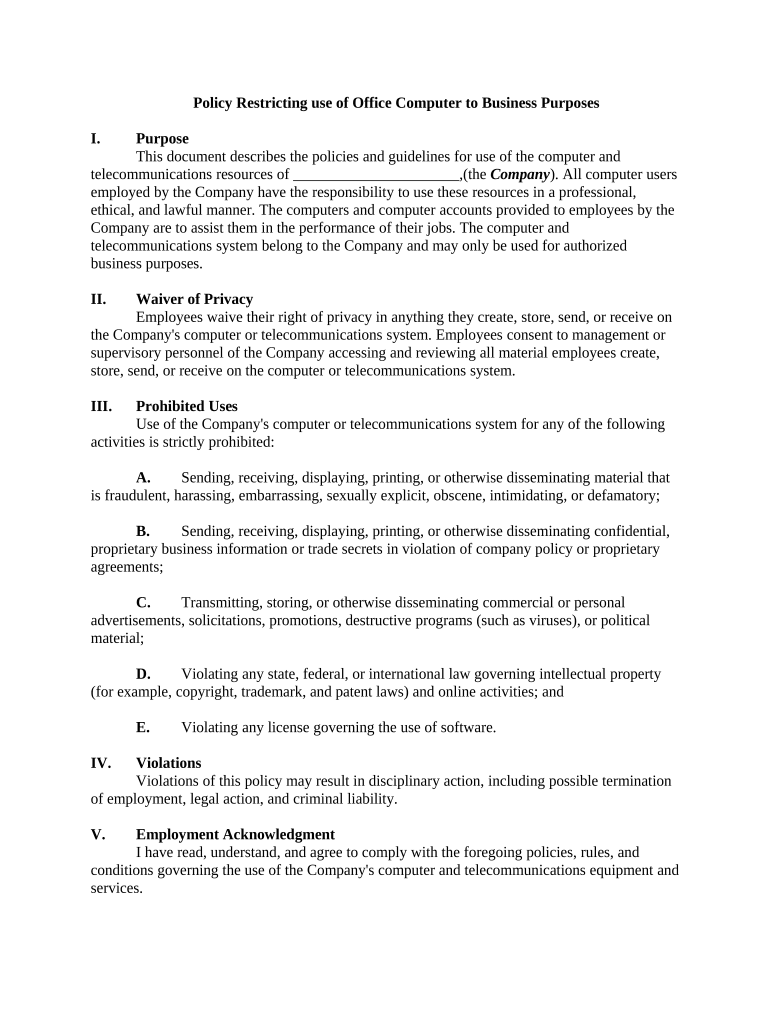
Click ‘Get Form’ to open the policy use business document in the editor.
Begin by reviewing the 'Purpose' section to understand the guidelines for using company resources. This will help you grasp your responsibilities as a user.
In the 'Waiver of Privacy' section, acknowledge that all materials created or stored on company systems can be accessed by management. Ensure you understand this before proceeding.
Carefully read through the 'Prohibited Uses' section. Make sure to avoid any activities listed here while using company resources.
If you agree with the policies, navigate to the 'Employment Acknowledgment' section. Here, fill in your printed name and date, then provide your signature electronically.
Finally, ensure that your computer account information is correctly entered before submitting the form for review.
Start using our platform today to streamline your document completion process for free!
Policy use business meaningPolicy use business redditPolicy use business examplePolicy use business calculatorPolicy use business costBusiness Owner policy exampleBusiness owners policy coverage guideBusiness owners policy vs commercial package
Security and compliance
At DocHub, your data security is our priority. We follow HIPAA, SOC2, GDPR, and other standards, so you can work on your documents with confidence.
May 6, 2026 If you use your car only for business purposes, you may deduct its entire cost of ownership and operation (subject to limits discussedRead more
Cookie consent notice
This site uses cookies to enhance site navigation and personalize your experience.
By using this site you agree to our use of cookies as described in our Privacy Notice.
You can modify your selections by visiting our Cookie and Advertising Notice.