




Here's how it works

01. Edit your ohio state patrol crash report online
Type text, add images, blackout confidential details, add comments, highlights and more.

02. Sign it in a few clicks
Draw your signature, type it, upload its image, or use your mobile device as a signature pad.

03. Share your form with others
Send ohio state patrol crash reports via email, link, or fax. You can also download it, export it or print it out.
How to use or fill out Ohio State Patrol Crash Report with our platform

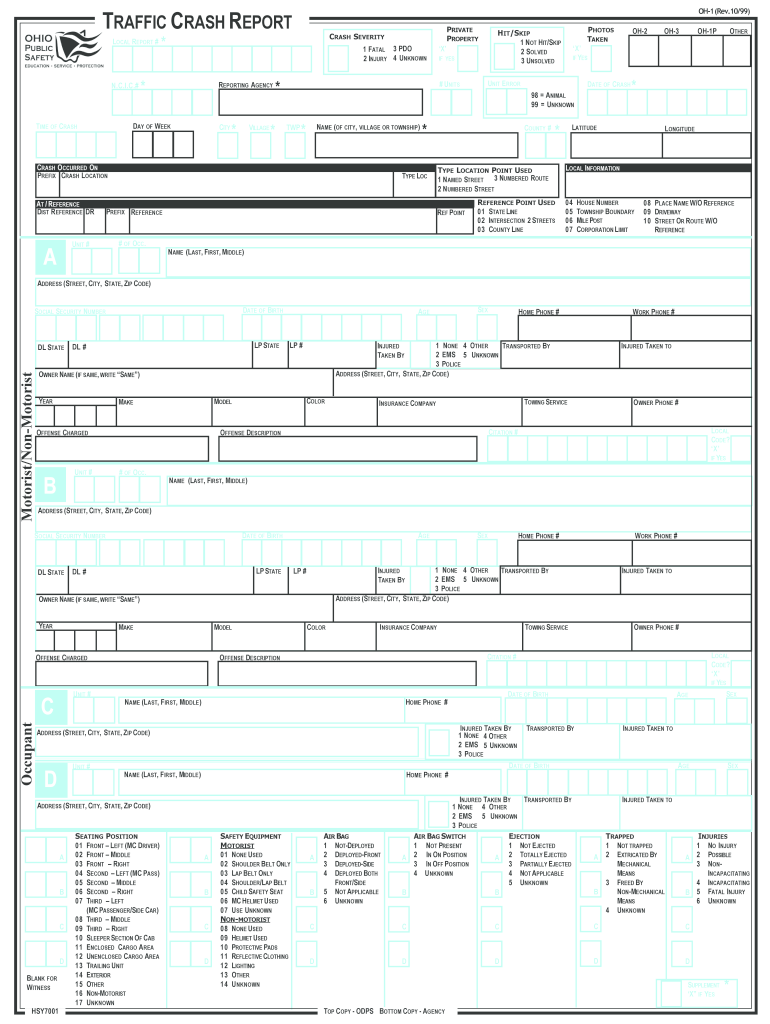
- Click ‘Get Form’ to open the Ohio State Patrol Crash Report in the editor.
- Begin by filling in the 'Local Report #' and 'N.C.I.C.#' at the top of the form. This information is crucial for tracking and referencing your report.
- In the 'Time of Crash' section, enter the exact time when the incident occurred. Ensure accuracy as this can impact investigations.
- Complete the 'City', 'Village', and 'County #' fields to specify where the crash took place. This helps in categorizing the report correctly.
- Proceed to fill out details about each involved party under sections labeled with 'Unit #' (A, B, C). Include names, addresses, and vehicle information such as make, model, and color.
- For injuries sustained during the crash, indicate whether there were any fatalities or injuries by checking appropriate boxes in the 'Crash Severity' section.
- Finally, review all entries for accuracy before saving or exporting your completed report using our platform's features.
Start filling out your Ohio State Patrol Crash Report online for free today!
Fill out ohio state patrol crash report online
It's free
See more ohio state patrol crash report versions
We've got more versions of the ohio state patrol crash report form. Select the right ohio state patrol crash report version from the list and start editing it straight away!
| Versions | Form popularity | Fillable & printable |
|---|---|---|
| 1999 | 4.8 Satisfied (601 Votes) |
Security and compliance
At DocHub, your data security is our priority. We follow HIPAA, SOC2, GDPR, and other standards, so you can work on your documents with confidence.
Learn more


Related forms

Nowy wniosek o wydanie dowodu osobistego
The document is a template for applying for an identity card in Poland, detailing the necessary information and sections ...

Septic Waiver Disclosure Form - DPOR - Virginia
The document is a disclosure form required by the Virginia Real Estate Board regarding the validity of a septic system o ...

Virginia Building Code or Zoning Ordinance Violations Disclosure
The document is a disclosure statement required by the Code of Virginia for owners of residential real property to infor ...

Web Applications: Characteristics
The document discusses the complexities and challenges of testing web applications, highlighting their dynamic nature co ...
The Association of Early Conduct Problems with Early Marijuana
The document presents a study by Benjamin Jacob Falls examining the relationship between early conduct problems and earl ...
A first step in form-based category abstraction by 12 - Montclair State - ling umd
The document presents research on how 12-month-old infants begin to acquire form-based categories in language. Through e ...
THE ECONOMIC IMPACTS OF AMERICAN INDIAN CASINOS - drum lib umd
The dissertation titled 'The Economic Impacts of American Indian Casinos' by Wooyoung Kim analyzes the social and econom ...