Dissolving business 2026

Get Form
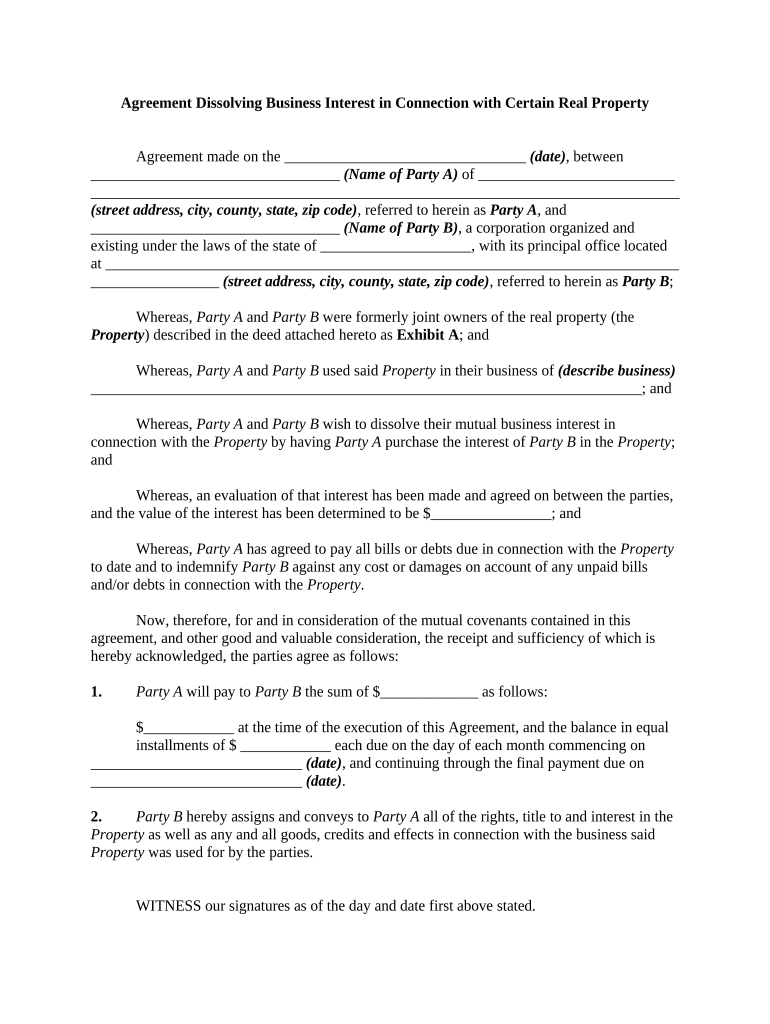
dissolving business Preview on Page 1

Here's how it works

01. Edit your form online
Type text, add images, blackout confidential details, add comments, highlights and more.
02. Sign it in a few clicks
Draw your signature, type it, upload its image, or use your mobile device as a signature pad.
03. Share your form with others
Send it via email, link, or fax. You can also download it, export it or print it out.

How to use or fill out dissolving business with our platform

Form edit decoration
9.5
Ease of Setup
DocHub User Ratings on G2
9.0
Ease of Use
DocHub User Ratings on G2
  1. Click ‘Get Form’ to open the dissolving business agreement in the editor.
  2. Begin by entering the date of the agreement in the designated field at the top of the form.
  3. Fill in the names and addresses of both Party A and Party B, ensuring all details are accurate for legal purposes.
  4. Describe the business associated with the property in the specified section, providing a clear context for the dissolution.
  5. Indicate the agreed value of Party B's interest in the property, ensuring it reflects any evaluations made between parties.
  6. Complete the payment terms by specifying amounts and dates for payments from Party A to Party B as outlined in sections 1 and 2.
  7. Ensure both parties sign and print their names where indicated, confirming their agreement to dissolve their business interest.
  8. If required, complete notary sections to validate signatures according to state laws, attaching Exhibit A as necessary.

Start using our platform today for free to streamline your document editing and signing process!

be ready to get more

Complete this form in 5 minutes or less

Get form

Got questions?

We have answers to the most popular questions from our customers. If you can't find an answer to your question, please contact us.
Contact us
Follow these steps to closing your business: Decide to close. File dissolution documents. Cancel registrations, permits, licenses, and business names. Comply with employment and labor laws. Resolve financial obligations. Maintain records.
Dissolution means that all activities of the legal entity cease. A dissolved legal entity may then continue to exist temporarily to pay possible debts and sell (liquidate) its assets.
When a company has been dissolved, it will cease to exist as a legal entity. All trade will stop, the companys name will be removed from the Companies House register, and it will have no further filing requirements.
Some of the cons include: Creditors can object to the dissolution, and those creditors can potentially take legal action. This legal action may force the business to pay outstanding debts. The leases on any properties owned by the business are not automatically terminated when the business is dissolved.

Security and compliance

At DocHub, your data security is our priority. We follow HIPAA, SOC2, GDPR, and other standards, so you can work on your documents with confidence.

Learn more
ccpa2
pci-dss
gdpr-compliance
hipaa
soc-compliance