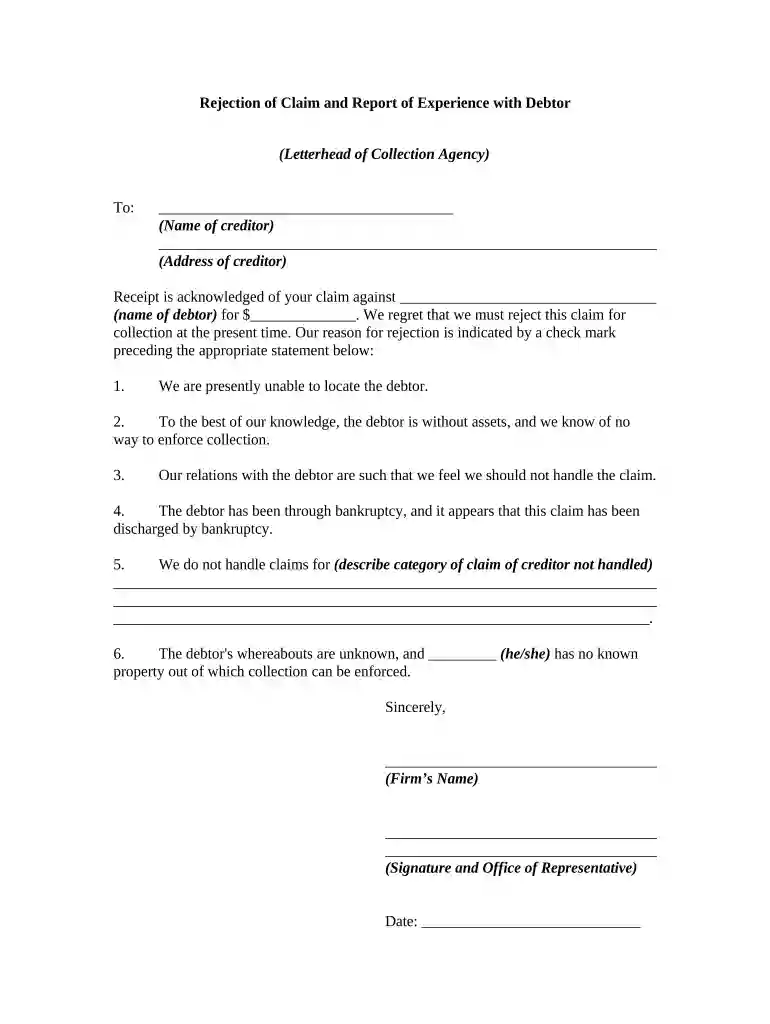
rejection claim Preview on Page 1

Rejection claim 2026

Here's how it works

  • 01. Edit your form online

    Type text, add images, blackout confidential details, add comments, highlights and more.

  • 02. Sign it in a few clicks

    Draw your signature, type it, upload its image, or use your mobile device as a signature pad.

  • 03. Share your form with others

    Send it via email, link, or fax. You can also download it, export it or print it out.

How to use or fill out rejection claim with our platform

Form edit decoration
9.5
Ease of Setup
DocHub User Ratings on G2
9.0
Ease of Use
DocHub User Ratings on G2
  1. Click ‘Get Form’ to open the rejection claim document in the editor.
  2. Begin by entering the name of the creditor in the designated field at the top of the form.
  3. Next, fill in the address of the creditor to ensure accurate communication.
  4. Indicate the name of the debtor and the amount of the claim being rejected in their respective fields.
  5. Select one reason for rejection by checking the appropriate box. Options include inability to locate debtor, lack of assets, or bankruptcy status.
  6. If applicable, provide additional details about claims not handled in the space provided.
  7. Finally, sign and date the document using our platform’s signature feature before sending it off.

Start using our platform today to streamline your rejection claim process for free!

be ready to get more

Complete this form in 5 minutes or less

Security and compliance

At DocHub, your data security is our priority. We follow HIPAA, SOC2, GDPR, and other standards, so you can work on your documents with confidence.

be ready to get more

Complete this form in 5 minutes or less

Related links

Rejected ClaimsExplanation of Codes - Community Care

The top 10 reasons claims for family member programs (like CHAMPVA) are rejected during claims processing are listed below, along with explanations of theRead more

Learn more
Most Common Medical Billing Denial Codes

Jan 8, 2026 If a claim is denied, it means the claim has DocHubed the insurance payer and was processed and then denied. If a claim or reference number isRead more

Learn more
If you believe that this page should be taken down, please follow our DMCA take down process here