Type text, add images, blackout confidential details, add comments, highlights and more.
02. Sign it in a few clicks
Draw your signature, type it, upload its image, or use your mobile device as a signature pad.
03. Share your form with others
Send variance forms via email, link, or fax. You can also download it, export it or print it out.
How to Fill Out the Application for a Variance Using Our Platform
Ease of Setup
DocHub User Ratings on G2
Ease of Use
DocHub User Ratings on G2
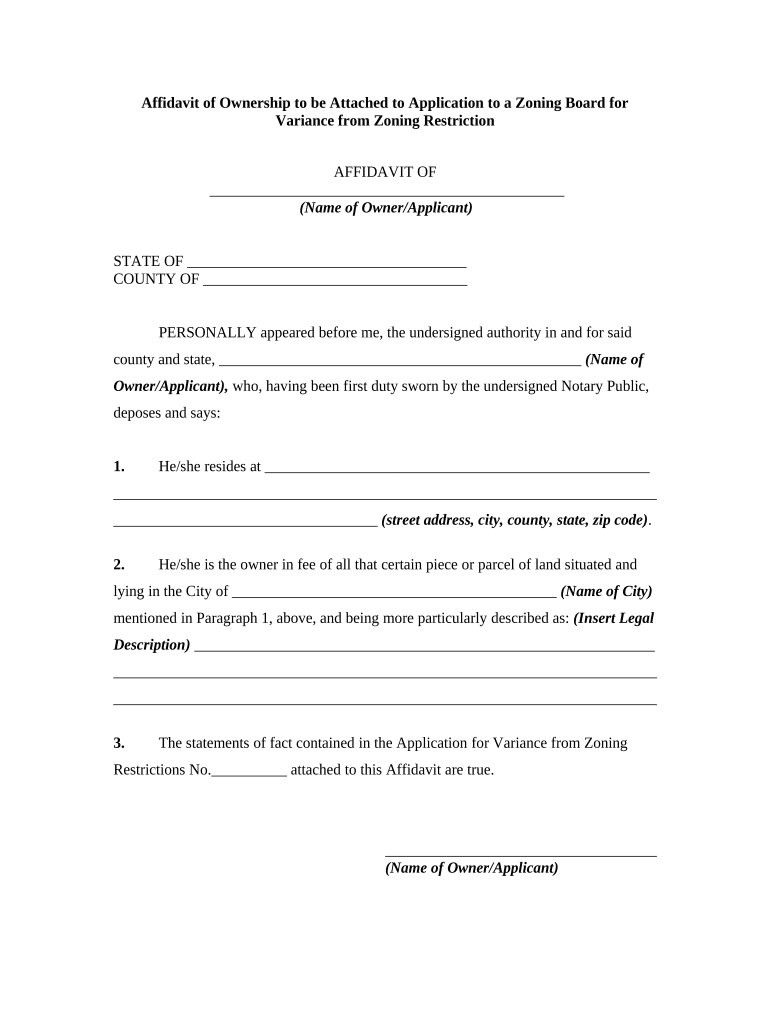
Click ‘Get Form’ to open it in the editor.
Begin by entering your name as the owner or applicant in the designated field. Ensure accuracy, as this will be used throughout the document.
Next, provide your complete residential address, including street address, city, county, state, and zip code. This information is crucial for identification purposes.
In the following section, specify the city where your property is located. This helps clarify jurisdiction and zoning regulations applicable to your variance request.
Insert the legal description of your property in the provided space. This should be a detailed account that accurately describes your land's boundaries.
Finally, confirm that all statements in your application for variance are true by signing at the bottom of the form. This signature must match your name entered earlier.
Start using our platform today to streamline your variance application process for free!
Fill out how to apply for a variance online It's free
A variance is a relaxation of a standard in a land use ordinance. Variances are decided by the zoning board of adjustment/appeals. The zoning board is a quasi-Read more
Cookie consent notice
This site uses cookies to enhance site navigation and personalize your experience.
By using this site you agree to our use of cookies as described in our Privacy Notice.
You can modify your selections by visiting our Cookie and Advertising Notice.