Bankruptcy which have 2026

Get Form
bankruptcy which have Preview on Page 1

Here's how it works

01. Edit your form online
Type text, add images, blackout confidential details, add comments, highlights and more.
02. Sign it in a few clicks
Draw your signature, type it, upload its image, or use your mobile device as a signature pad.
03. Share your form with others
Send it via email, link, or fax. You can also download it, export it or print it out.

How to use or fill out bankruptcy which have with our platform

Form edit decoration
9.5
Ease of Setup
DocHub User Ratings on G2
9.0
Ease of Use
DocHub User Ratings on G2
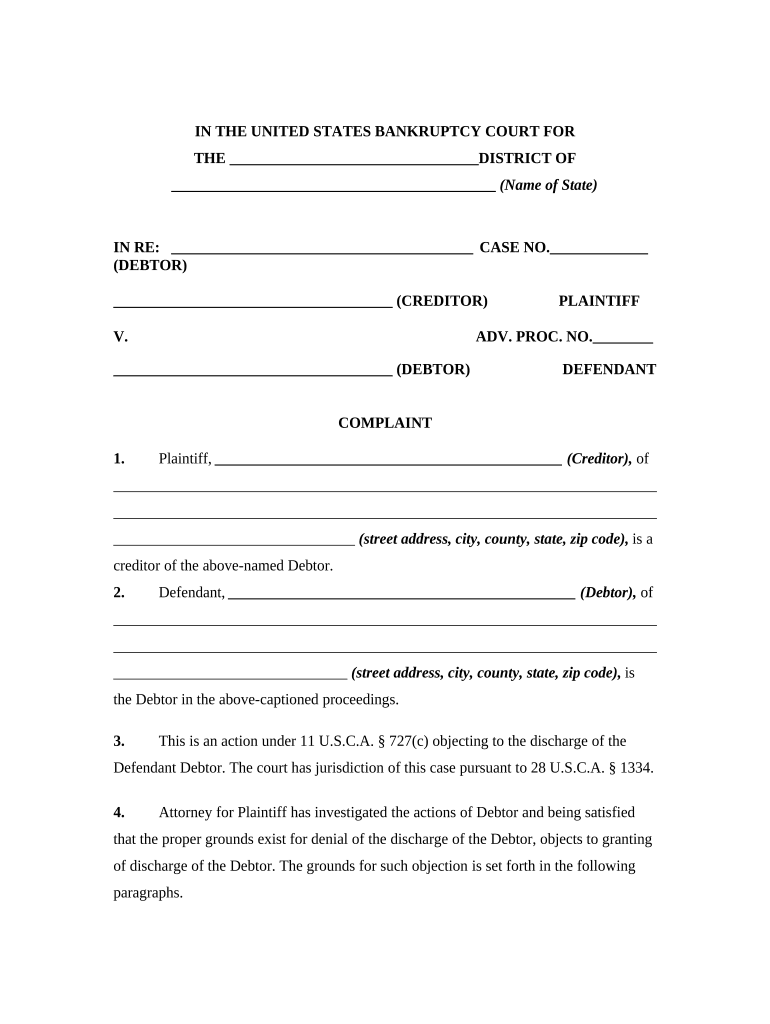
  1. Click ‘Get Form’ to open the bankruptcy form in the editor.
  2. Begin by filling in the name of the district and state at the top of the form. This is crucial for jurisdiction purposes.
  3. In the 'IN RE' section, enter the debtor's name and case number accurately to ensure proper identification.
  4. Complete the creditor's information, including their full name and address, ensuring all details are correct.
  5. In paragraph 3, confirm that you understand this action is under 11 U.S.C.A. § 727(c) regarding discharge objections.
  6. Detail any grounds for objection in paragraph 4, providing a clear explanation of why discharge should be denied.
  7. Fill in the date of destruction of records in paragraph 5, as this is critical for establishing your case.
  8. Finally, complete the Certificate of Service section at the end, ensuring all parties involved are notified correctly.

Start using our platform today to fill out your bankruptcy forms online for free!

be ready to get more

Complete this form in 5 minutes or less

Get form

Got questions?

We have answers to the most popular questions from our customers. If you can't find an answer to your question, please contact us.
Contact us
The 3-Year Rule: Waiting Period for Tax Return Due Dates This rule means that the tax debt must be tied to a return that was due three years before the date you file for Chapter 7 bankruptcy. If an extension was filed for that tax return, then the 3-year clock starts from the extended due date.
Chapter 7 is considered a liquidation bankruptcy: it doesnt require a repayment plan but the business has to sell some assets to pay creditors. Chapter 11 is considered a reorganization bankruptcy that allows businesses to maintain their operations while creating a plan to repay creditors. United States Courts.
The most common types of nondischargeable debts are certain types of tax claims, debts not set forth by the debtor on the lists and schedules the debtor must file with the court, debts for spousal or child support or alimony, debts for willful and malicious injuries to person or property, debts to governmental units
Debts resulting from fraud, theft, or embezzlement. Court-ordered fines, penalties, or restitution. Most tax debts (some older tax debts may be dischargeable). Debts that were not listed in your bankruptcy petition (unless the creditor learns of your bankruptcy case).
No one loses all of their property when filing for bankruptcy. Find out if you can keep your house, car, and other assets in bankruptcy. Dont worryyou wont lose everything in bankruptcy. Most people can keep household furnishings, a retirement account, and some equity in a house and car in bankruptcy.

Security and compliance

At DocHub, your data security is our priority. We follow HIPAA, SOC2, GDPR, and other standards, so you can work on your documents with confidence.

Learn more
ccpa2
pci-dss
gdpr-compliance
hipaa
soc-compliance

People also ask

In a Nutshell Bankruptcy is a great way to get rid of credit card debt, medical bills, and personal and payday loans. But bankruptcy cant wipe out recent income tax you owe, alimony, child support, or debt incurred from illegal acts (embezzlement, larceny, etc.).
Here is a list of different types of debt that will survive a bankruptcy: Student loans that are less than 7 years old (if loans are between 5 and 7 years old, the trustee could make a hardship application to have them included) Child support payments or arrears. Spousal support / alimony payments or arrears.

Related links