Mv 221 2025

Get Form
penndot form mv 221 Preview on Page 1

Here's how it works

01. Edit your penndot form mv 221 online
Type text, add images, blackout confidential details, add comments, highlights and more.

02. Sign it in a few clicks
Draw your signature, type it, upload its image, or use your mobile device as a signature pad.

03. Share your form with others
Send mv 221 form via email, link, or fax. You can also download it, export it or print it out.

How to use or fill out mv 221 with our platform

Form edit decoration
9.5
Ease of Setup
DocHub User Ratings on G2
9.0
Ease of Use
DocHub User Ratings on G2
  1. Click ‘Get Form’ to open the MV-221 in the editor.
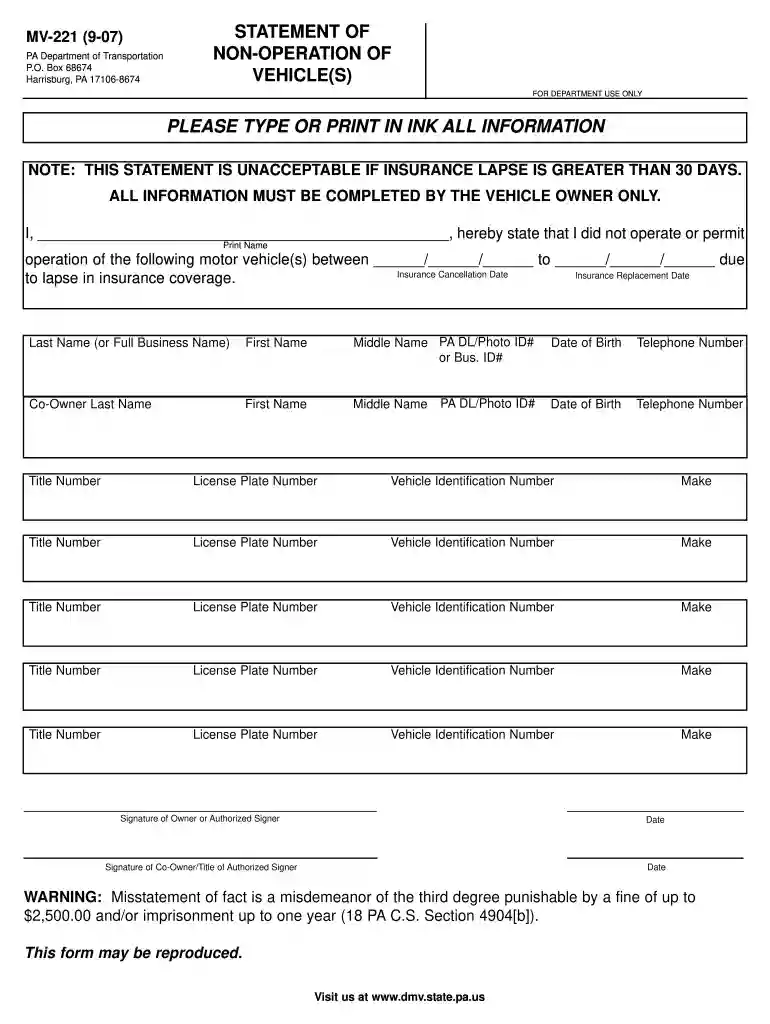
  2. Begin by entering your full name in the designated field. Ensure that you print clearly, as this information is crucial for identification.
  3. Fill in the dates during which you did not operate the vehicle. This includes both the insurance cancellation date and the replacement date.
  4. Provide your last name, first name, middle name, and PA DL/Photo ID number or Business ID number. Also, include your date of birth and telephone number for contact purposes.
  5. If applicable, enter co-owner details in the specified fields, including their personal information and identification numbers.
  6. List all vehicles involved by filling out each section with title number, license plate number, vehicle identification number (VIN), and make of each vehicle.
  7. Finally, sign and date the form at the bottom. If there is a co-owner, they must also provide their signature and date.

Start using our platform today to fill out your MV-221 form easily and for free!

See more mv 221 versions

We've got more versions of the mv 221 form. Select the right mv 221 version from the list and start editing it straight away!
Versions Form popularity Fillable & printable
2007 4.9 Satisfied (60 Votes)
be ready to get more

Complete this form in 5 minutes or less

Get form

Got questions?

We have answers to the most popular questions from our customers. If you can't find an answer to your question, please contact us.
Contact us
Proof Letter. PennDOT does not receive notice of new insurance from companies. Therefore, PennDOT must send a proof letter asking the customer to provide verification that new insurance is in place for the vehicle(s) listed. The letter describes several situations a customer may find themselves in.
--No person shall operate and no owner shall permit to be operated upon any highway a vehicle the registration of which has been suspended. (b) Penalty. --Any person violating this section is guilty of a summary offense and shall, upon conviction, be sentenced to pay a fine of not less than $100 nor more than $500.
0:55 3:32 If its sent via certified mail youll need to sign for it.MoreIf its sent via certified mail youll need to sign for it.
One common sender of certified letters is government agencies. This could be the IRS notifying you about an audit or it could be the DMV informing you of a traffic violation. Government entities often use Certified Mail for official correspondence.
The letter informs the driver, that someone has made a request of their driving record. This often comes from employers, potential employers or insurance companies.

People also ask

How to Check the Status of Your Drivers License in Pennsylvania Online: One option is to request your driving record from PennDOT. Visit your local online messenger service/tag store/notary: These services may be online with PennDOT, and they also can pull your record instantly.

mv 221 pa