Type text, add images, blackout confidential details, add comments, highlights and more.
02. Sign it in a few clicks
Draw your signature, type it, upload its image, or use your mobile device as a signature pad.
03. Share your form with others
Send form 2047 via email, link, or fax. You can also download it, export it or print it out.
How to use or fill out fsa form ad 2047 2012 with our platform
Ease of Setup
DocHub User Ratings on G2
Ease of Use
DocHub User Ratings on G2
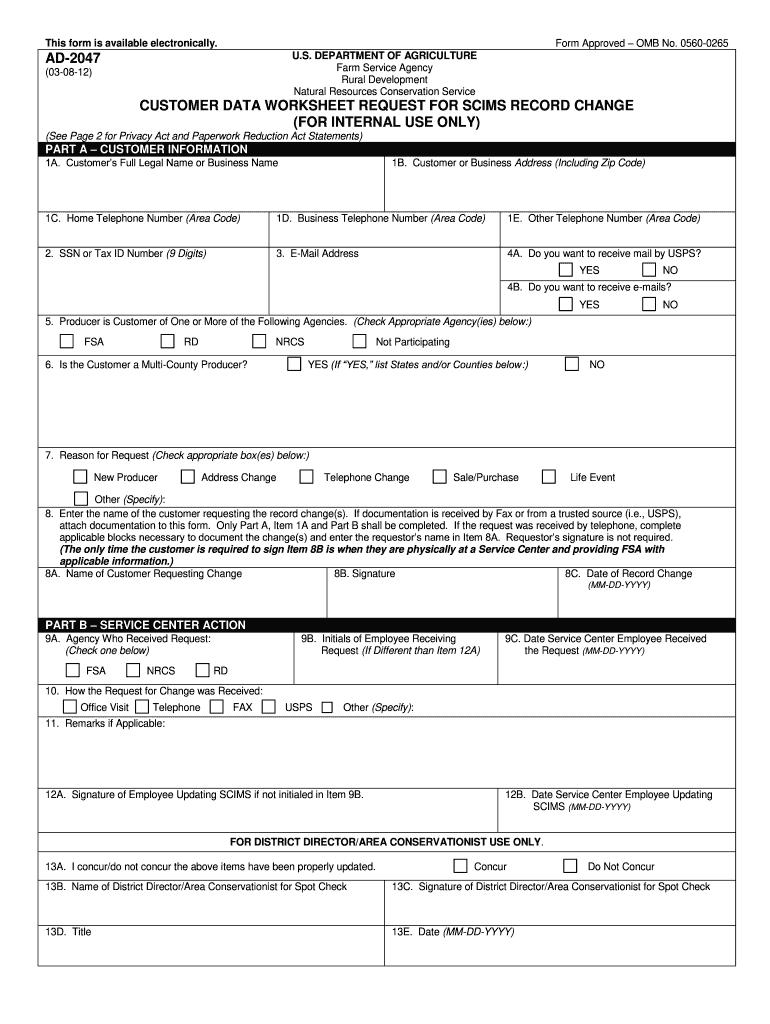
Click ‘Get Form’ to open the AD-2047 in the editor.
In Part A, enter the Customer’s Full Legal Name or Business Name in field 1A. This is essential for identifying the individual or entity requesting changes.
Fill in the Customer or Business Address (1B), ensuring to include the Zip Code for accurate correspondence.
Provide contact numbers in fields 1C, 1D, and 1E. Include area codes for home, business, and any other relevant phone numbers.
Enter the SSN or Tax ID Number in field 2. This information is crucial for processing your request.
Indicate your preference for receiving mail and emails in fields 4A and 4B by selecting 'YES' or 'NO'.
Check the appropriate agency(ies) you are a customer of in field 5. This helps direct your request correctly.
Complete fields regarding multi-county producer status (6) and reason for request (7). Specify if necessary.
If applicable, fill out Item 8A with the name of the customer requesting changes and sign Item 8B if at a Service Center.
In Part B, ensure all required fields are completed by Service Center staff as indicated from items 9A to 12B.
Start using our platform today to easily fill out your FSA Form AD-2047 online for free!
We've got more versions of the fsa form ad 2047 2012 form. Select the right fsa form ad 2047 2012 version from the list and start editing it straight away!
Fsa form ad 2047 2012 pdf downloadFsa form ad 2047 2012 pdfAD-2047 instructionsFsa form ad 2047 2012 downloadAD-2047 formAd 2047 form pdfForm CCC-902AD-1026 FSA form
Security and compliance
At DocHub, your data security is our priority. We follow HIPAA, SOC2, GDPR, and other standards, so you can work on your documents with confidence.
Nov 14, 2023 Required forms: Form AD-2047, Customer Data Worksheet. Form CCC-902, Farm Operating Plan for an individual or legal entity. Form CCCRead more
Jun 27, 2004 Red Book refers to the original Apple II Reference Manual dated 1978. WOZPAK refers to the WOZPAK II, a publication by Call-A.P.P.L.E.,Read more
Cookie consent notice
This site uses cookies to enhance site navigation and personalize your experience.
By using this site you agree to our use of cookies as described in our Privacy Notice.
You can modify your selections by visiting our Cookie and Advertising Notice.