Type text, add images, blackout confidential details, add comments, highlights and more.
02. Sign it in a few clicks
Draw your signature, type it, upload its image, or use your mobile device as a signature pad.
03. Share your form with others
Send it via email, link, or fax. You can also download it, export it or print it out.
How to use or fill out judicial foreclosure with our platform
Ease of Setup
DocHub User Ratings on G2
Ease of Use
DocHub User Ratings on G2
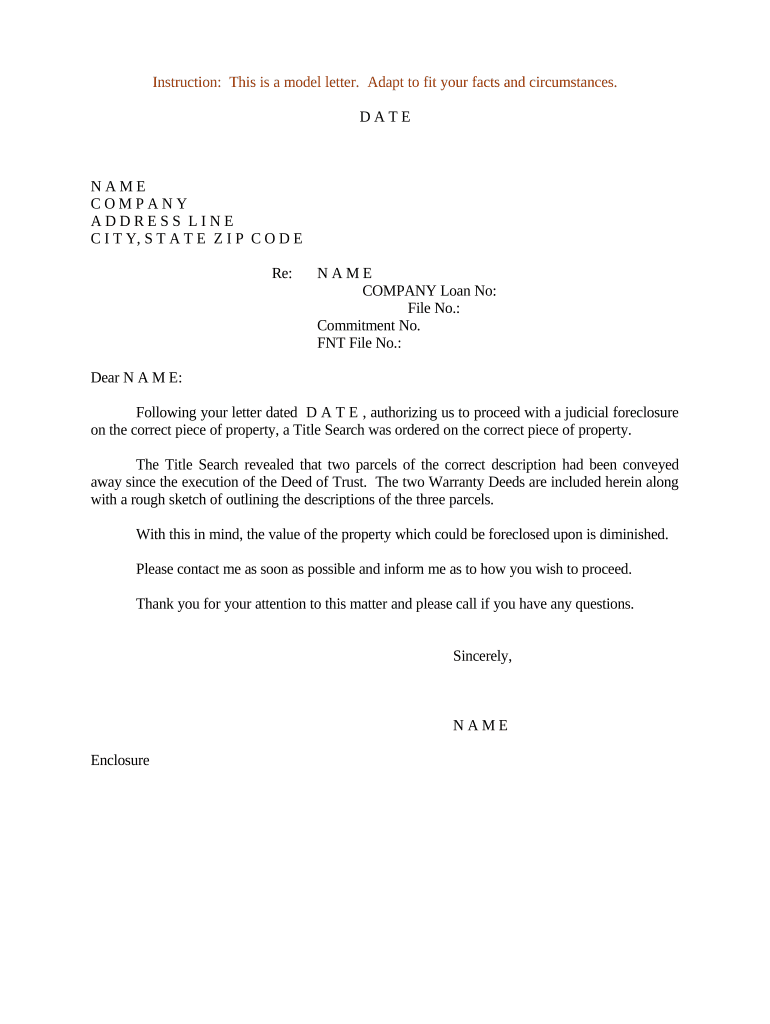
Click ‘Get Form’ to open the judicial foreclosure document in the editor.
Begin by entering the date at the top of the form. This is crucial for establishing a timeline for your correspondence.
Fill in your name, company, and address details accurately. Ensure that all information is current to avoid any delays.
In the 'Re:' section, specify the name of the individual or entity involved in the foreclosure process along with relevant loan and file numbers.
Draft your message clearly, referencing any previous correspondence and outlining key points from the Title Search results. Be concise yet informative.
Conclude with a polite closing statement, inviting further communication if there are questions or clarifications needed.
Start using our platform today to streamline your judicial foreclosure process for free!
Non judicial foreclosureJudicial foreclosure vs non judicial foreclosureJudicial foreclosure statesNon judicial foreclosure statesJudicial foreclosure processHow to buy a judicial foreclosureNon judicial foreclosure hoaJudicial foreclosure process flow chart
Security and compliance
At DocHub, your data security is our priority. We follow HIPAA, SOC2, GDPR, and other standards, so you can work on your documents with confidence.
Differences between Judicial Foreclosure and Non - diff.wiki
Mar 6, 2026 In a judicial foreclosure, the lender files a lawsuit against the borrower to obtain a court order to sell the home. This process begins withRead more
Cookie consent notice
This site uses cookies to enhance site navigation and personalize your experience.
By using this site you agree to our use of cookies as described in our Privacy Notice.
You can modify your selections by visiting our Cookie and Advertising Notice.