Agreement real estate 2026

Get Form
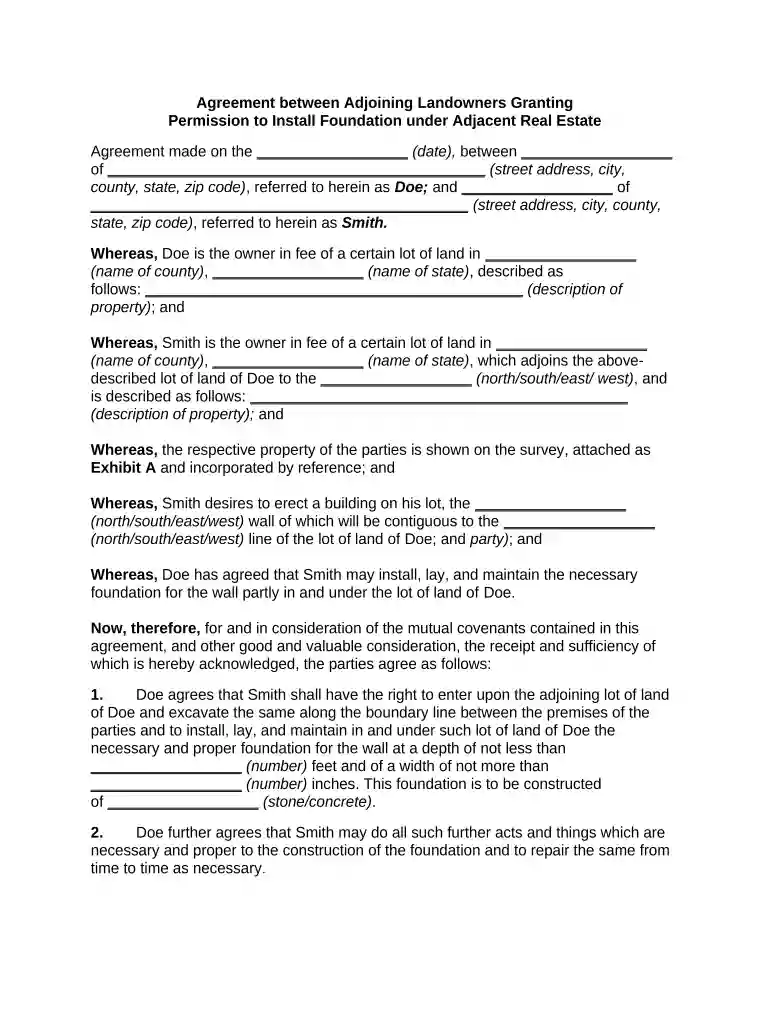
agreement real estate Preview on Page 1

Here's how it works

01. Edit your form online
Type text, add images, blackout confidential details, add comments, highlights and more.

02. Sign it in a few clicks
Draw your signature, type it, upload its image, or use your mobile device as a signature pad.

03. Share your form with others
Send it via email, link, or fax. You can also download it, export it or print it out.

How to use or fill out agreement real estate with our platform

Form edit decoration
9.5
Ease of Setup
DocHub User Ratings on G2
9.0
Ease of Use
DocHub User Ratings on G2
  1. Click ‘Get Form’ to open the agreement real estate document in the editor.
  2. Begin by entering the date of the agreement in the designated field at the top of the document.
  3. Fill in the names and addresses of both parties, Doe and Smith, ensuring all details are accurate for legal purposes.
  4. Provide a detailed description of each property involved, including county and state information, to clarify ownership.
  5. Specify the direction (north/south/east/west) where Smith's property adjoins Doe's lot, as well as any relevant construction details.
  6. Complete sections regarding foundation specifications, including depth and width measurements, along with material type.
  7. Review all entries for accuracy before signing. Utilize our platform’s features to add signatures electronically.

Start using our platform today to streamline your real estate agreements for free!

be ready to get more

Complete this form in 5 minutes or less

Get form

Got questions?

We have answers to the most popular questions from our customers. If you can't find an answer to your question, please contact us.
Contact us
If a principal cannot be physically present to sign documents, they may assign a POA to someone else to sign on their behalf. California law requires these documents to be notarized to avoid disputes regarding their validity.
Some states, like California, have created real estate purchase agreements you can download and change. You can also get a template from PandaDoc, as well as benefiting from real estate contract management software functionality.
A real estate purchase agreement spells out the terms under which a buyer and seller agree to engage in a real estate transaction. Signing a purchase agreement effectively places both the buyer and seller (as well as the property in question) under contract.
While the PSA lays out the transactions details leading up to the closing date, the purchase agreement is what you sign to finalize the transaction.
How to write a real estate purchase agreement. Identify the address of the property being purchased, including all required legal descriptions. Identify the names and addresses of both the buyer and the seller. Detail the price of the property and the terms of the purchase. Set the closing date and closing costs.

Security and compliance

At DocHub, your data security is our priority. We follow HIPAA, SOC2, GDPR, and other standards, so you can work on your documents with confidence.

Learn more
ccpa2
pci-dss
gdpr-compliance
hipaa
soc-compliance

People also ask

Any purchase agreement should include at least the following information: The identity of the buyer and seller. A description of the property being purchased. The purchase price. The terms as to how and when payment is to be made. The terms as to how, when, and where the goods will be delivered to the purchaser.
How to write a purchase order Names of the seller and purchaser. This provision should list the names and businesses of both the seller and purchaser. Purchase items. Representations and warranties. Price. Delivery. Payment terms and conditions. Legal recourse.
In California, home buyers are generally able to back out of a purchase agreement during the contingency period without penalty. After all, thats the whole point of adding contingencies to a real estate contract. It gives the home buyer an exit strategy for unforeseen circumstances.

Related links