Type text, add images, blackout confidential details, add comments, highlights and more.
02. Sign it in a few clicks
Draw your signature, type it, upload its image, or use your mobile device as a signature pad.
03. Share your form with others
Send it via email, link, or fax. You can also download it, export it or print it out.
How to use or fill out attorney cover with our platform
Ease of Setup
DocHub User Ratings on G2
Ease of Use
DocHub User Ratings on G2
Click ‘Get Form’ to open the attorney cover in the editor.
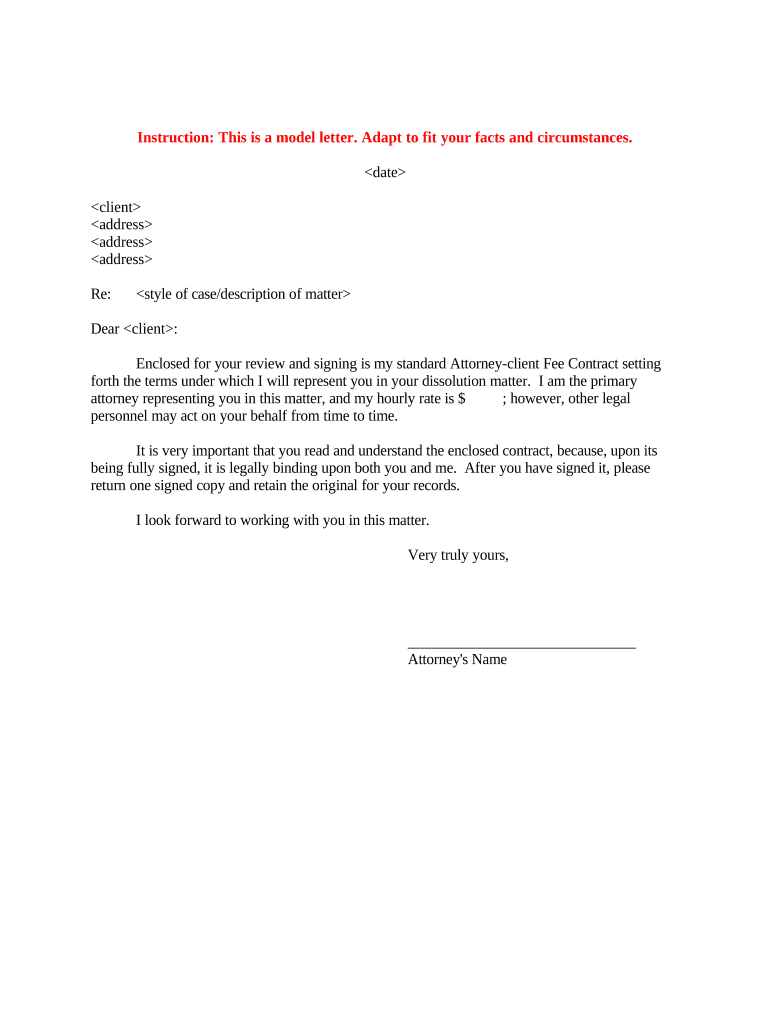
Begin by entering the date at the top of the document. This is crucial for establishing a timeline for your agreement.
Next, fill in the client's name and address details. Ensure accuracy as this identifies who the contract is for.
In the section labeled 'Re:', provide a brief description of the case or matter. This helps clarify the purpose of your representation.
Specify your hourly rate in the designated field. If applicable, mention that other legal personnel may assist in this matter.
Review the entire document carefully to ensure all information is correct and complete before signing.
Once satisfied, sign the document electronically using our platform's signature feature and return one signed copy while keeping an original for your records.
Start using our platform today to streamline your attorney cover process effortlessly!
With a durable power of attorney, you are able to appoint an agent to manage your financial affairs, make health care decisions, or conduct other business forRead more
A cover letter is a sample of your written work and should be brief (preferably one page), persuasive, well-reasoned, and grammatically perfect.Read more
Cookie consent notice
This site uses cookies to enhance site navigation and personalize your experience.
By using this site you agree to our use of cookies as described in our Privacy Notice.
You can modify your selections by visiting our Cookie and Advertising Notice.