Permission reprint 2026

Get Form
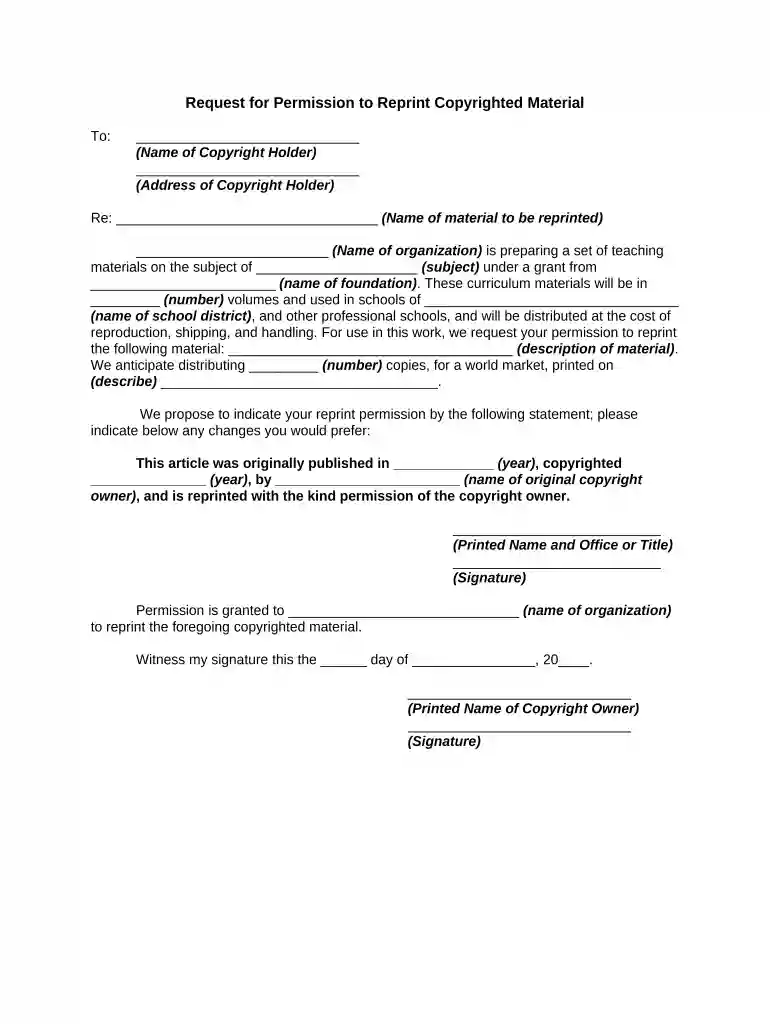
permission reprint Preview on Page 1

Here's how it works

01. Edit your form online
Type text, add images, blackout confidential details, add comments, highlights and more.

02. Sign it in a few clicks
Draw your signature, type it, upload its image, or use your mobile device as a signature pad.

03. Share your form with others
Send it via email, link, or fax. You can also download it, export it or print it out.

How to use or fill out permission reprint with our platform

Form edit decoration
9.5
Ease of Setup
DocHub User Ratings on G2
9.0
Ease of Use
DocHub User Ratings on G2
  1. Click ‘Get Form’ to open the permission reprint document in the editor.
  2. Begin by filling in the name and address of the copyright holder at the top of the form. This information is crucial for identifying who you are requesting permission from.
  3. In the section labeled 'Re:', specify the name of the material you wish to reprint. This helps clarify exactly what content you are seeking permission for.
  4. Next, provide details about your organization and the subject matter of your teaching materials. Include information about any grants involved, as this adds context to your request.
  5. Describe the material you want to reprint in detail, ensuring that it is clear and specific. This will aid in obtaining a favorable response.
  6. Indicate how many copies you plan to distribute and describe how they will be printed. This transparency can help build trust with the copyright holder.
  7. Finally, complete the signature section with your printed name, title, and signature, along with a space for the copyright owner's approval.

Start using our platform today to streamline your document editing and permissions process for free!

be ready to get more

Complete this form in 5 minutes or less

Get form

Got questions?

We have answers to the most popular questions from our customers. If you can't find an answer to your question, please contact us.
Contact us
To reprint something is to publish it again, or issue it in a new form.
Change settings for a specific site On your computer, open Chrome. Go to a site. To the left of the web address, select View site information . Select Site settings. Change a permission setting.
Reprinted with Permission: Requesting Permission to Reproduce Published Material. If you are going to use someone elses written work, you will need to make sure that you have permission to do so.
to print a book again, or to be printed again: The first edition sold out so we are reprinting it/it is reprinting. Synonym. reissue.
This means you have the right to use the portion of the work you requested permission to reprint, but you have no other rights to the work. Those exclusive rights remain with the copyright owner.

Security and compliance

At DocHub, your data security is our priority. We follow HIPAA, SOC2, GDPR, and other standards, so you can work on your documents with confidence.

Learn more
ccpa2
pci-dss
gdpr-compliance
hipaa
soc-compliance

People also ask

A formal request or demand for an additional print or reproduction of a document, publication, or artwork which has been previously produced.

Related links