Depreciation worksheet 2026

Get Form
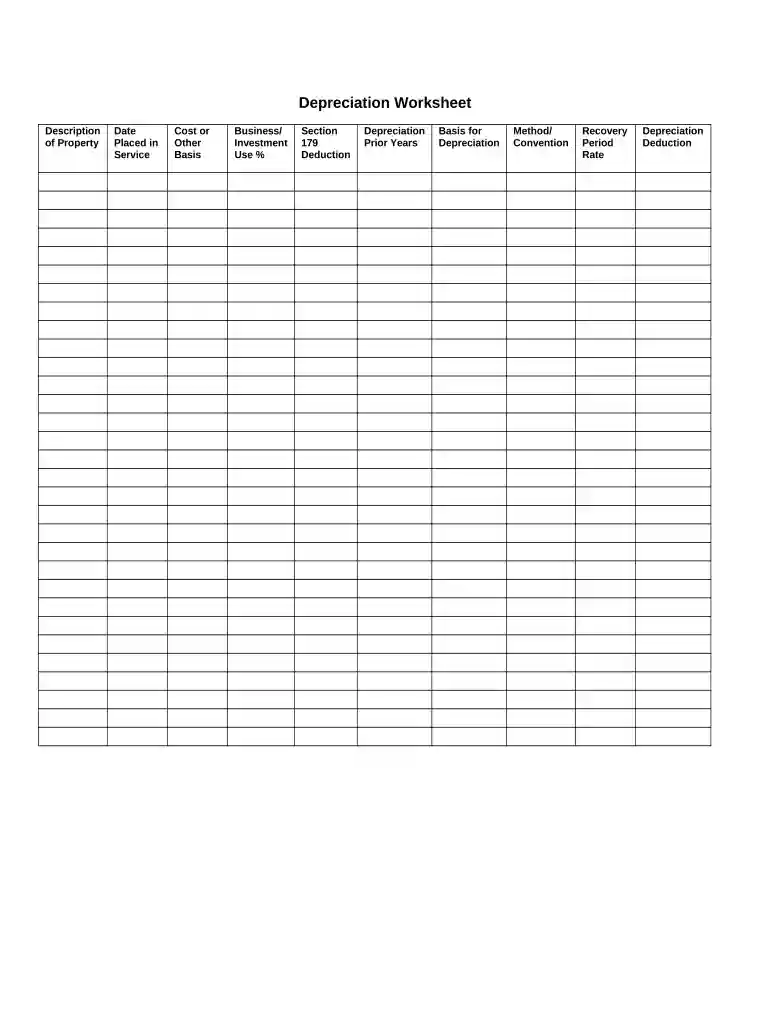
depreciation detail listing worksheet Preview on Page 1

Here's how it works

01. Edit your depreciation detail listing worksheet online
Type text, add images, blackout confidential details, add comments, highlights and more.

02. Sign it in a few clicks
Draw your signature, type it, upload its image, or use your mobile device as a signature pad.

03. Share your form with others
Send depreciation worksheet via email, link, or fax. You can also download it, export it or print it out.

How to use or fill out depreciation worksheet with our platform

Form edit decoration
9.5
Ease of Setup
DocHub User Ratings on G2
9.0
Ease of Use
DocHub User Ratings on G2
  1. Click ‘Get Form’ to open the depreciation worksheet in the editor.
  2. Begin by filling out the 'Description of Property' field, providing a clear name or description of the asset you are depreciating.
  3. Enter the 'Date Placed in Service' to indicate when the property was first used for business purposes.
  4. In the 'Cost or Other Basis' section, input the total cost incurred for acquiring the property, including any additional expenses necessary for its readiness.
  5. Specify the 'Business/Investment Use %', indicating how much of the property is used for business versus personal use.
  6. If applicable, enter any amounts under 'Section 179 Deduction' to claim immediate expensing on qualifying assets.
  7. Fill in 'Depreciation Prior Years' if this asset has been depreciated in previous tax years.
  8. Provide the 'Basis for Depreciation', which is typically your cost basis adjusted for any prior deductions.
  9. Select your preferred 'Method/Convention' for calculating depreciation, such as straight-line or declining balance methods.
  10. Finally, determine and enter your 'Recovery Period Rate', which dictates how long you will depreciate the asset over time.

Start using our platform today to easily complete your depreciation worksheet online for free!

be ready to get more

Complete this form in 5 minutes or less

Get form

Security and compliance

At DocHub, your data security is our priority. We follow HIPAA, SOC2, GDPR, and other standards, so you can work on your documents with confidence.
Learn more
ccpa2
pci-dss
gdpr-compliance
hipaa
soc-compliance
be ready to get more

Complete this form in 5 minutes or less

Get form