Customer Satisfaction Telephone Survey 2026

Get Form
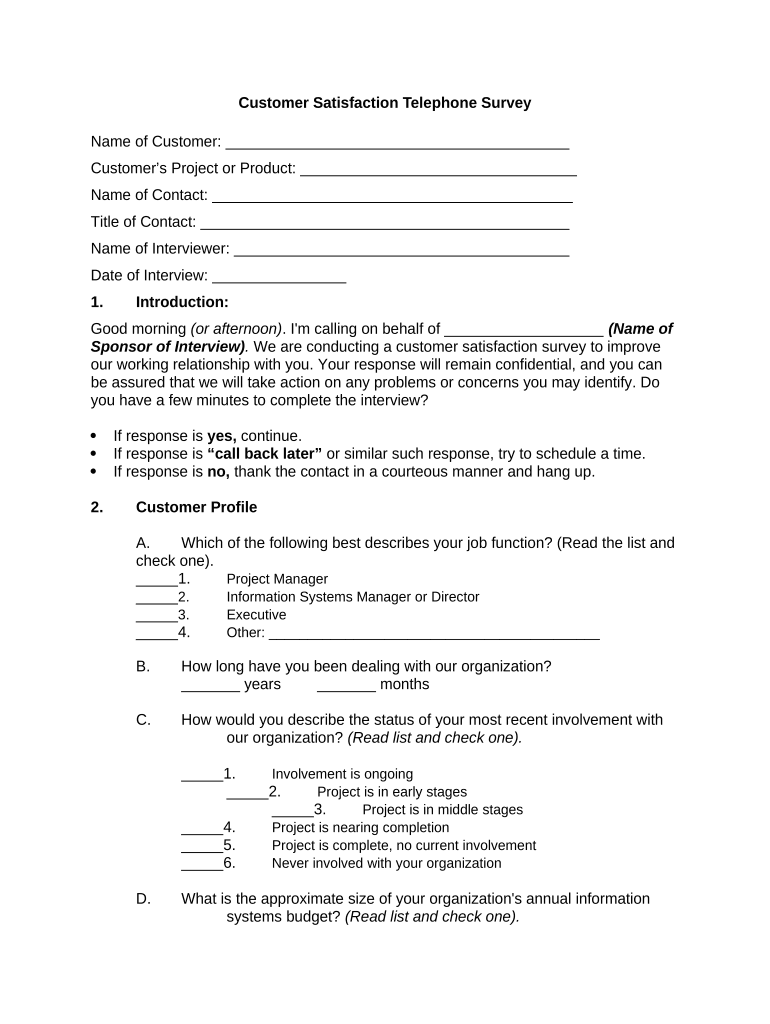
customer satisfaction survey online Preview on Page 1

Here's how it works

01. Edit your customer satisfaction survey online online
Type text, add images, blackout confidential details, add comments, highlights and more.
02. Sign it in a few clicks
Draw your signature, type it, upload its image, or use your mobile device as a signature pad.
03. Share your form with others
Send telephone survey examples via email, link, or fax. You can also download it, export it or print it out.

How to use or fill out Customer Satisfaction Telephone Survey with our platform

Form edit decoration
9.5
Ease of Setup
DocHub User Ratings on G2
9.0
Ease of Use
DocHub User Ratings on G2
  1. Click ‘Get Form’ to open the Customer Satisfaction Telephone Survey in the editor.
  2. Begin by filling in your name, project or product, and contact details at the top of the form. This information helps personalize the survey.
  3. In the Customer Profile section, select your job function from the provided options and indicate how long you have been dealing with the organization.
  4. Rate your recent involvement status with the organization and provide details about your organization's annual information systems budget.
  5. For each attribute listed under Customer Satisfaction Measures, rate its importance and performance on a scale of 1 to 10. If an item is not applicable, mark it accordingly.
  6. Complete the Overall Satisfaction section by rating your overall satisfaction and providing any suggestions for improvement.
  7. Finally, answer whether you would recommend the organization to others and provide any general comments before submitting your responses.

Start using our platform today to easily complete your Customer Satisfaction Telephone Survey for free!

be ready to get more

Complete this form in 5 minutes or less

Get form

Got questions?

We have answers to the most popular questions from our customers. If you can't find an answer to your question, please contact us.
Contact us
General satisfaction questions What would you suggest to help us improve our [product/service]? What is one thing we could do to improve your experience with [company/service]? On a scale of 1 to 10, how satisfied are you with [product/service]? Would you recommend [product/service] to friends and family?
Product and usage survey questions you could ask include: How often do you use our products/services? Which key features of our products/our services are the most useful? How easy do you find our products/our services to use? Do our products/services provide value for money?
How is CSAT Measured in a Contact Center? Send Surveys: Use a survey to get feedback quickly after customer interaction. Gather Responses: Get hold of the ratings from your customers. Calculate the Score: To calculate your CSAT score use the following formula:
1 to 5 Likert Scale These rating scales offer five response options, typically ranging from Strongly Disagree/Very Dissatisfied (1) to Strongly Agree/Very Satisfied (5). You can use a 1 to 5 Likert scale survey template to precisely assess respondent sentiments across statements or questions.

Security and compliance

At DocHub, your data security is our priority. We follow HIPAA, SOC2, GDPR, and other standards, so you can work on your documents with confidence.

Learn more
ccpa2
pci-dss
gdpr-compliance
hipaa
soc-compliance
be ready to get more

Complete this form in 5 minutes or less

Get form