Type text, add images, blackout confidential details, add comments, highlights and more.
02. Sign it in a few clicks
Draw your signature, type it, upload its image, or use your mobile device as a signature pad.
03. Share your form with others
Send new hire forms texas via email, link, or fax. You can also download it, export it or print it out.
How to use or fill out the Texas New Hire Reporting Form with our platform
Ease of Setup
DocHub User Ratings on G2
Ease of Use
DocHub User Ratings on G2
Click ‘Get Form’ to open it in the editor.
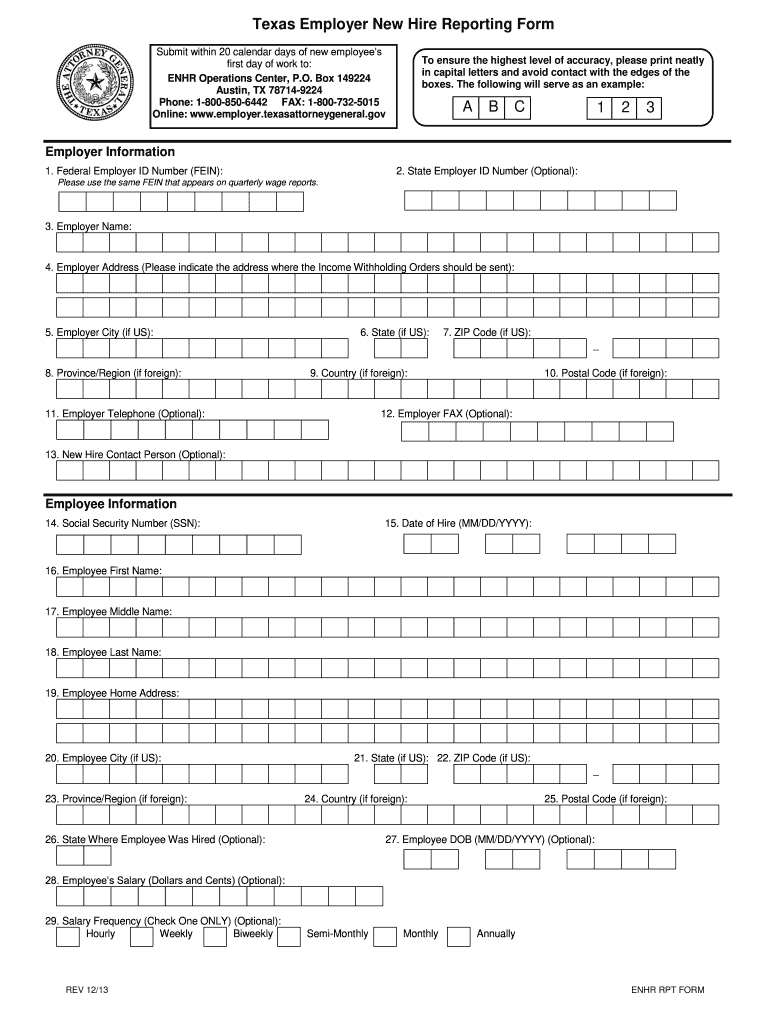
Begin by filling out the Employer Information section. Enter your Federal Employer ID Number (FEIN) in Box 1, ensuring it matches your quarterly wage reports.
In Box 3, provide your Employer Name as listed on the employee’s W4 form. Follow this by entering your Employer Address in Box 4, where Income Withholding Orders should be sent.
Complete the Employee Information section starting with the Social Security Number (SSN) in Box 14 and Date of Hire in Box 15. Ensure accuracy as these are critical for compliance.
Fill out the employee's personal details including First Name, Last Name, and Home Address. Be sure to include City, State, and ZIP Code as applicable.
Finally, review all entries for completeness and accuracy before submitting via fax or online through our platform.
Start using our platform today to streamline your new hire reporting process effortlessly!
We've got more versions of the how to texas new hire form. Select the right how to texas new hire version from the list and start editing it straight away!
Employers must obtain an Employer Identification Number (EIN) from the IRS for federal tax purposes and register with the Texas Workforce Commission for state unemployment tax. Employees do not need an EIN but must have a Social Security Number or an Individual Taxpayer Identification Number for tax reporting.
How to report a new hire in Texas?
Both Federal W-4 Form and California DE 4 Withholding Certificate must be provided to newly hired employees. Generally speaking, most employers in California are required to provide the following documents with new employees upon hire: Time of Hire Pamphlet. Sexual Harassment Pamphlet (DFEH-185P)
What is the 7 minute rule in Texas?
The 7-minute rule lets employers round an employees time to the nearest quarter-hour. It states that employers may round down the time if an employee works 7 minutes or less beyond a quarter-hour increment. Conversely, they round up the time if the employee works more than 7 minutes up to the next quarter-hour.
Can you quit at any time in Texas?
It is important that employers pay hourly paid staff (especially those on minimum wage) for the actual time worked. Employers should not make a deduction for 10-minute intervals if the employee clocked in 1 minute late but they can make payments exact for the hours worked.
How does the 7 minute rule work?
In Texas, the idea of employment at will is common. This means that you or your employer can end your job at any time, and theres no legal rule saying you must give notice. For example, if you decide to quit, you can do so without giving advance notice, unless your work contract or employee handbook says you should.
texas employer new hire reporting form
Texas New Hire ReportingTexas new Hire Reporting formTexas New Hire Reporting Form PDFTexas New Hire Reporting employer loginTexas new hire Reporting requirementsTexas new hire Reporting onlineOag new hire reportingEmployer New Hire Reporting
Security and compliance
At DocHub, your data security is our priority. We follow HIPAA, SOC2, GDPR, and other standards, so you can work on your documents with confidence.
Employers must report new hires and rehires within 20 calendar days of the hire date. If you report electronically, you must report 12 to 16 days apart, whichRead more
The new hire must meet with an HR contact or delegate in your department to complete an electronic I-9 and E-Verify. The employee must complete Section 1 of theRead more
After a request for PTO is submitted, an employee then marks that time off on their MoHA Google Calendar as Out of Office by creating an Out of Office timeRead more
Cookie consent notice
This site uses cookies to enhance site navigation and personalize your experience.
By using this site you agree to our use of cookies as described in our Privacy Notice.
You can modify your selections by visiting our Cookie and Advertising Notice.