Limited liability company make 2026

Get Form
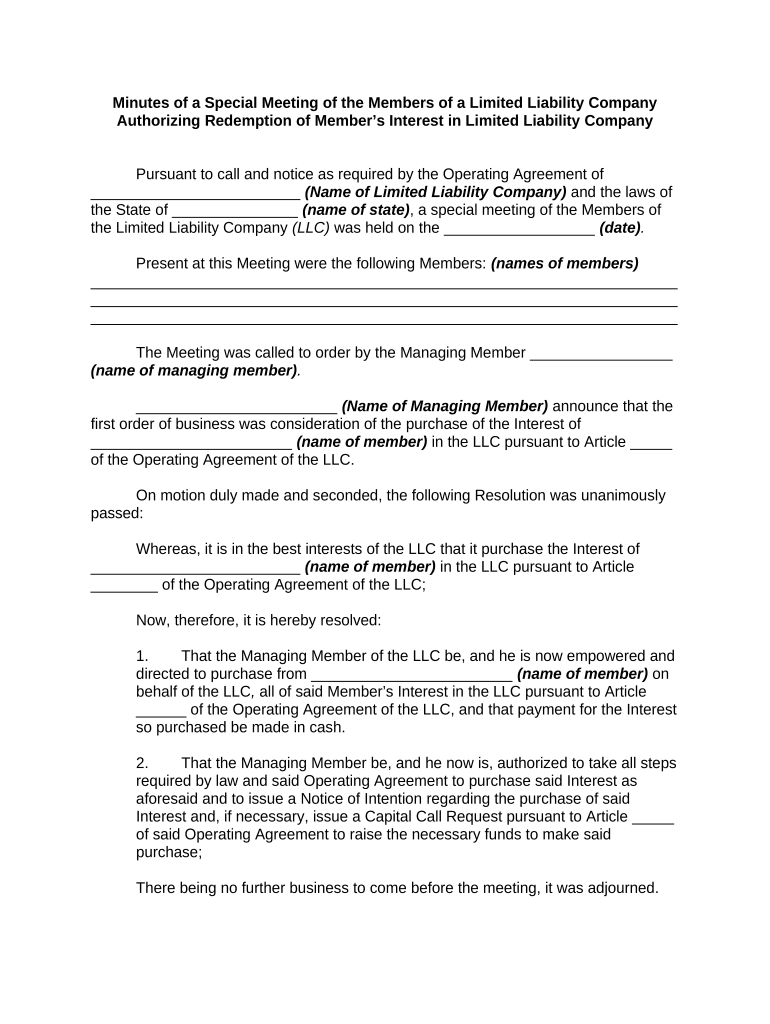
limited liability company make Preview on Page 1

Here's how it works

01. Edit your form online
Type text, add images, blackout confidential details, add comments, highlights and more.
02. Sign it in a few clicks
Draw your signature, type it, upload its image, or use your mobile device as a signature pad.
03. Share your form with others
Send it via email, link, or fax. You can also download it, export it or print it out.

How to use or fill out limited liability company make with our platform

Form edit decoration
9.5
Ease of Setup
DocHub User Ratings on G2
9.0
Ease of Use
DocHub User Ratings on G2
  1. Click ‘Get Form’ to open the limited liability company make in the editor.
  2. Begin by entering the name of your Limited Liability Company in the designated field. This is crucial for identifying your LLC in all legal documents.
  3. Next, input the state where your LLC is registered. This ensures compliance with local laws and regulations.
  4. Fill in the date of the special meeting. Accurate dating is essential for record-keeping and legal purposes.
  5. List the names of all members present at the meeting. This section validates who participated in the decision-making process.
  6. Indicate the name of the managing member who called the meeting. This person will be responsible for executing decisions made during this meeting.
  7. Complete any resolutions passed during the meeting, including details about purchasing a member's interest as outlined in your Operating Agreement.
  8. Finally, ensure that both printed name and signature fields for the managing member are filled out accurately to validate these minutes.

Start using our platform today to streamline your document editing and form completion for free!

be ready to get more

Complete this form in 5 minutes or less

Get form

Got questions?

We have answers to the most popular questions from our customers. If you can't find an answer to your question, please contact us.
Contact us
No, an LLC does not need to generate income to maintain its legal status. However, it may still have tax filing obligations.
Getting paid as a single-member LLC However, you are not paid like a sole proprietor where your business earnings are your salary. Instead, you are paid directly through what is known as an owners draw from the profits that your company earns. This means you withdraw funds from your business for personal use.
Forming an LLC in Missouri is cost-effective. The $50 fee to file the Articles of Organization online is the only mandatory cost. It jumps up to $105 for paper filings. The real cost savings come in the form of no annual filing fee, which adds up over time.
Starting a New Mexico LLC costs $50. This is the state filing fee for a document called the Articles of Organization. The Articles of Organization is filed with the New Mexico Secretary of State and once approved, this is what creates your LLC. The $50 fee is a one-time fee.
You can prepare and file the Articles of Organization yourself. But its important that you understand the requirements of your intended state of formation.

Security and compliance

At DocHub, your data security is our priority. We follow HIPAA, SOC2, GDPR, and other standards, so you can work on your documents with confidence.

Learn more
ccpa2
pci-dss
gdpr-compliance
hipaa
soc-compliance

People also ask

How much does a Michigan LLC cost? The cost to form an LLC in Michigan is $50. This is a one-time filing fee for your Articles of Organization with ZenBusiness. Processing Time: The default processing time is approximately 2 - 3 weeks, or you can rush the processing time to 1 - 2 days for $79.

Related links