Disciplinary action 2026

Get Form
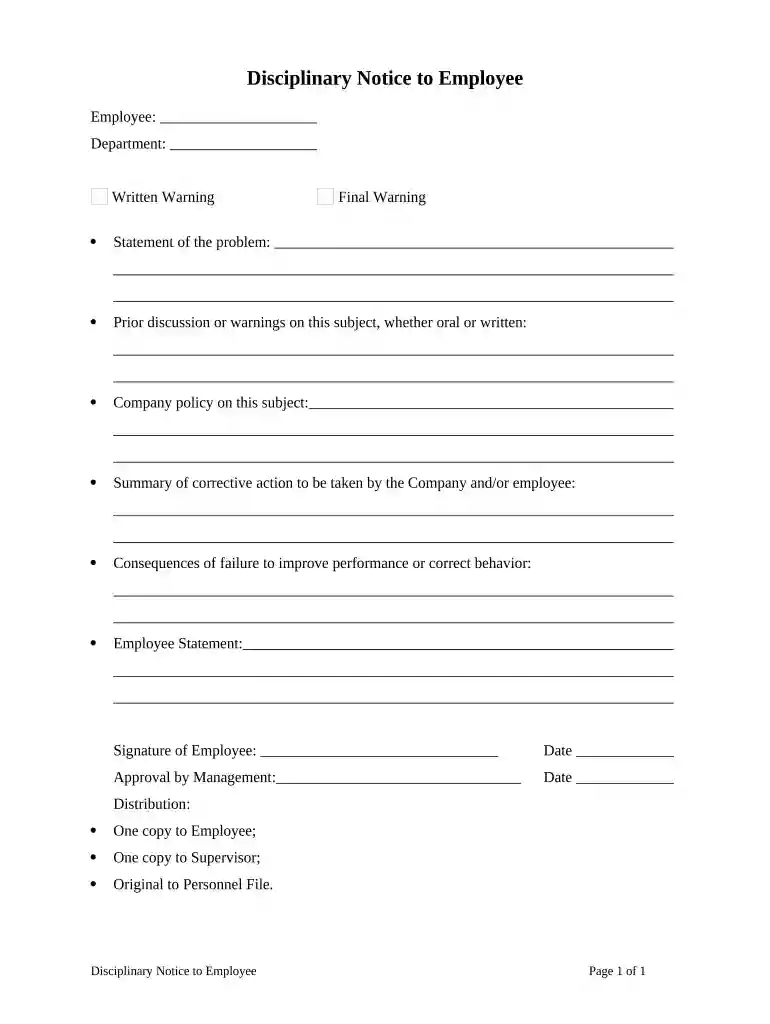
disciplinary action Preview on Page 1

Here's how it works

01. Edit your form online
Type text, add images, blackout confidential details, add comments, highlights and more.

02. Sign it in a few clicks
Draw your signature, type it, upload its image, or use your mobile device as a signature pad.

03. Share your form with others
Send it via email, link, or fax. You can also download it, export it or print it out.

How to Use or Fill Out Disciplinary Action with Our Platform

Form edit decoration
9.5
Ease of Setup
DocHub User Ratings on G2
9.0
Ease of Use
DocHub User Ratings on G2
  1. Click ‘Get Form’ to open the Disciplinary Notice in the editor.
  2. Begin by entering the employee's name and department in the designated fields. This ensures that the notice is personalized and relevant.
  3. Select whether this is a Written Warning or Final Warning by checking the appropriate box. This distinction is crucial for record-keeping.
  4. In the 'Statement of the problem' section, provide a clear and concise description of the issue at hand. Be specific to avoid ambiguity.
  5. Document any prior discussions or warnings related to this issue in the next field. This helps establish a history of communication regarding performance expectations.
  6. Outline the company policy relevant to this situation in the following section, ensuring that employees understand the standards they are expected to meet.
  7. Summarize corrective actions required from both the company and employee. Clarity here can foster accountability and improvement.
  8. Clearly state the consequences of failing to improve performance or correct behavior, which serves as a critical motivator for change.
  9. Provide space for an Employee Statement, allowing them to express their perspective on the matter.
  10. Finally, ensure both parties sign and date the document, including management approval, before distributing copies as outlined at the end of the form.

Start using our platform today for free to streamline your disciplinary action process!

be ready to get more

Complete this form in 5 minutes or less

Get form

Security and compliance

At DocHub, your data security is our priority. We follow HIPAA, SOC2, GDPR, and other standards, so you can work on your documents with confidence.
Learn more
ccpa2
pci-dss
gdpr-compliance
hipaa
soc-compliance