Mn self certification form 2013-2026

Get Form
minnesota self certification form Preview on Page 1

Here's how it works

01. Edit your minnesota self certification form online
Type text, add images, blackout confidential details, add comments, highlights and more.
02. Sign it in a few clicks
Draw your signature, type it, upload its image, or use your mobile device as a signature pad.
03. Share your form with others
Send self certification form via email, link, or fax. You can also download it, export it or print it out.

How to use or fill out mn self certification form 2013 with our platform

Form edit decoration
9.5
Ease of Setup
DocHub User Ratings on G2
9.0
Ease of Use
DocHub User Ratings on G2
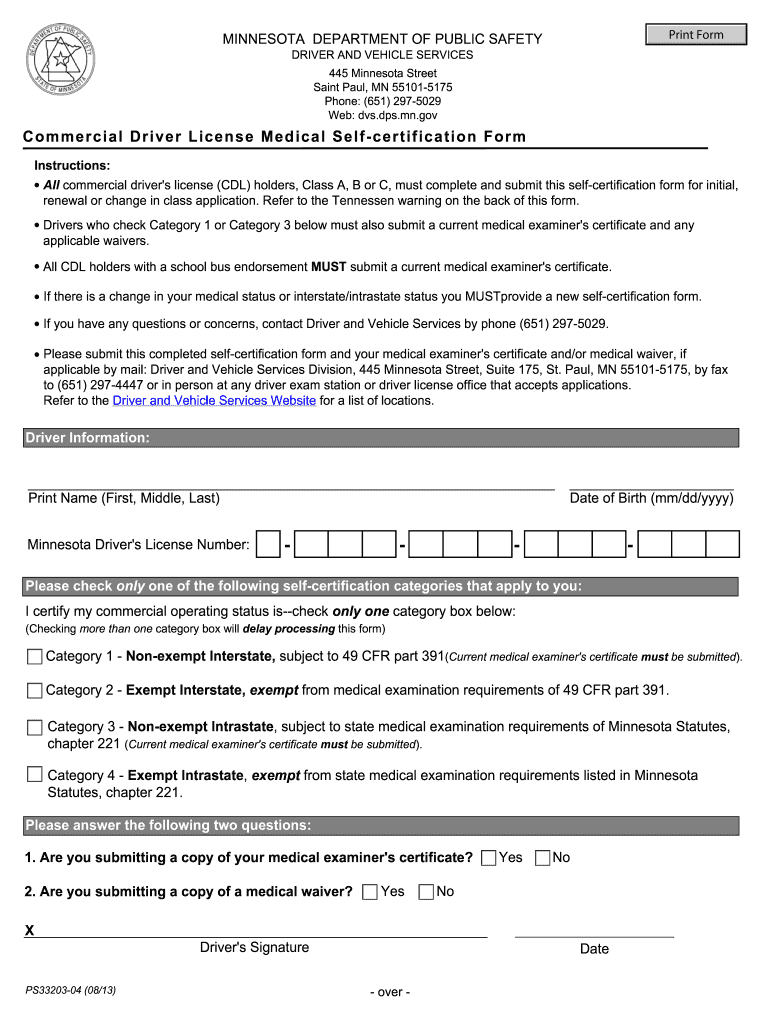
  1. Click ‘Get Form’ to open the mn self certification form 2013 in the editor.
  2. Begin by entering your Driver Information. Fill in your full name, Minnesota Driver's License Number, and Date of Birth in the designated fields.
  3. Next, select your commercial operating status by checking only one category box that applies to you. Ensure you check only one to avoid processing delays.
  4. Answer the two questions regarding the submission of your medical examiner's certificate and any medical waivers. Check 'Yes' or 'No' as applicable.
  5. Finally, sign and date the form at the bottom. Review all entries for accuracy before submitting.

Start using our platform today to fill out your mn self certification form 2013 easily and for free!

See more mn self certification form 2013 versions

We've got more versions of the mn self certification form 2013 form. Select the right mn self certification form 2013 version from the list and start editing it straight away!
Versions Form popularity Fillable & printable
2021 4.8 Satisfied (61 Votes)
2014 4 Satisfied (53 Votes)
2013 4.1 Satisfied (75 Votes)
2012 4.2 Satisfied (72 Votes)
be ready to get more

Complete this form in 5 minutes or less

Get form

Got questions?

We have answers to the most popular questions from our customers. If you can't find an answer to your question, please contact us.
Contact us
Self-certification when off sick for 7 days or less If someone is off sick for 7 calendar days or less (including weekends), they do not need a fit note. They can tell their employer theyre not well enough to work. They do not need to provide medical evidence. This is called self-docHubing their sick leave.
You can complete a Self-Certification form yourself. Many employers have their own self-certification forms. If your employer doesnt have its own form you can download the Self Certification Form. Please print it, fill it in and hand it in to your employer.
Self-certification is when an employee provides a personal note explaining their reasons for being off work sick. Employees wont need a private certificate or doctors note for this type of short-term absence. Instead, theyll need to say how they were ill and if theyre well enough to do their usual job.
Thou, upon expiry of Commercial Drivers Learners Permit or self-certification, it will be deleted. The drivers complying with NI and NA category have to re-docHub every 2 years, on their expiry of the medical certificate.

Security and compliance

At DocHub, your data security is our priority. We follow HIPAA, SOC2, GDPR, and other standards, so you can work on your documents with confidence.

Learn more