Type text, add images, blackout confidential details, add comments, highlights and more.
02. Sign it in a few clicks
Draw your signature, type it, upload its image, or use your mobile device as a signature pad.
03. Share your form with others
Send it via email, link, or fax. You can also download it, export it or print it out.
How to use or fill out introductory letter with our platform
Ease of Setup
DocHub User Ratings on G2
Ease of Use
DocHub User Ratings on G2
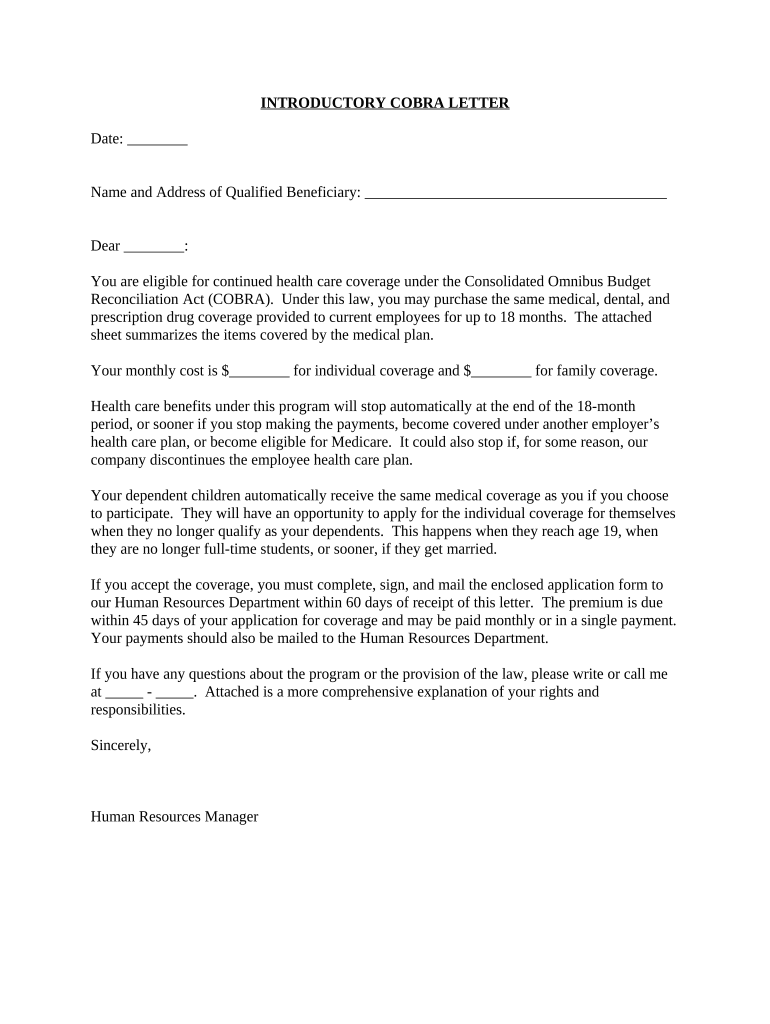
Click ‘Get Form’ to open the introductory letter in the editor.
Begin by entering the date at the top of the letter. This is essential for record-keeping and ensures clarity regarding when the letter was issued.
In the 'Name and Address of Qualified Beneficiary' section, input the recipient's full name and address. This personalizes the letter and ensures it reaches the correct individual.
Next, fill in the blank after 'Dear' with the recipient's name to maintain a professional tone.
Complete the fields indicating monthly costs for both individual and family coverage. This information is crucial for transparency regarding expenses.
Review all sections for accuracy, ensuring that all necessary details are included before finalizing your document.
Once completed, save your changes and download or share your document directly from our platform for free.
Start using our platform today to effortlessly complete your introductory letter!
Introductory letter sampleLetter of introduction for studentsIntroductory letter to a companyIntroductory letter From employerLetter of introduction sample PDFSample letter introducing yourselfIntroductory Letter to the Bank PDFSelf introduction letter for job
Security and compliance
At DocHub, your data security is our priority. We follow HIPAA, SOC2, GDPR, and other standards, so you can work on your documents with confidence.
It is customary to write to the Principal Officer to express your pleasure with the assignment. This letter should arrive no earlier than six weeks before yourRead more
Letters of introduction are used to introduce yourself to a professional, seek opportunities or introduce your skills/talent to an organization.Read more
Cookie consent notice
This site uses cookies to enhance site navigation and personalize your experience.
By using this site you agree to our use of cookies as described in our Privacy Notice.
You can modify your selections by visiting our Cookie and Advertising Notice.