Type text, add images, blackout confidential details, add comments, highlights and more.
02. Sign it in a few clicks
Draw your signature, type it, upload its image, or use your mobile device as a signature pad.
03. Share your form with others
Send supplemental information for resume via email, link, or fax. You can also download it, export it or print it out.
How to use or fill out Resume Supplement with our platform
Ease of Setup
DocHub User Ratings on G2
Ease of Use
DocHub User Ratings on G2
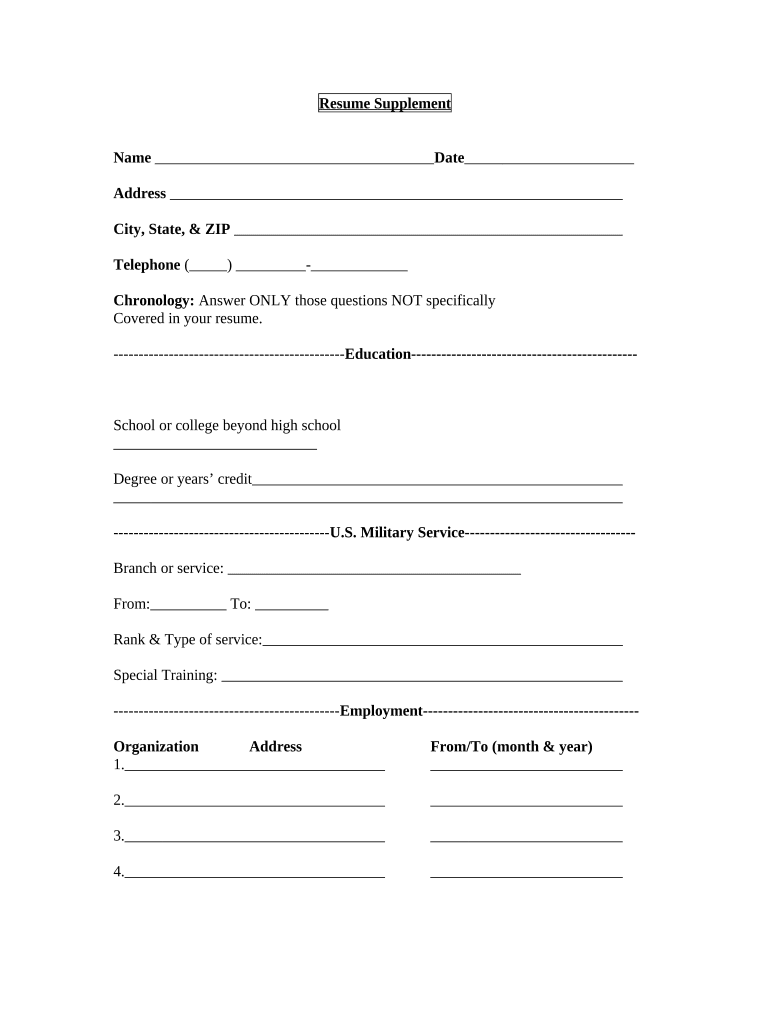
Click ‘Get Form’ to open the Resume Supplement in the editor.
Begin by entering your personal information in the 'Name', 'Date', and 'Address' fields. Ensure accuracy for effective communication.
In the 'Chronology' section, answer only those questions not covered in your resume. This helps provide a complete picture of your qualifications.
Fill out the 'Education' section by listing any schools or colleges attended beyond high school, along with degrees earned or years of credit completed.
For the 'U.S. Military Service' section, provide details about your service branch, dates of service, rank, type of service, and any special training received.
In the 'Employment' section, list organizations where you have worked. Include addresses and employment dates (month & year) for each position.
Indicate how you were referred to the organization and circle which employers may be contacted for references.
Finally, review all entries for accuracy before signing at the bottom to certify that all statements are true.
Start filling out your Resume Supplement today on our platform for free!
Resume supplement templateFree resume supplementBest resume supplementIs a Resume a supplemental attachmentExamples of supplemental information on a job applicationSupplemental information on job applicationSupplemental information for resume exampleSupplemental training or experience examples
Security and compliance
At DocHub, your data security is our priority. We follow HIPAA, SOC2, GDPR, and other standards, so you can work on your documents with confidence.
new mexico judicial branch - resume supplemental form
The completion of this Resume Supplemental Form along with a complete resume represents your ability to follow directions and provide written communication. ▫Read more
Cookie consent notice
This site uses cookies to enhance site navigation and personalize your experience.
By using this site you agree to our use of cookies as described in our Privacy Notice.
You can modify your selections by visiting our Cookie and Advertising Notice.