Type text, add images, blackout confidential details, add comments, highlights and more.
02. Sign it in a few clicks
Draw your signature, type it, upload its image, or use your mobile device as a signature pad.
03. Share your form with others
Send it via email, link, or fax. You can also download it, export it or print it out.
How to use or fill out erisa with our platform
Ease of Setup
DocHub User Ratings on G2
Ease of Use
DocHub User Ratings on G2
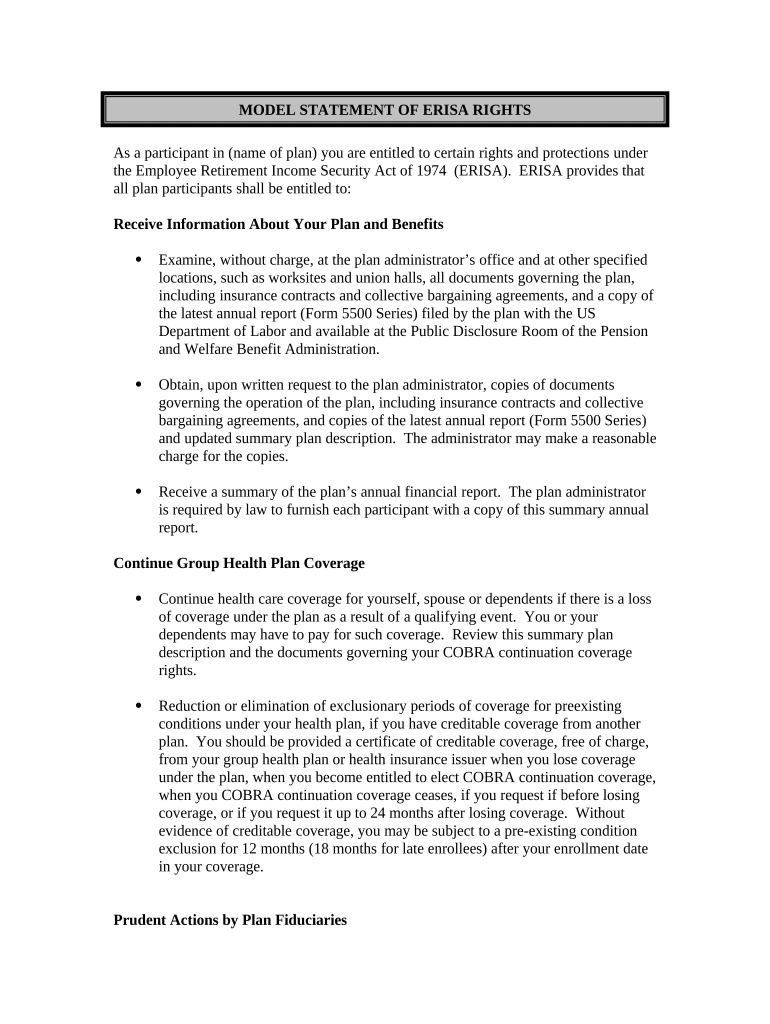
Click ‘Get Form’ to open the ERISA document in the editor.
Begin by reviewing the section titled 'Receive Information About Your Plan and Benefits.' Ensure you understand your rights to examine plan documents and request copies from the plan administrator.
Move on to the 'Continue Group Health Plan Coverage' section. Fill in any required fields regarding your health care coverage, especially if there has been a qualifying event affecting your benefits.
Next, address the 'Prudent Actions by Plan Fiduciaries' section. Acknowledge your understanding of fiduciary duties and how they protect your rights as a participant.
In the 'Enforce Your Rights' section, note any claims you may need to appeal. Document any denials or ignored claims for future reference.
Finally, review the 'Assistance with Your Questions' section. Make sure to include contact information for your plan administrator or relevant offices for further assistance.
Start using our platform today to easily fill out your ERISA form online for free!
ERISA | Wex | US Law | LII / Legal Information Institute
The Employee Retirement Income Security Act of 1974 (ERISA), a federal statute, delineates minimum standards for the administration of private industrysRead more
ERISA is a federal law that sets minimum standards for most voluntarily established retirement and health plans in private industry to provide protection forRead more
Cookie consent notice
This site uses cookies to enhance site navigation and personalize your experience.
By using this site you agree to our use of cookies as described in our Privacy Notice.
You can modify your selections by visiting our Cookie and Advertising Notice.