Type text, add images, blackout confidential details, add comments, highlights and more.
02. Sign it in a few clicks
Draw your signature, type it, upload its image, or use your mobile device as a signature pad.
03. Share your form with others
Send it via email, link, or fax. You can also download it, export it or print it out.
How to use or fill out work policy form with our platform
Ease of Setup
DocHub User Ratings on G2
Ease of Use
DocHub User Ratings on G2
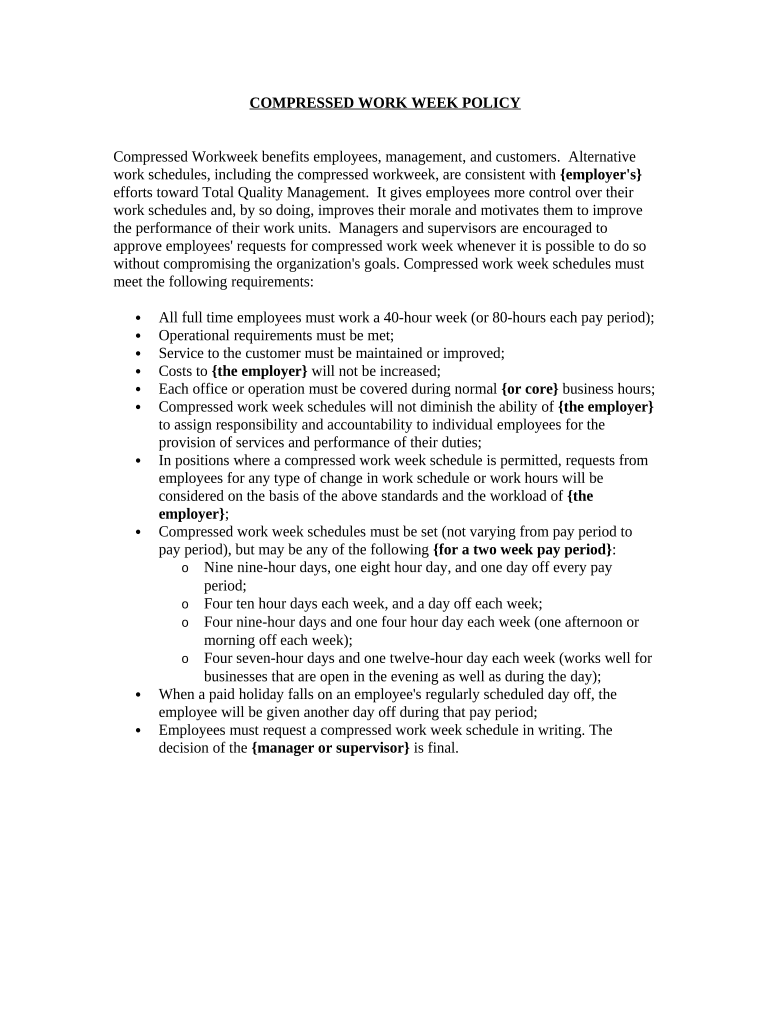
Click ‘Get Form’ to open the work policy form in the editor.
Begin by entering your name and employee ID in the designated fields at the top of the form. This information is essential for identifying your request.
In the section regarding schedule preferences, select your desired compressed workweek option from the provided choices. Ensure you understand each option's implications on your workload and responsibilities.
Next, provide a brief explanation of why you are requesting this schedule change in the comments section. This helps management understand your reasoning and supports your request.
Finally, review all entered information for accuracy before clicking ‘Submit’. This ensures that your request is clear and complete, facilitating a smoother approval process.
Start using our platform today to streamline your work policy form submissions for free!
The five steps needed to develop and implement a new employer policy are outlined below. Step 1: Identify the Need for a Policy. Step 2: Determine Policy Content. Step 3: Obtain Stakeholder Support. Step 4: Communicate with Employees. Step 5: Update and Revise the Policy.
What is a good example of a policy?
Whistleblower Policy Make sure to have a no-retaliation policy to protect your employees and the company. Employee Performance Policies Define the role of every employee, including their level of responsibility, amount of authority for decision-making, overarching goals and specific tasks.
How do I format a policy document?
Important Tips on Formatting Policies Use Similar Formatting. Set and Follow Best Practices. Use Standard Templates. Limit Policy Length. Use Succinct Language. Use Bullets and Lists. Link to Related Documents and Forms. Include a Glossary.
What are the 7 steps of creating a policy?
Using a scenario, it walks learners through each of the seven stages of this process: (1) Issue identification and definition; (2) Data, research and analysis for policymaking; (3) Policy formulation; (4) Consultation; (5) Policy adoption; (6) Policy implementation; (7) Policy monitoring and evaluation.
How do you write a work policy?
Policy Writing Guidance Keep it simple. Policies should be written in plain language not legalese. Keep it general. Policies cannot contemplate all possible situations. Make it relevant. Check for accuracy and compliance. Ensure the policy can be enforced. Clearly state who does what. Less is more.
Related Searches
Work policy form pdfWork policy form templateWork policy form template wordFree work policy formSimple work policy formFree company policy template WordSample policy document PDFCompany policy Sample PDF
Security and compliance
At DocHub, your data security is our priority. We follow HIPAA, SOC2, GDPR, and other standards, so you can work on your documents with confidence.
Workplace policies are rules and guidelines for how you expect employees to behave when they work for your organization. They can also determine what policies your managers and HR departments should follow.
What is the format for writing a policy?
The policy should clearly tell the audience why it exists, who it affects, major conditions and restrictions, when and under what circumstances it applies, and how it should be executed. Terms of Art should be clearly defined for the reader under the Definitions section. Check for accuracy and compliance.
Related links
Remote Work Arrangement Form
Proposed Remote Work Schedule. Please provide the central and remote workplace hours and the total hours for each workday. Example: Central = 4.00; Remote
Cookie consent notice
This site uses cookies to enhance site navigation and personalize your experience.
By using this site you agree to our use of cookies as described in our Privacy Notice.
You can modify your selections by visiting our Cookie and Advertising Notice.