




Here's how it works

01. Edit your erep case number online
Type text, add images, blackout confidential details, add comments, highlights and more.

02. Sign it in a few clicks
Draw your signature, type it, upload its image, or use your mobile device as a signature pad.

03. Share your form with others
Send 116m form via email, link, or fax. You can also download it, export it or print it out.
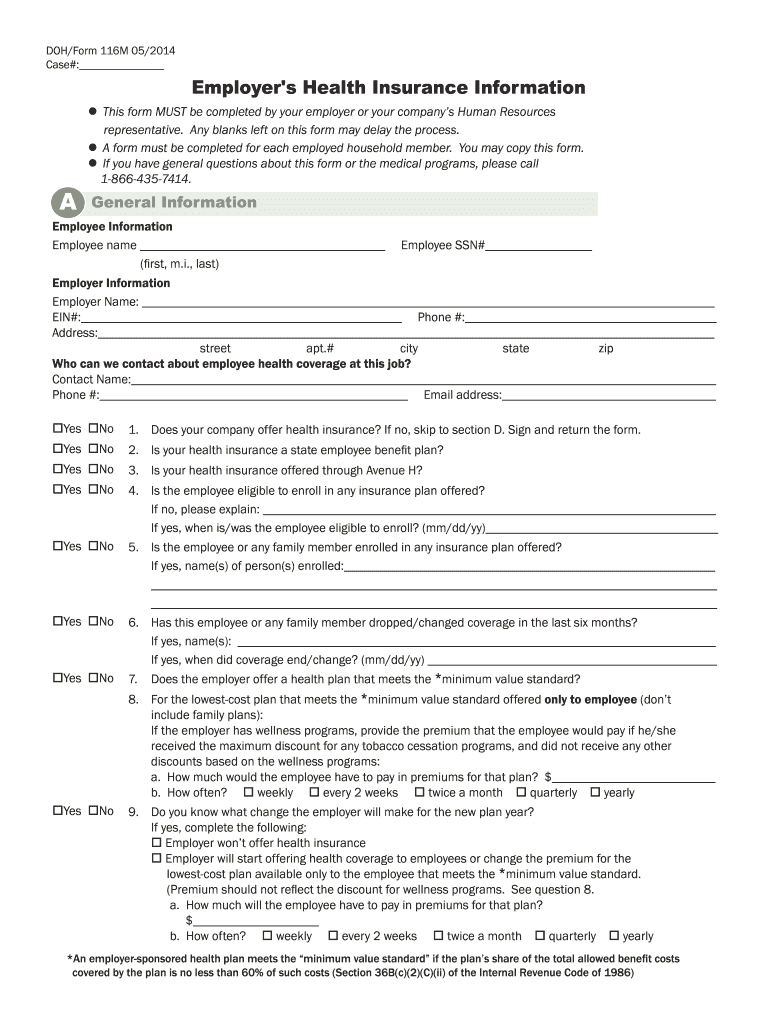
How to use or fill out doh 116m form with our platform

- Click ‘Get Form’ to open the doh 116m form in the editor.
- Begin by filling out the 'Employee Information' section. Enter the employee's name and Social Security Number (SSN) accurately.
- In the 'Employer Information' section, provide details such as the employer's name, EIN, phone number, and address. Ensure all fields are completed to avoid delays.
- Proceed to answer the questions regarding health insurance offerings. Select 'Yes' or 'No' for each question and provide additional information where required.
- Complete Section B by detailing the employer’s least expensive plan or Avenue H Default Plan. Fill in premium amounts and deductible information as applicable.
- In Section C, specify the employee’s chosen health plan details including insurance company name and policy number. Answer questions about coverage limits and benefits.
- Finally, ensure that a representative from Human Resources signs and dates the form before submission.
Start using our platform today to fill out your doh 116m form easily and for free!
Fill out doh 116m form online
It's free
See more doh 116m form versions
We've got more versions of the doh 116m form form. Select the right doh 116m form version from the list and start editing it straight away!
Security and compliance
At DocHub, your data security is our priority. We follow HIPAA, SOC2, GDPR, and other standards, so you can work on your documents with confidence.
Learn more


Related forms

ORGANIC CHEMISTRY II: CHEMISTRY 360 SYLLABUS
The document is the syllabus for Organic Chemistry II (Chemistry 360) for Spring 2017, taught by Dr. Craig P. Jasperse a ...
Lease Rollover Certification Form - road2la
The Lease Roll-Over Certification Form outlines the requirements for a tenant's lease rollover under the Small Rental Pr ...

FM Farmer Application Form - Beverly Hills, California - beverlyhills
The document is an application form for farmers wishing to participate in the Beverly Hills Farmers' Market, which opera ...

Icmc data sheet
The document is a data sheet for the Initial Case Management Conference in a divorce case in Anoka County, Minnesota. It ...

Stomach Cancer vs Stomach Ulcers: Differences in Symptoms
The document is a Gastrointestinal Disorder Questionnaire designed for individuals applying for life insurance. It inclu ...
PrescriPtion renewal Form - OptumRx
The document is a Prescription Renewal Form used to renew mail service prescriptions that have expired or lack refills. ...

Citizen Feedback Form - City of Black Diamond
The document is a Citizen Feedback Form for the City of Black Diamond, allowing residents to submit compliments, comment ...

EA Information for Filing an Eviction Action 8150-207
The document outlines the procedures for filing an eviction action in Maricopa County Justice Courts, detailing the nece ...