tennessee property disclosure form 2024 Preview on Page 1

Tennessee Real Estate Residential Property Disclosure Form - Tennessee 2026

Here's how it works

  • 01. Edit your tennessee property disclosure form 2024 online

    Type text, add images, blackout confidential details, add comments, highlights and more.

  • 02. Sign it in a few clicks

    Draw your signature, type it, upload its image, or use your mobile device as a signature pad.

  • 03. Share your form with others

    Send tennessee residential property disclosure act via email, link, or fax. You can also download it, export it or print it out.

How to use or fill out Tennessee Real Estate Residential Property Disclosure Form - Tennessee with our platform

Form edit decoration
9.5
Ease of Setup
DocHub User Ratings on G2
9.0
Ease of Use
DocHub User Ratings on G2
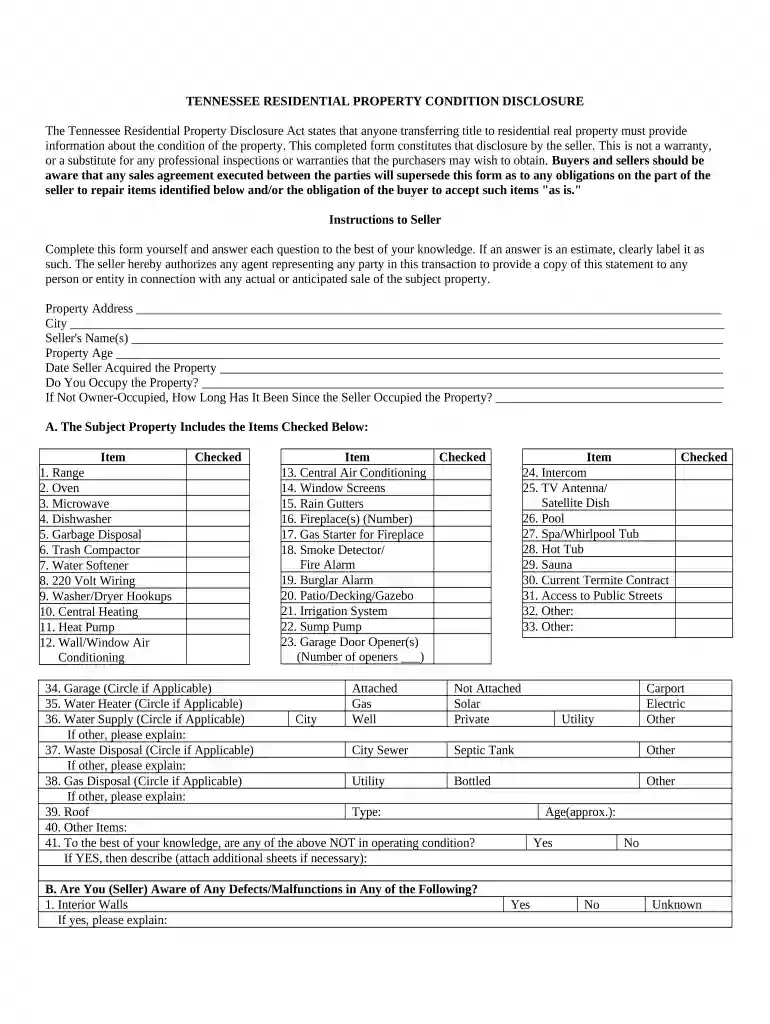
  1. Click ‘Get Form’ to open the Tennessee Real Estate Residential Property Disclosure Form in the editor.
  2. Begin by entering the property address, city, and seller's name(s) at the top of the form. This information is crucial for identifying the property being disclosed.
  3. Indicate the property's age and when you acquired it. If you do not occupy the property, specify how long it has been since you last occupied it.
  4. In Section A, check all items that are included with the property. This includes appliances and systems like heating and air conditioning units. Be thorough to ensure accurate disclosure.
  5. Proceed to Section B and answer questions regarding any known defects or malfunctions in various parts of the property, such as walls, plumbing, and electrical systems.
  6. In Section C, disclose any environmental hazards or shared features with neighboring properties. This section is vital for transparency.
  7. Finally, certify that all information provided is true to your knowledge by signing and dating the form at the bottom.

Start using our platform today to easily complete your Tennessee Real Estate Residential Property Disclosure Form for free!

be ready to get more

Complete this form in 5 minutes or less

Got questions?

We have answers to the most popular questions from our customers. If you can't find an answer to your question, please contact us.

According to eSignature laws, forms signed electronically have the same validity as traditionally approved ones. You can electronically sign almost any business and personal paperwork. Four types of documents still require handwritten signatures only - wills and testamentary trusts, court orders and other court papers, state statutes regulating divorce, adoption, or other family law, and notice of cancellation of utility services. If you follow the rules and use a reliable and compliant software solution, like DocHub, you can eSign your tennessee property disclosure form 2022 without printing it.

You can easily edit fill out your tennessee property disclosure form 2023 on any iOS device. Open an internet browser of your choice, visit the DocHub site, authorize or create a new account, add your file for editing, and make your desired changes. Our service is mobile-friendly, so using its functions on your phone will be a no-brainer, even on the first try.

Security and compliance

At DocHub, your data security is our priority. We follow HIPAA, SOC2, GDPR, and other standards, so you can work on your documents with confidence.

be ready to get more

Complete this form in 5 minutes or less

tn property disclosure form

case commentaries - real estate disclosures

by P Clarke The Tennessee Court of Appeals held that a real estate seller has an obligation to disclose material defects in addition to the conditions.Read more

Learn more
If you believe that this page should be taken down, please follow our DMCA take down process here