Tennessee minors 2026

Get Form
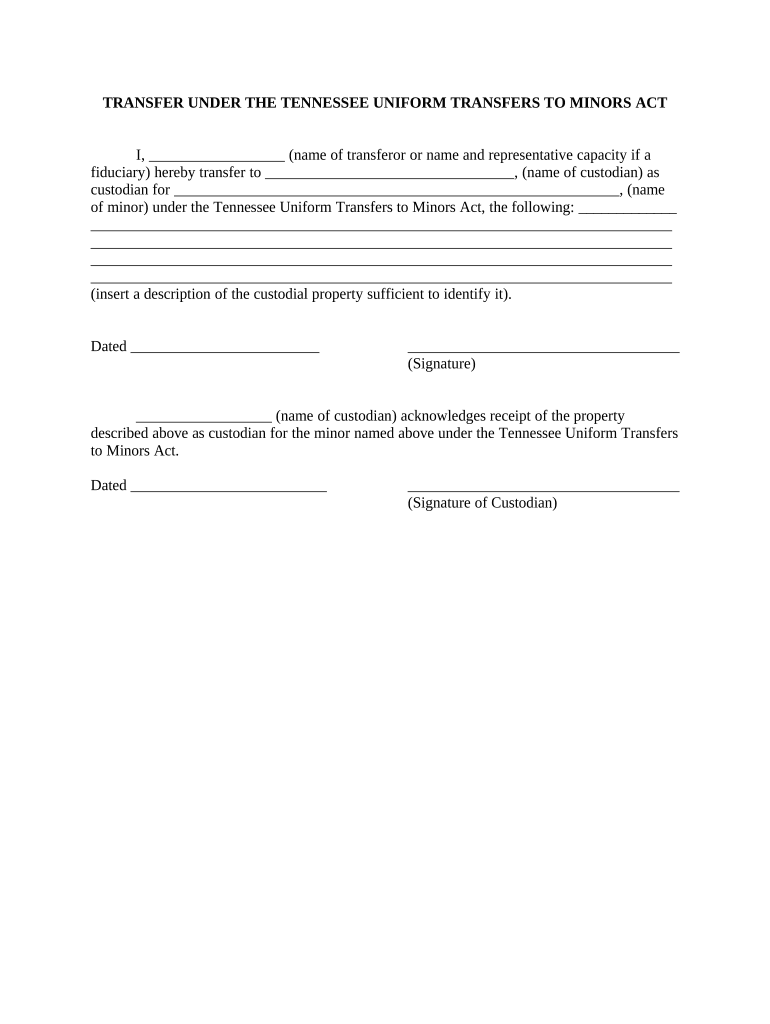
tennessee minors Preview on Page 1

Here's how it works

01. Edit your form online
Type text, add images, blackout confidential details, add comments, highlights and more.
02. Sign it in a few clicks
Draw your signature, type it, upload its image, or use your mobile device as a signature pad.
03. Share your form with others
Send it via email, link, or fax. You can also download it, export it or print it out.

How to use or fill out Tennessee Minors with Our Platform

Form edit decoration
9.5
Ease of Setup
DocHub User Ratings on G2
9.0
Ease of Use
DocHub User Ratings on G2
  1. Click ‘Get Form’ to open the Tennessee Minors document in the editor.
  2. In the first field, enter the name of the transferor or their representative capacity if applicable. This identifies who is transferring the property.
  3. Next, fill in the name of the custodian responsible for managing the assets on behalf of the minor.
  4. In the following section, provide the name of the minor who will benefit from this transfer. Ensure accuracy to avoid any legal issues.
  5. Describe the custodial property being transferred in detail. This should be sufficient to identify it clearly, such as including account numbers or descriptions of physical items.
  6. Enter the date of transfer in the designated field to document when this transaction takes place.
  7. The transferor must sign at the bottom to validate this document legally.
  8. The custodian should acknowledge receipt by signing and dating their section as well.

Start using our platform today for free to streamline your document editing and signing process!

be ready to get more

Complete this form in 5 minutes or less

Get form

Got questions?

We have answers to the most popular questions from our customers. If you can't find an answer to your question, please contact us.
Contact us

You should use only trusted software solutions with strong data protection compliance to sign your paperwork electronically. DocHub is just the type of editor you need! It stores data on Amazon Web Servers and complies with all necessary security criteria and eSignature laws, so it’s a trusted way to eSign your tennessee minors or other paperwork using this tool.

You need only a web connection and a web browser to fill out your tennessee minors by using an iOS phone. Open the DocHub website and authenticate. Then, add your document or choose it from the list in your dashboard. Then use our editing instruments to fill out your form and save all your modifications. You may also send it to a specified recipient immediately.

The answer to this question in international and domestic law is clear: a child is anyone under the age of 18.
In the United States, a minor is any individual under the specified age of majority for their state or territory., All states define an age of majority, which is usually set at 18, but states like Indiana and Mississippi set it at 21, while in Alabama, Colorado, Maryland, or Nebraska, the age of majority is 19.
A child is a person who is under eighteen years of age or who is reasonably presumed to be under eighteen years of age. Tenn. Code Ann. 37-1-401.

Security and compliance

At DocHub, your data security is our priority. We follow HIPAA, SOC2, GDPR, and other standards, so you can work on your documents with confidence.

Learn more
ccpa2
pci-dss
gdpr-compliance
hipaa
soc-compliance
be ready to get more

Complete this form in 5 minutes or less

Get form

People also ask

The age of majority is 18 in most areas, except three states. Alabama and Nebraska set the age of majority to 19 and Mississippi sets it at 21.
1-3-105 provides that the age of majority is 18. Tenn. Code Ann. 29-31-101 - 29-31-105 specify the criteria and procedures for emancipation of minors.
Minors 16 and 17 years of age may not be employed between the hours of 10:00 pm and 6:00 am, Sunday through Thursday, preceding a school day. Tenn. Code Ann. 50-5-105(b)(2).

Related links