South dakota form 2026

Get Form
epath sd Preview on Page 1

Here's how it works

01. Edit your epath sd online
Type text, add images, blackout confidential details, add comments, highlights and more.
02. Sign it in a few clicks
Draw your signature, type it, upload its image, or use your mobile device as a signature pad.
03. Share your form with others
Send epath sd login via email, link, or fax. You can also download it, export it or print it out.

How to use or fill out South Dakota Form with our platform

Form edit decoration
9.5
Ease of Setup
DocHub User Ratings on G2
9.0
Ease of Use
DocHub User Ratings on G2
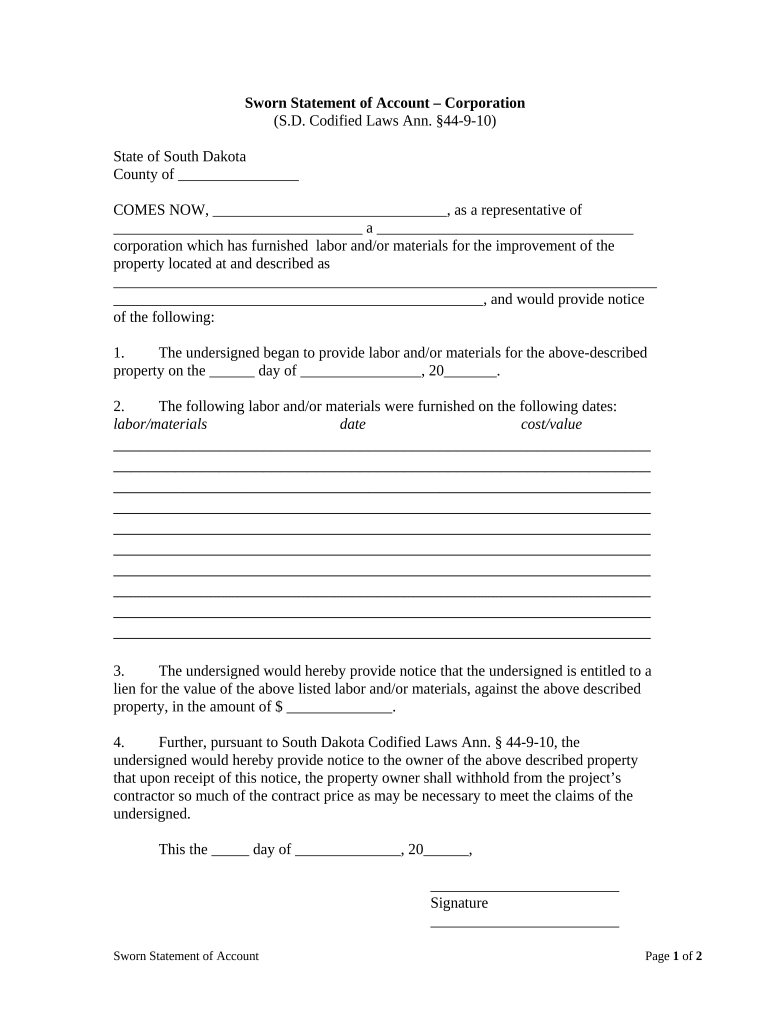
  1. Click ‘Get Form’ to open the Sworn Statement of Account in the editor.
  2. Begin by filling in the county and your name as a representative of the corporation at the top of the form.
  3. In section one, indicate the date you started providing labor and/or materials for the property.
  4. For section two, list each type of labor or material provided along with corresponding dates and costs. Ensure all entries are clear and accurate.
  5. In section three, specify the total amount you are claiming for your services or materials against the property.
  6. Complete section four by noting that this notice requires the property owner to withhold necessary funds from their contractor.
  7. Finally, sign and date the form at the bottom, then provide your printed name, title, and corporation details.
  8. If required, have a notary public witness your signature in the designated area.
  9. For delivery certification, fill out your name and how you delivered a copy of this statement to the relevant party.

Start using our platform today to easily complete your South Dakota form online for free!

be ready to get more

Complete this form in 5 minutes or less

Get form

Got questions?

We have answers to the most popular questions from our customers. If you can't find an answer to your question, please contact us.
Contact us
This involves signing a lease or purchasing property, changing your mailing address to a South Dakota location, and registering your vehicle within the state. Proper documentation is essential for proving your commitment to South Dakota residency.
The territory that would become South Dakota was purchased from France and added to the United States in 1803 as part of the Louisiana Purchase. Nine states were eventually organized out of the Louisiana Territory. The first permanent American settlement was established at Fort Pierre in 1817.
A growing population in the Dakota Territory caused political dissatisfaction between northern and southern territory residents, with the southern half being always more populated. Following the territorial capital being moved from Yankton to Bismarck in the northern part, calls for dividing the territory increased.
Early history Other groups who settled in the area were the Mandan and the Arikara, who established a large trading network across the region. By the early 1700s, the Sioux had come to dominate the area.
November 2, 1889 South Dakota / Statehood granted

Security and compliance

At DocHub, your data security is our priority. We follow HIPAA, SOC2, GDPR, and other standards, so you can work on your documents with confidence.

Learn more
ccpa2
pci-dss
gdpr-compliance
hipaa
soc-compliance

People also ask

South Dakota Official State Homepage.
In 1889, the Omnibus Bill or the Enabling Act was adopted, which provided for the dividing of Dakota Territory into the states of North and South Dakota. This enabled the two Dakotas, Montana, and Washington to formulate constitutions. Today, South Dakota is located in the heartland of the United States.
The goal of the MOST initiative is to inform and empower patients to clearly state their end-of-life care wishes and to authorize healthcare providers to carry out those wishes. MOST is only for patients with a terminal illness as defined by SD Law 34-12D-1.

sd epath login