Option to Purchase Addendum to Residential Lease - Lease or Rent to Own - South Dakota 2026

Get Form
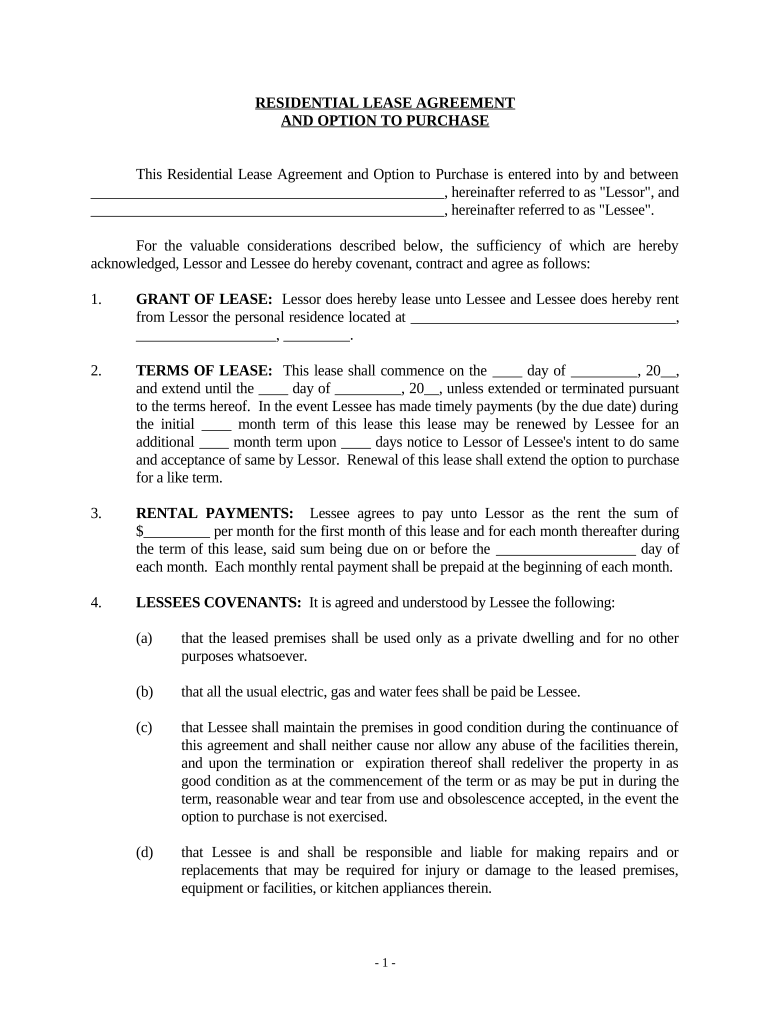
Option to Purchase Addendum to Residential Lease - Lease or Rent to Own - South Dakota Preview on Page 1

Here's how it works

01. Edit your form online
Type text, add images, blackout confidential details, add comments, highlights and more.
02. Sign it in a few clicks
Draw your signature, type it, upload its image, or use your mobile device as a signature pad.
03. Share your form with others
Send it via email, link, or fax. You can also download it, export it or print it out.

How to use or fill out Option to Purchase Addendum to Residential Lease - Lease or Rent to Own - South Dakota

Form edit decoration
9.5
Ease of Setup
DocHub User Ratings on G2
9.0
Ease of Use
DocHub User Ratings on G2
  1. Click ‘Get Form’ to open it in the editor.
  2. Begin by filling in the names of the Lessor and Lessee at the top of the document. Ensure accuracy as these are critical identifiers.
  3. In the 'Grant of Lease' section, specify the address of the leased property clearly, including street, city, and zip code.
  4. Next, complete the 'Terms of Lease' section by entering the start and end dates of the lease term. Include any renewal terms if applicable.
  5. Fill in the rental payment amount in 'Rental Payments', along with due dates for each month. This ensures clarity on financial obligations.
  6. Review and complete all covenants under 'Lessee's Covenants', ensuring you understand your responsibilities regarding property maintenance and usage.
  7. In 'Option to Purchase', indicate when Lessee can exercise their purchase option and specify the purchase price. This is crucial for future transactions.

Start using our platform today for free to streamline your document editing and signing process!

be ready to get more

Complete this form in 5 minutes or less

Get form

Got questions?

We have answers to the most popular questions from our customers. If you can't find an answer to your question, please contact us.
Contact us
Lease amendment vs. It is used when both the landlord and tenant agree to modify existing aspects of the lease, such as rent amounts, lease duration, or maintenance responsibilities. On the other hand, a lease addendum adds new terms or provisions to the existing lease agreement without changing the original terms.
An addendum is attached to a contract to create additional terms, and an amendment changes the terms within an existing contract.
An addendum to a lease is a separate legal agreement added by the landlord or tenant to the original lease agreement between the landlord and a tenant. Lease addenda are used to provide additional information that the original lease does not cover.
Flexible path to buying a home: A lease option could be a suitable alternative if you aspire to become a homeowner but cant quite afford it just yet. Using this type of contract, you get a little more time to potentially save toward the down payment or work to improve your credit.
A lease amendment is a document that allows landlords and tenants to make changes or additions to an existing lease agreement without the need to create an entirely new contract. It is a flexible tool that ensures both parties are on the same page when adjustments are required during the lease term.

Security and compliance

At DocHub, your data security is our priority. We follow HIPAA, SOC2, GDPR, and other standards, so you can work on your documents with confidence.

Learn more
ccpa2
pci-dss
gdpr-compliance
hipaa
soc-compliance

People also ask

Key Differences Financial Structure: Rent-to-own payments are lower and are not considered loans or financing, while lease-to-own is a financing agreement with payments contributing towards the purchase, often with interest and fees.
A lease option is typically more flexible since the tenant isnt obligated to buy the property and may potentially opt out at the end of their lease. By contrast, a lease purchase contract is more rigid and usually does not give a choice to walk away from a deal.

Related links