Type text, add images, blackout confidential details, add comments, highlights and more.
02. Sign it in a few clicks
Draw your signature, type it, upload its image, or use your mobile device as a signature pad.
03. Share your form with others
Send it via email, link, or fax. You can also download it, export it or print it out.
How to use or fill out Connecticut Trust with our platform
Ease of Setup
DocHub User Ratings on G2
Ease of Use
DocHub User Ratings on G2
Click ‘Get Form’ to open the Connecticut Trust document in the editor.
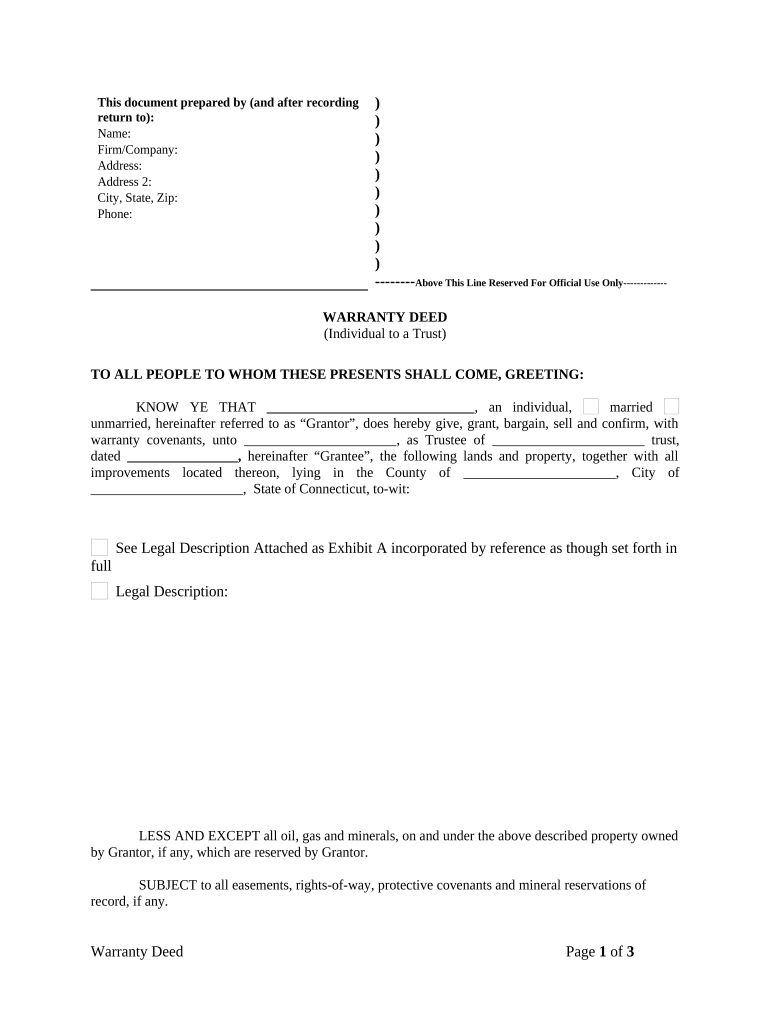
Begin by filling in the 'Prepared by' section at the top. Enter your name, firm/company, address, city, state, zip code, and phone number.
In the Warranty Deed section, identify yourself as the Grantor. Indicate your marital status (married/unmarried) and provide the name of the Trustee and trust date.
Complete the property description fields. Specify the county, city, and state where the property is located. Attach a legal description as Exhibit A if necessary.
Sign and date the document in front of witnesses. Ensure that all names are printed clearly beneath signatures for clarity.
Finally, have a notary public acknowledge your signature to validate the document before submission.
Start using our platform today to easily fill out your Connecticut Trust form for free!
Conn. Agencies Regs. 12-701(a)(4)-1 - Resident trust or estate
The entire corpus of the trust consists of securities of United States corporations, which are actively traded by the trustee on the New York Stock Exchange.Read more
Probate Courts have jurisdiction over the administration and oversight of trusts and estates. These matters include the following: probating wills and theRead more
Jan 30, 2026 Bridgeport Energy Project is an operating power station of at least 520-megawatts (MW) in Bridgeport, Fairfield, Connecticut, United States.
Cookie consent notice
This site uses cookies to enhance site navigation and personalize your experience.
By using this site you agree to our use of cookies as described in our Privacy Notice.
You can modify your selections by visiting our Cookie and Advertising Notice.