01. Edit your workers comp questions california online
Type text, add images, blackout confidential details, add comments, highlights and more.
02. Sign it in a few clicks
Draw your signature, type it, upload its image, or use your mobile device as a signature pad.
03. Share your form with others
Send it via email, link, or fax. You can also download it, export it or print it out.
How to use or fill out CA Workers Compensation with our platform
Ease of Setup
DocHub User Ratings on G2
Ease of Use
DocHub User Ratings on G2
Click ‘Get Form’ to open the CA Workers Compensation form in the editor.
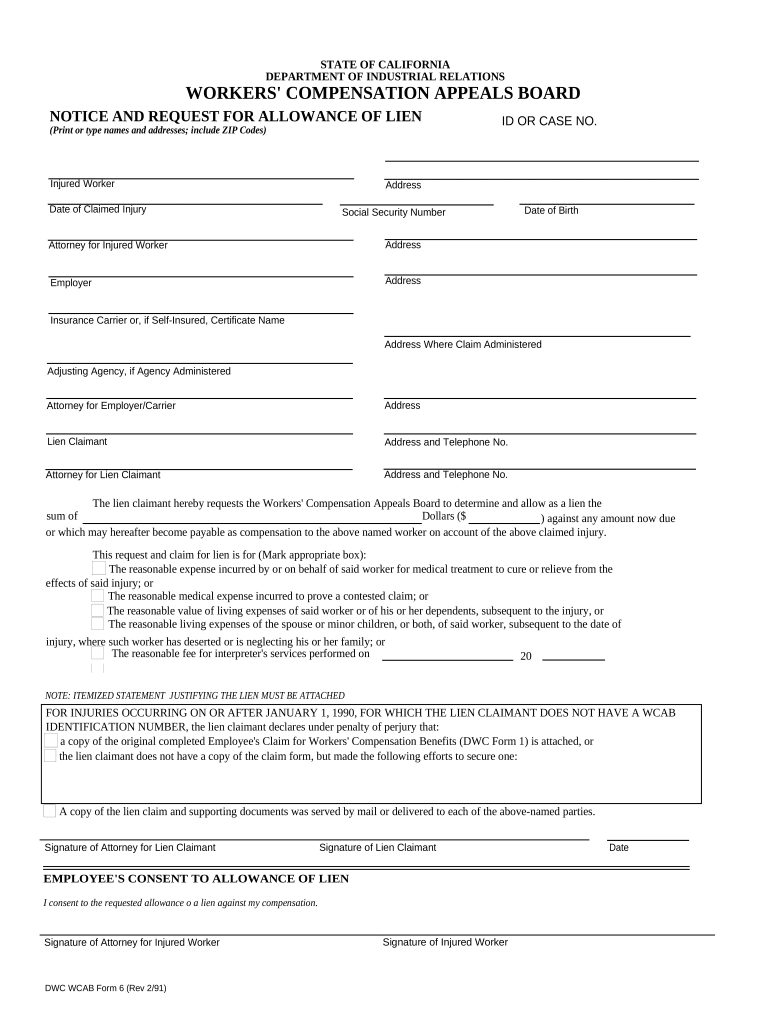
Begin by entering the Injured Worker’s name and address, including ZIP Code. Ensure accuracy as this information is crucial for processing.
Fill in the Date of Claimed Injury and ID or Case Number. This helps identify the specific claim associated with the injured worker.
Provide details for the Attorney for Injured Worker, including their address, ensuring all contact information is correct.
Next, input the Employer's name and address, followed by the Insurance Carrier or Self-Insured Certificate Name along with their administrative address.
Complete sections regarding Lien Claimant and their attorney, including addresses and telephone numbers for both parties.
Specify the amount requested as a lien against any compensation due to the injured worker. Mark the appropriate box indicating the reason for this request.
Attach an itemized statement justifying the lien as required. If applicable, include a copy of Employee's Claim for Workers' Compensation Benefits (DWC Form 1).
Finally, ensure all signatures are completed: Lien Claimant, Attorney for Lien Claimant, and Injured Worker where consent is needed.
Start filling out your CA Workers Compensation form online for free today!
Workers compensation (WC) benefits are available to University of California employees who are injured within the course and scope of their UniversityRead more
Workers Compensation - California Department of Insurance
All California employers must provide workers compensation benefits to their employees under California Labor Code Section 3700. If a business employs one orRead more
Cookie consent notice
This site uses cookies to enhance site navigation and personalize your experience.
By using this site you agree to our use of cookies as described in our Privacy Notice.
You can modify your selections by visiting our Cookie and Advertising Notice.