Type text, add images, blackout confidential details, add comments, highlights and more.
02. Sign it in a few clicks
Draw your signature, type it, upload its image, or use your mobile device as a signature pad.
03. Share your form with others
Send it via email, link, or fax. You can also download it, export it or print it out.
How to use or fill out Alabama Claim Compensation with our platform
Ease of Setup
DocHub User Ratings on G2
Ease of Use
DocHub User Ratings on G2
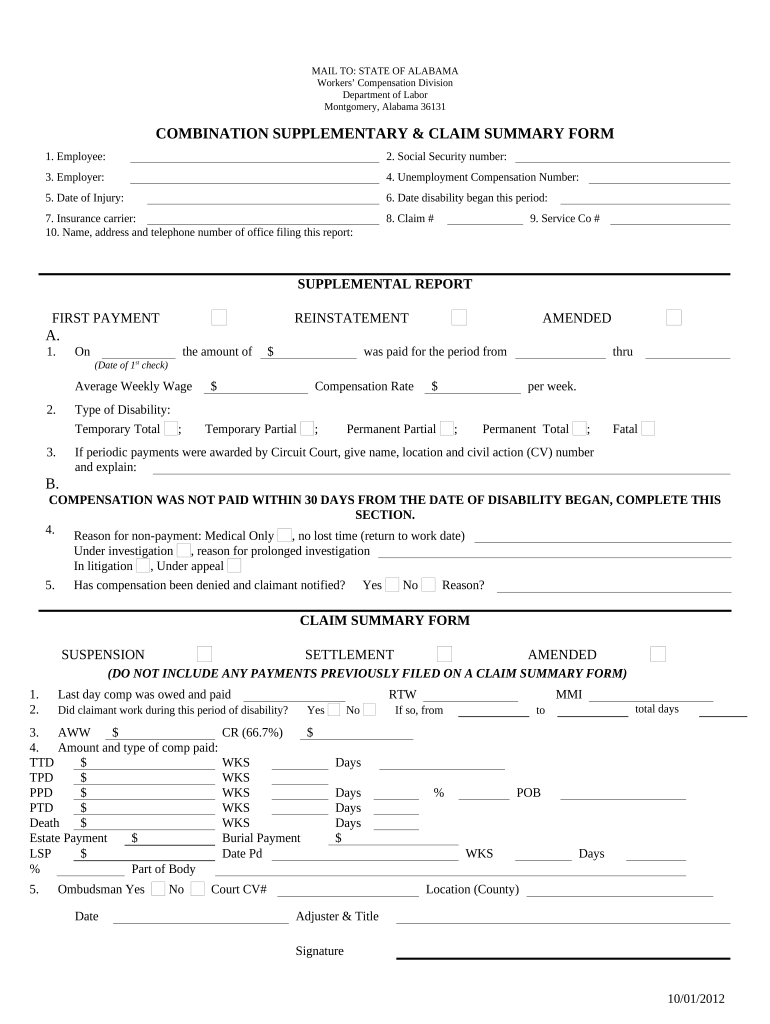
Click ‘Get Form’ to open the Alabama Claim Compensation form in the editor.
Begin by entering your personal information in Section 1. Fill in your name, Social Security number, and employer details accurately.
In Section 5, specify the date of injury and the date when your disability began. This is crucial for processing your claim.
Complete the Insurance Carrier section with the relevant details about your insurance provider.
For the Supplemental Report, indicate if this is a first payment or an amended report. Provide details on compensation amounts and types of disability as applicable.
If there was a delay in payment, fill out the reason for non-payment in Section B to ensure clarity on your claim status.
Review all entered information for accuracy before submitting. Use our platform’s features to save and share your completed form easily.
Start filling out your Alabama Claim Compensation form online for free today!
Fill out alabama claim compensation online It's free
Unemployment claim PortalAlabama unemploymentAlabama unemployment claim status not paidHow to apply for unemployment in AlabamaCheck my unemployment status onlineUnemployment claim onlineAlabama unemployment pay rateInitial unemployment claim
Security and compliance
At DocHub, your data security is our priority. We follow HIPAA, SOC2, GDPR, and other standards, so you can work on your documents with confidence.
Notice of Availability of Unemployment Compensation
If you have questions about the status of your UI claim, you can call the Alabama Dept. of Labor Call. Center Inquiry Line at 800-361-4524. Contact the HRRead more
EPA Coal Plant Settlements - Global Energy Monitor
This partial settlement resolves the claim brought to Alabama Power that they allegedly violated NSR requirements by not completing construction of twoRead more
Cookie consent notice
This site uses cookies to enhance site navigation and personalize your experience.
By using this site you agree to our use of cookies as described in our Privacy Notice.
You can modify your selections by visiting our Cookie and Advertising Notice.