Type text, add images, blackout confidential details, add comments, highlights and more.
02. Sign it in a few clicks
Draw your signature, type it, upload its image, or use your mobile device as a signature pad.
03. Share your form with others
Send it via email, link, or fax. You can also download it, export it or print it out.
How to use or fill out ak warranty deed with our platform
Ease of Setup
DocHub User Ratings on G2
Ease of Use
DocHub User Ratings on G2
Click ‘Get Form’ to open the ak warranty deed in the editor.
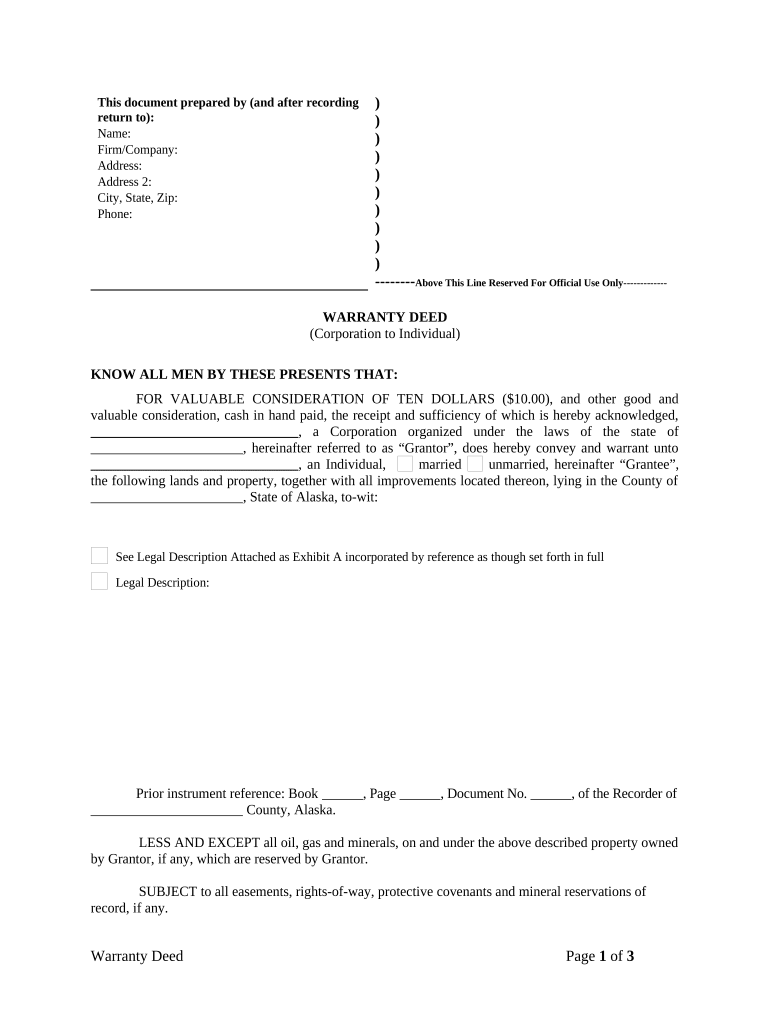
Begin by filling in the 'Prepared by' section at the top. Enter your name, firm/company, address, city, state, zip, and phone number.
In the 'Grantor' section, input the corporation's name and state of incorporation. Then, specify the 'Grantee' as an individual and indicate their marital status (married/unmarried).
Provide a detailed legal description of the property being conveyed. If you have an attachment (Exhibit A), ensure it is incorporated correctly.
Complete any prior instrument references if applicable, including book, page, and document numbers.
Fill in the date of execution and include the signature of an authorized signatory along with their title.
Lastly, complete the notary section by entering details about the notary public who will acknowledge this document.
Start using our platform today to easily fill out your ak warranty deed for free!
Wagner v. Cutler: Novel Interpretation of a Warranty Deed
by MC Hesse 1990 At no time have warranty deeds, in themselves, warranted the condition of the property itself. Third, a special warranty deed merely limits a gen- eral warrantyRead more
Apr 24, 2013 TITLE IHAZARDOUS SUBSTANCES RELEASES, LIABILITY,. COMPENSATION. Sec. 101. Definitions. Sec. 102. Reportable quantities and additionalRead more
IN WITNESS WHEREOF, I have hereunto set my hand and affixed my official seal the day and year above written. [NOTARY SEAL]. Notary Public in and for the StateRead more
Cookie consent notice
This site uses cookies to enhance site navigation and personalize your experience.
By using this site you agree to our use of cookies as described in our Privacy Notice.
You can modify your selections by visiting our Cookie and Advertising Notice.